DVR Settings
Entering/Changing System Settings
Flashback3 & Flashback HD User’s Guide
L3 Mobile-Vision 6.23.2017 Page 201
8 Pr
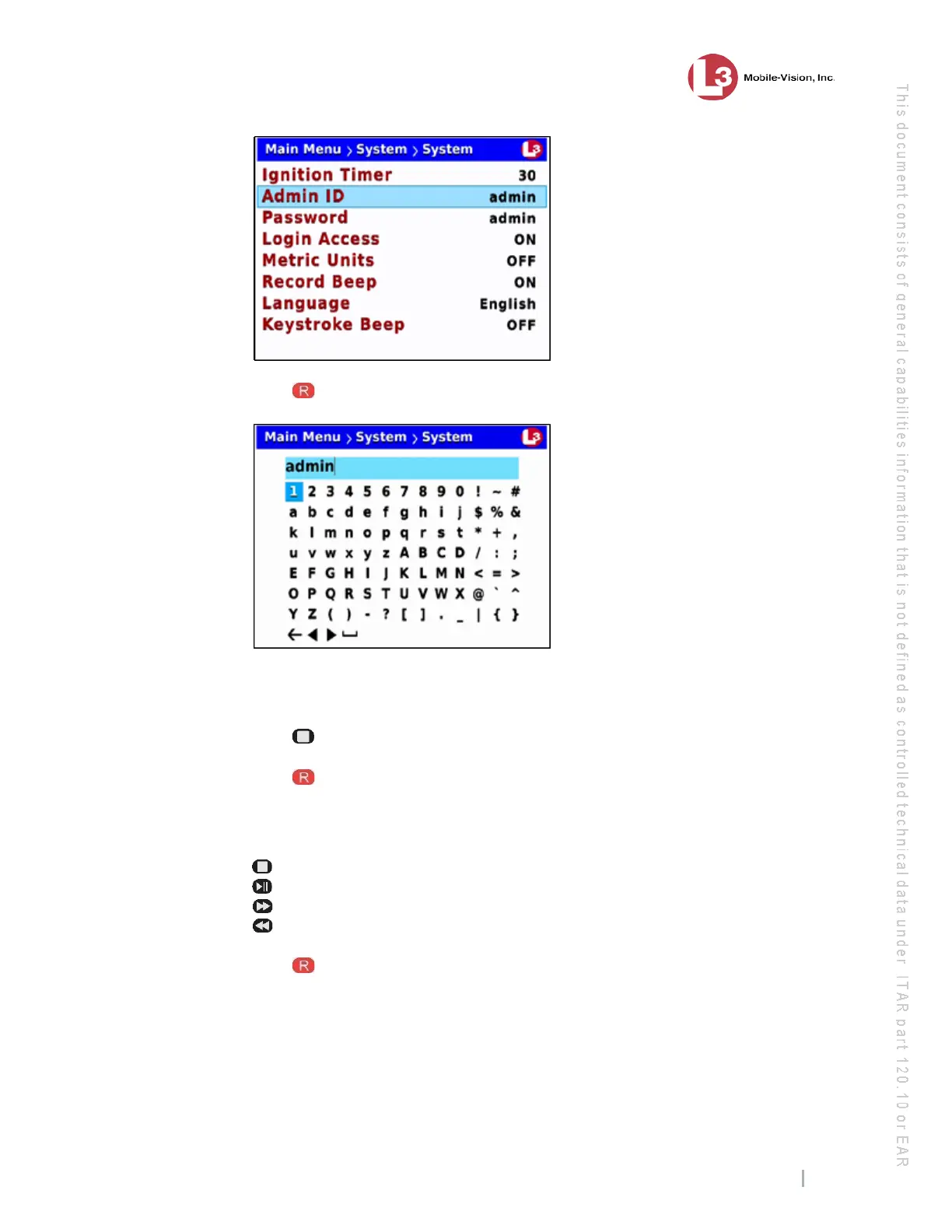
ess to select the Admin ID field. A data entry keyboard displays.
You w
ill be using this keyboard to spell out your DES Administrator’s User ID.
Begin by deleting the old Admin ID, as described in steps 9 and 10.
9 Pr
ess to highlight the icon.
10 Press several times until the existing Admin User ID is deleted.
11 Using the following navigation buttons, highlight the first letter of the new Admin
User ID you wish to enter.
....... Up
....... Down
....... Right
....... Left
12 Press . The selected character displays at the top of the screen.
13 Rep
eat steps 11 and 12 until the Admin User ID is spelled out at the top of your
screen. If you need to add or delete a character, use the following buttons:
............Move forward one character
............Move back one character
............Delete previous character



 To Next Page