L-Gate User Manual 95 LOYTEC
Version 3.2 LOYTEC electronics GmbH
To Create an external NV manually
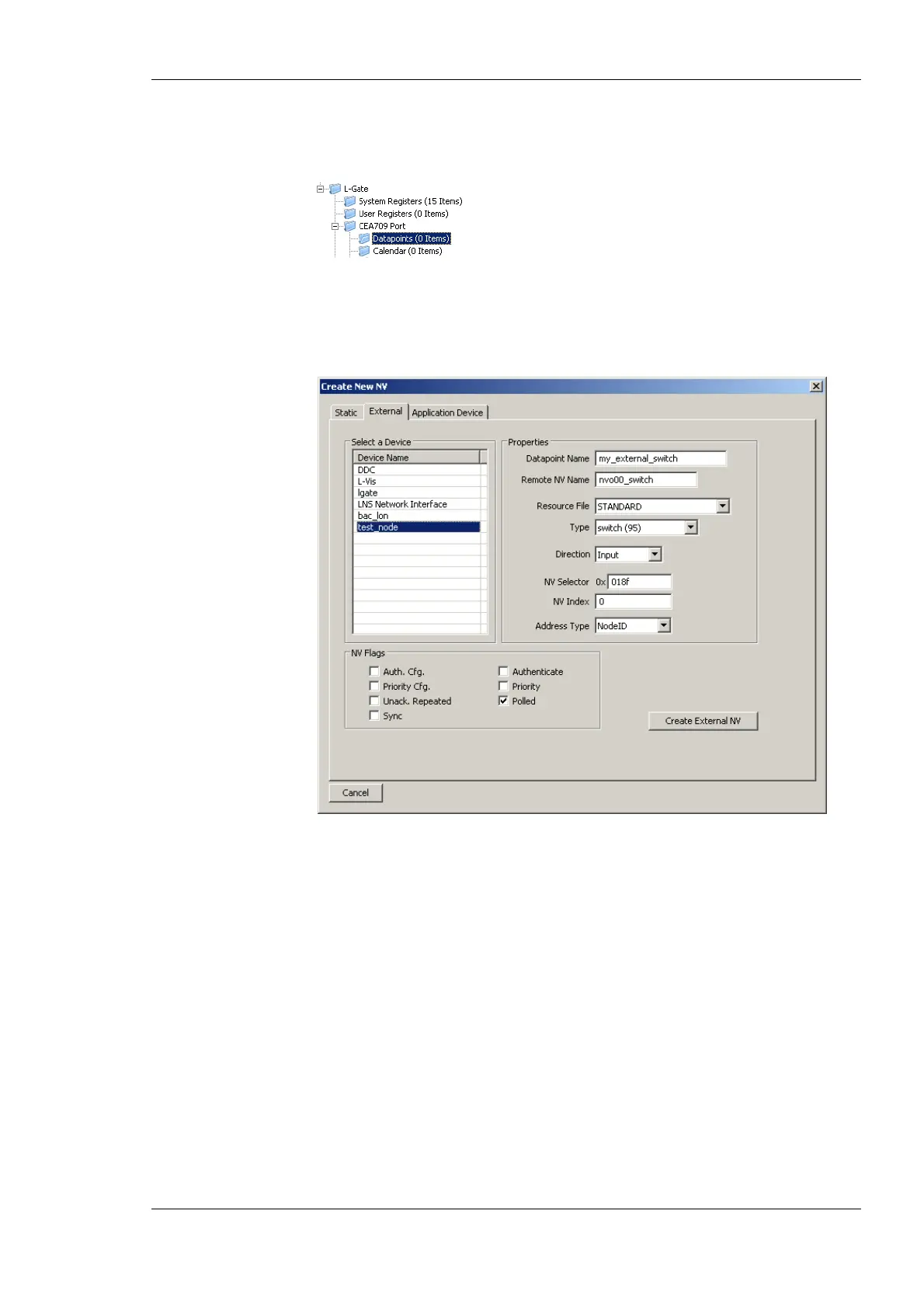
1. Select the L-Gate/CEA-709 Port/Datapoints folder
2. Right-click in the data point list and select New Datapoint… in the context menu.
This opens the NV creation dialog.
3. Click on the tab External as shown in Figure 80.
Figure 80: Create a new external NV.
4. Select the device in the box Select a Device on the left-hand side.
5. Enter the properties of the external NV on that device, starting with the local data point
name, the remote programmatic NV name, the NV type (SNVT) and direction. Note,
that the direction is the direction of the external NV on the L-Gate. Therefore, the
remote output NV nvo00_switch becomes an input on the L-Gate. Also enter the NV
selector in hexadecimal and the NV index in decimal. Choose the preferred addressing
mode, e.g., Node ID.
6. Click Create External NV to add this NV to the data point list.
7. The external NV now appears in the data point list as shown in Figure 81. For external
NVs which are inputs to the L-Gate, adapt the poll cycle property to your needs.



 To Next Page