38 HD96-24-CC-TP User Manual
11. Ø – Polarity Switch. Changes the polarity of the selected channel by 180° (often inaccurately called phase reverse as the button only inverts polarity).
12. HPF on – Activates the HPF (inputs only).
13. LPF on – Activates the LPF (inputs only).
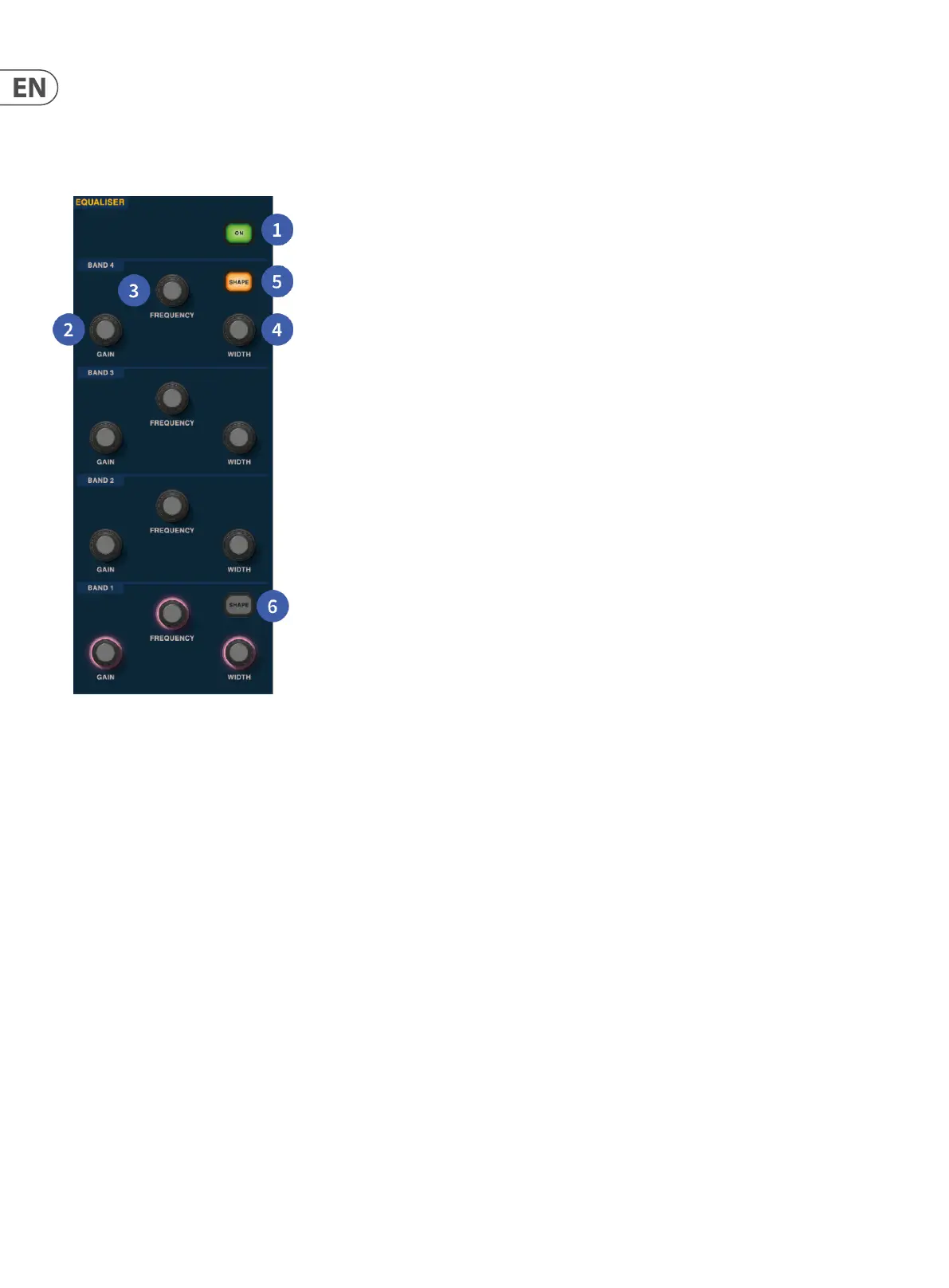
Equaliser
1. On – Turns the Equaliser on for the selected channel.
2. Gain – Each band has +- 16.2 dB of range.
3. Frequency – Each band as a frequency range of 16 Hz to 25 kHz.
4. Width – The width or Q of an EQ band can be changed from 0.3 to 5.3.
5. Shape – Changes the shape of Band 4. For inputs, the shape options include, Bell, Bright, Classic and Soft. For outputs, the Shape button has Shelf, LP 6 dB,
LP 12 dB and Bell modes.
6. Shape – Changes the shape of Band 1. For inputs, the shape options include, Bell, Deep, Classic and Warm. For outputs, the Shape button has Shelf, HP 6 dB,
HP 12 dB and Bell modes.


 To Next Page
 Loading...