2 - M - 3
LCT-1000 TRAY PAPER FEED/CONVEYANCE SECTION
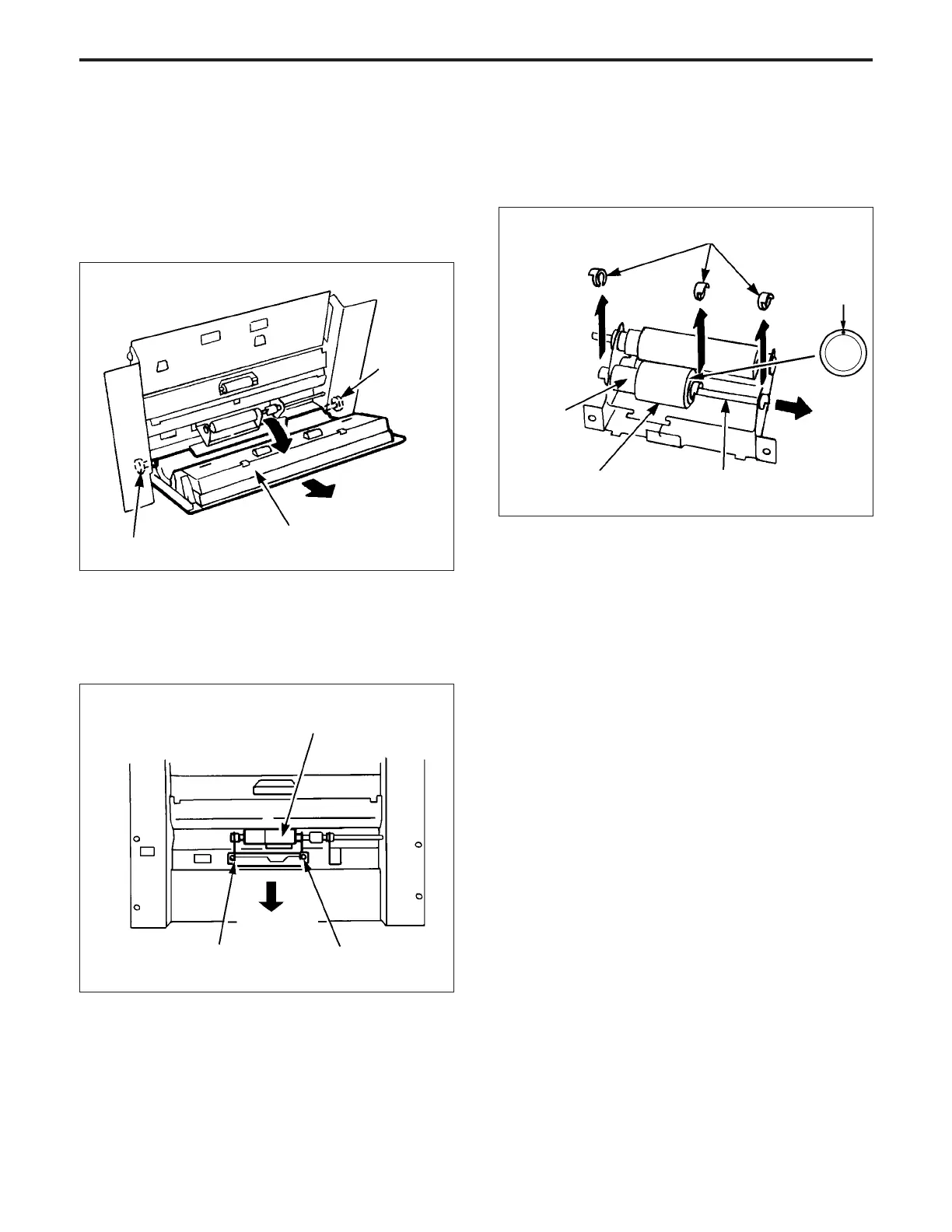
3. Replacing the Rubber of the Double Feed
Prevention Roller
a. Procedure
(1) Remove the LCT1000 paper feed/conveyance sec-
tion.
(2) Slacken the two set screws, then remove the LCT
conveyance door.
(4) Remove the three Stop rings, then pull out the shaft,
and remove the double feed prevention roller.
(5) Remove the double feed prevention rubber from the
double feed prevention roller.
(3) Remove the two set screws, and remove the double
feed prevention roller. (When re-installing the double
feed prevention roller, insert the two projections on the
double feed prevention roller unit into the square holes,
and push them downward to fix them in place.
Paint mark
Stop rings
Double feed prevention
rubber
Shaft
Double feed
prevention roller
Set screw
LCT conveyance door
Set screw
Double feed prevention roller unit
Push-down
direction
Set screw Set screw
(6) Re-install the rubber in the opposite sequence to
removal.
Caution: Ensure that the mounting direction of the rubber is
correct.



 To Next Page