2 - M - 4
LCT-1000 TRAY PAPER FEED/CONVEYANCE SECTION
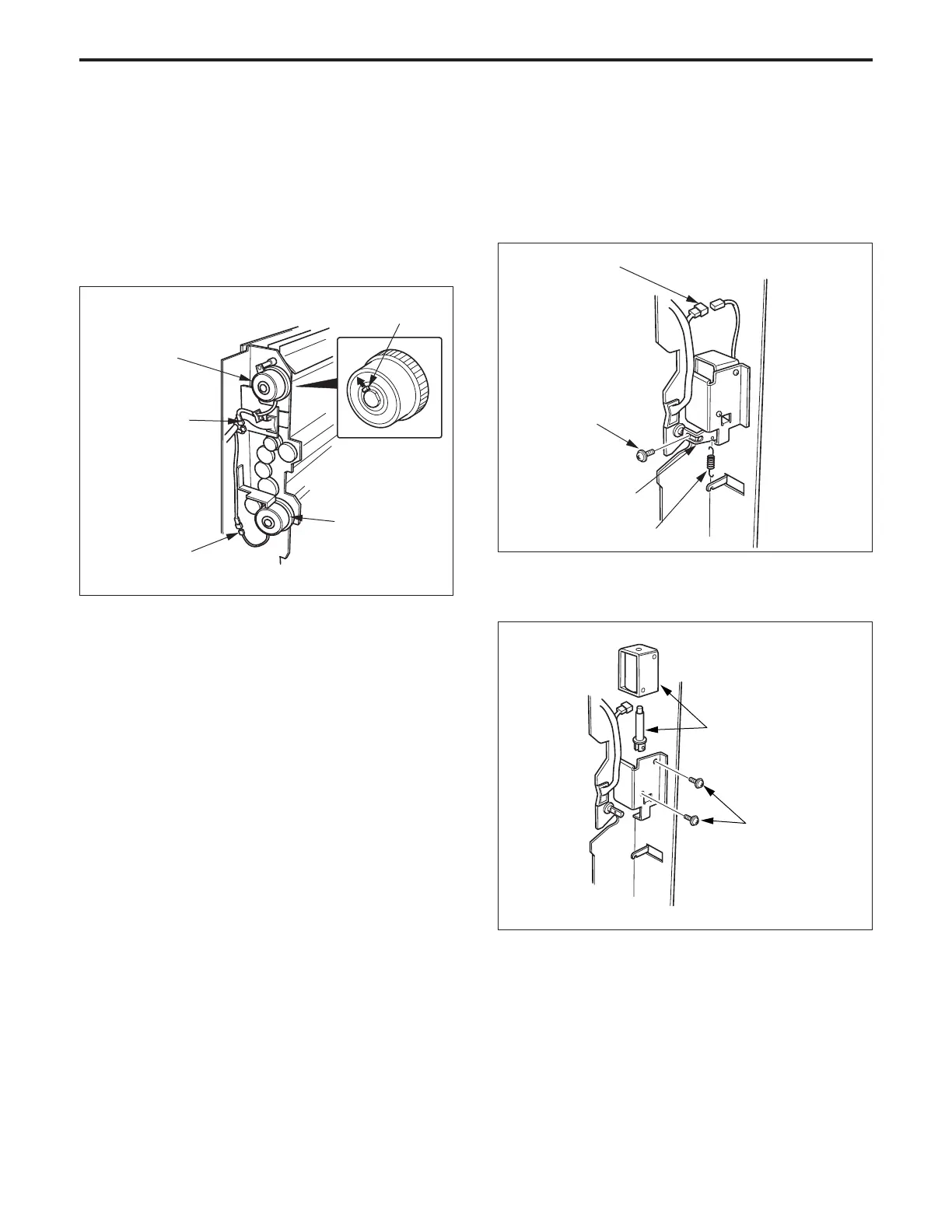
5. Replacing the Solenoid
a. Procedure
(1) Remove the LCT1000 paper/conveyance section.
(2) Disconnect the solenoid connector (CN721).
(3) Remove the set screw, then remove the solenoid
pulling piece together with the spring.
Claw
Paper feed
clutch
(4) Re-install the above parts in the opposite sequence to
removal.
Caution: Do not forget to fix the clutch to prevent it from
rotating.
4. Replacing the Paper Feed Clutch
a. Procedure
(1) Remove the LCT1000 paper feed/conveyance sec-
tion.
(2) Disconnect the connectors (CN720 and CN730) of the
paper feed clutch.
(3) Remove the paper feed clutch while pulling the claw
outward.
Connector
(CN720)
Connector
(CN730)
Paper feed
clutch
Solenoid pulling
piece
Spring
Set screw
Connector
(CN721)
Set screws
Solenoid
(5) Re-install the above parts in the opposite sequence to
removal.
(4) Remove the two set screws, the remove the solenoid.



 To Next Page