149
Chap.7
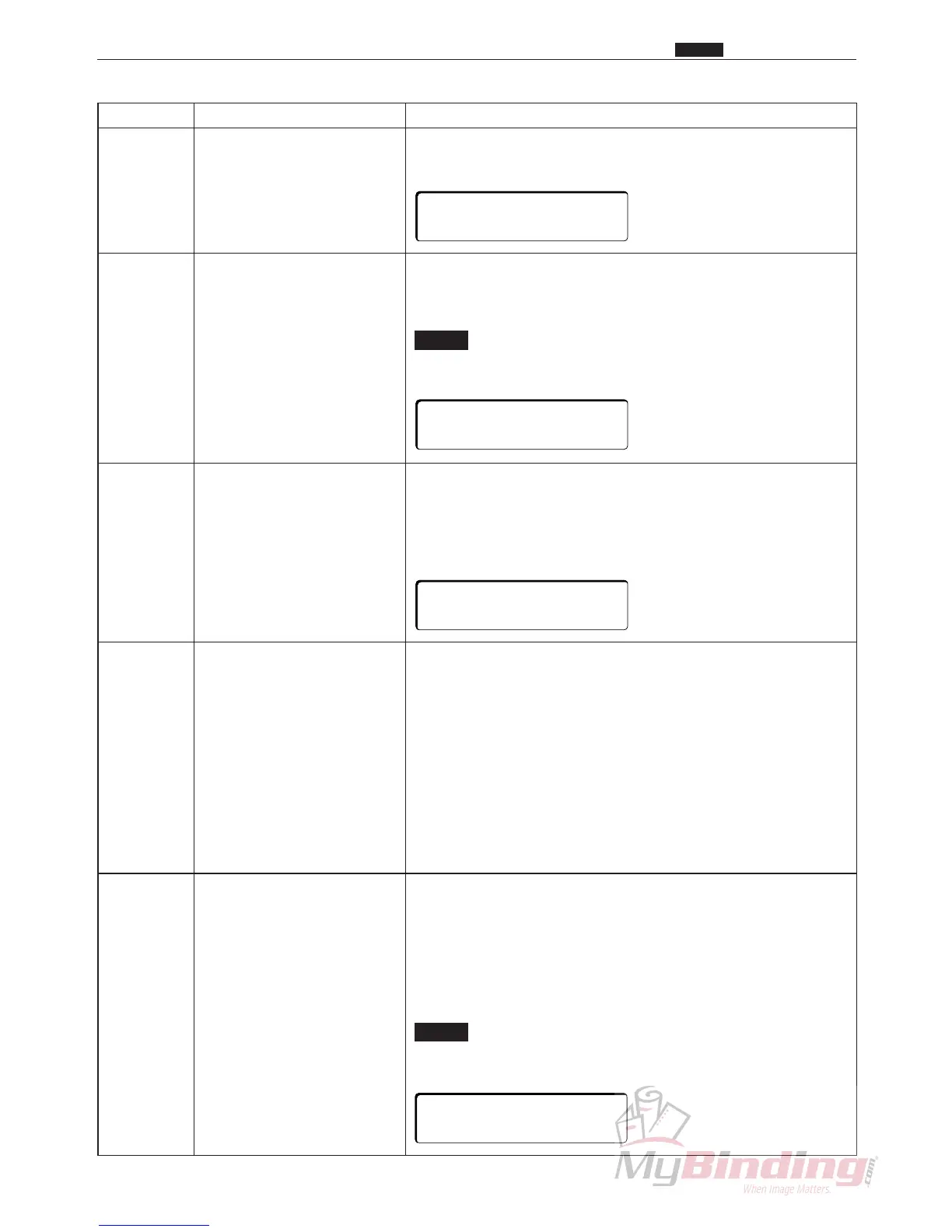
HELP No. Adjustments and checks Contents and descriptions
H-30 Fan check Fan motor function test (when the option is installed)
(Optional AF-100) Suction fan operates when the <+> key is pressed.
Blower fan operates when the <-> key is pressed.
H-31 Solenoid and feed check Shutter solenoid and feed motor function test (when the option
(Optional AF-100) is installed)
The shutter solenoid operates when the <+> key is pressed.
The feed motor operates when the <-> key is pressed.
NOTE :
• Do not press the <+> for more than 2 seconds.
Doing so may damage the solenoid.
H-32 Feeder function test Optional feeder sequential function test (when the option is
(Optional AF-100) attached)
Elevator moves up when the <+> key is pressed. (The upper
limit switch stops the elevator.)
Elevator moves down when the <+> key is pressed. (The lower
limit switch stops the elevator.)
H-33 Specify slitter movement Switch the slitter control method when REG. MARK is ON.
control method ON : Slitter moves just the amount of drift as the REG.
MARK scan indicates. (It returns to the home position
under the following conditions.)
OFF : Slitter returns to the home position as the REG.
MARK is scanned.
<Conditions under which the slitter returns to the home position
when REG. MARK is ON>
q When processing immediately after the power is turned on.
w When processing after an error.
e When processing after paper was cut.
r When processing after opening a cover.
t When the job changes.
H-34 CCD Change the method to adjust the main motor when reading the
Reg. Mark.
Select CCD2 if a E4 : REG. MARK ERROR occurs whether or
not the Reg. Mark are printed correctly. Usually CCD1 is used.
CCD1 : Turn on the main motor’s magnetization when
reading Reg. Marks.
CCD2 : Turn off the main motor’s magnetization when
reading Reg. Marks.
NOTE :
• A sound occurs when reading Reg. Marks when
CCD2 is selected, but this in not a malfunction.
c HELP Description
+KEY:SOL.ON
-KEY:FEED ON
+KEY:ELEV.UP
-KEY:ELEV.DWN
+KEY:FAN1 ON
-KEY:FAN2 ON
CCD SCAN.
∗
CCD1 CCD2



 To Next Page