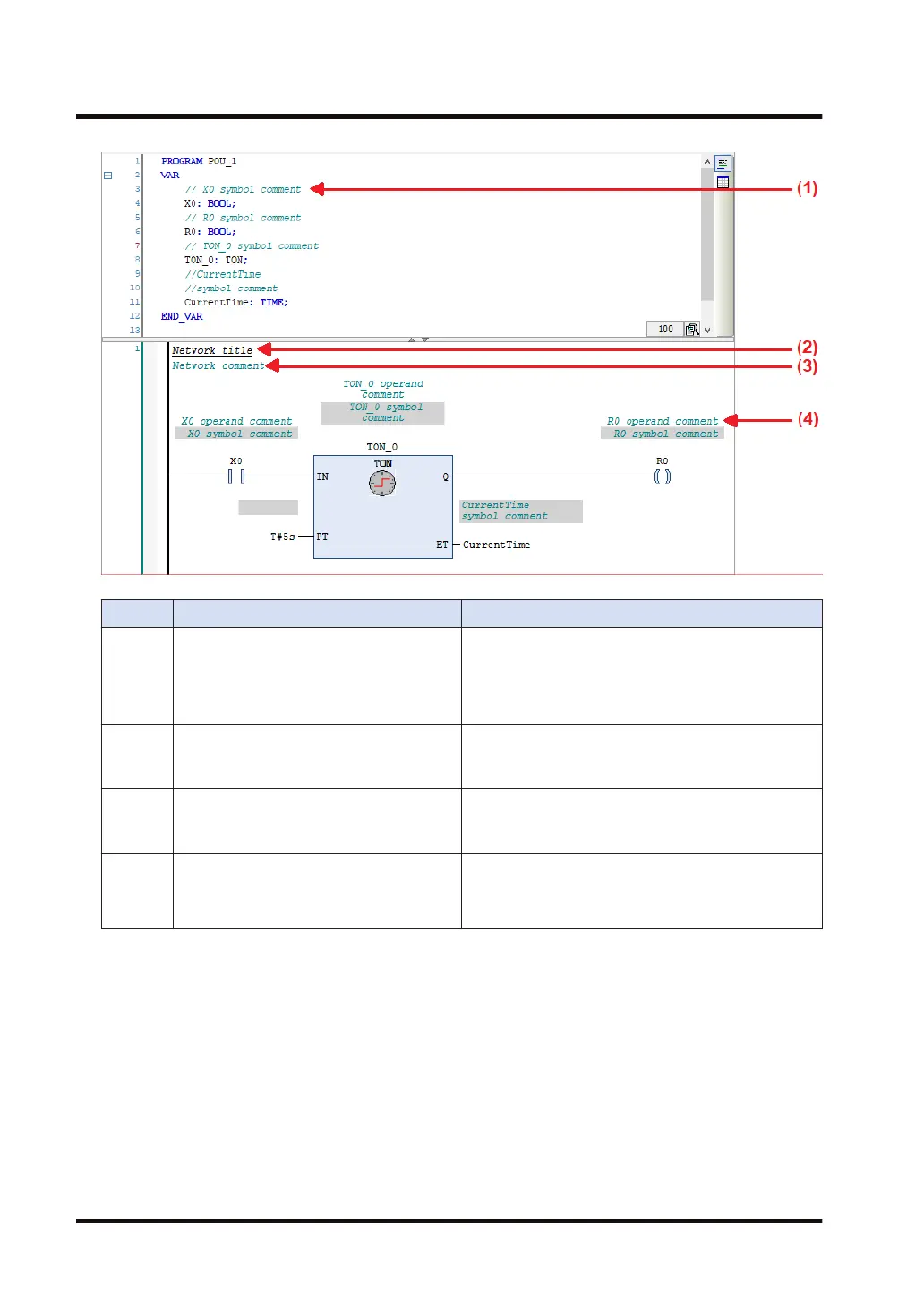
No. Item Description
(1) Symbol comment
This is a comment on a declared variable. The same
comment is displayed for the same variable. Enter a
comment on a variable in the declaration section.
The comment will be displayed in a cell with a black
background.
(2)
Network title
(circuit title)
A title can be assigned to each network (circuit).
Click the top left of the network (circuit) and enter a
title.
(3)
Network comment
(circuit comment)
A comment can be assigned to each network (circuit).
Click the top left of the network (circuit) and enter a
comment.
(4) Operand comment
This is a comment on a variable. Different comments
can be assigned to the same variable. Click a position
above each variable in the implementation section and
enter a comment.
To display titles and comments, you must configure settings.
Open the Options window (by selecting T
ools>Options), select the "FBD, LD, and IL editors"
category and then the General tag, and select the items to be displayed in the Display section.
7.1 Programming in Ladder Diagram (LD)
7-12 WUME-GM1RTXOP-01












 To Next Page