Network and Remote Operation
R&S
®
FSPN
287User Manual 1179.4363.02 ─ 01
●
Modifying device configurations
●
Monitoring connections from the device to other devices
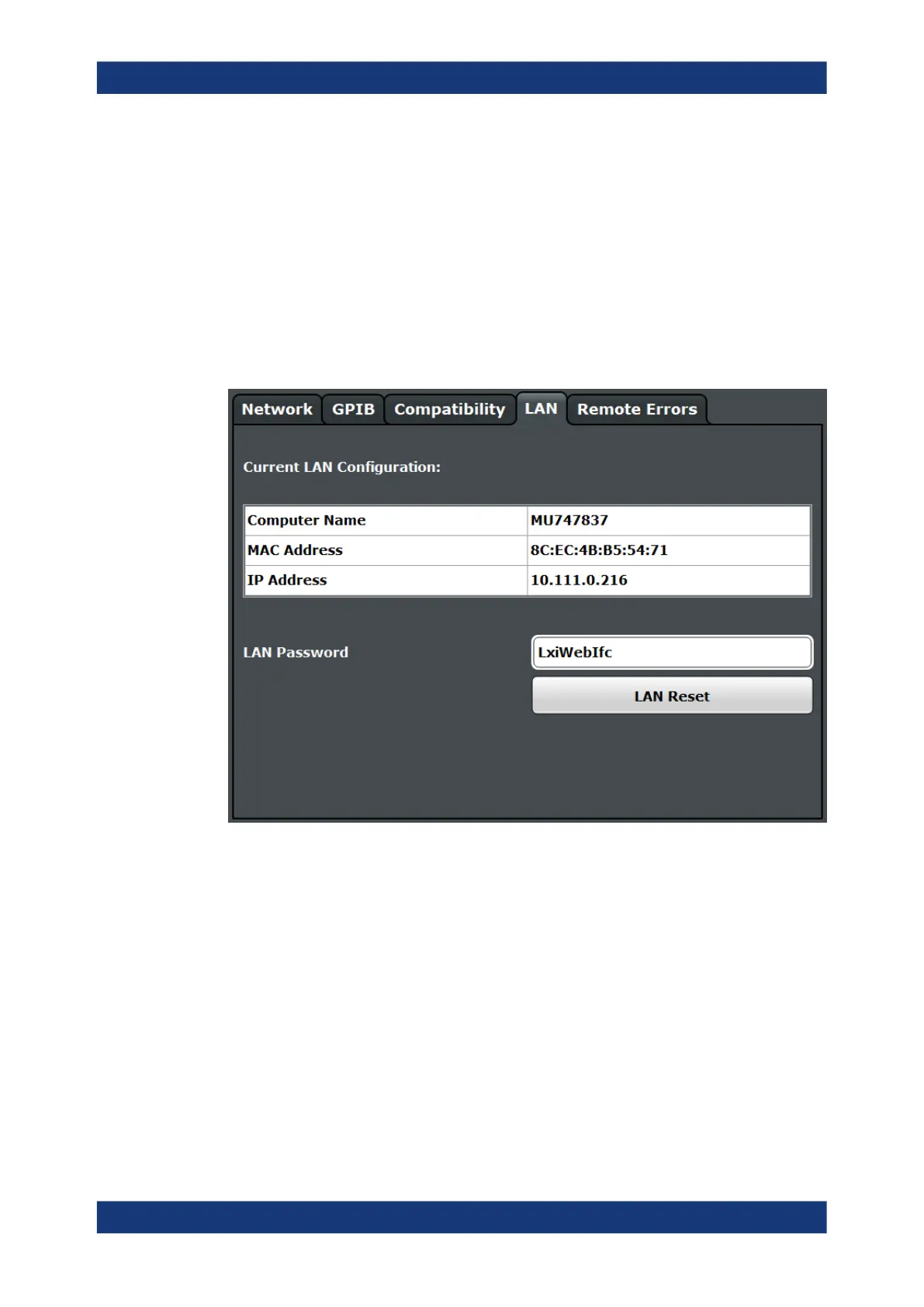
The "LAN" tab of the "Network + Remote" dialog box provides basic LAN configuration
functions and information for the R&S FSPN.
Alternatively, you can change the LAN settings using the web browser interface.
For details see Chapter 10.4.1.4, "How to Configure the LAN Using the Web Browser
Interface", on page 294.
Only user accounts with administrator rights are able to use LAN configuration and
web browser functionality.
Current LAN Configuration..........................................................................................287
LAN Password............................................................................................................ 288
LAN Reset...................................................................................................................288
Current LAN Configuration
Displays the current LAN information from the R&S FSPN (read-only).
"Computer
name"
Name of the R&S FSPN as defined in the operating system (see also
"Computer Name" on page 281)
"MAC address"
Media Access Control address (MAC address), a unique identifier for
the network card in the R&S FSPN
"IP address"
IP address of the R&S FSPN as defined in the operating system (see
also "IP Address" on page 282).
Network and Remote Control Settings



 To Next Page