Build 21 v21.4.1
© 2007-2010 RED.COM INC. FEBRUARY 23, 2010
100 100
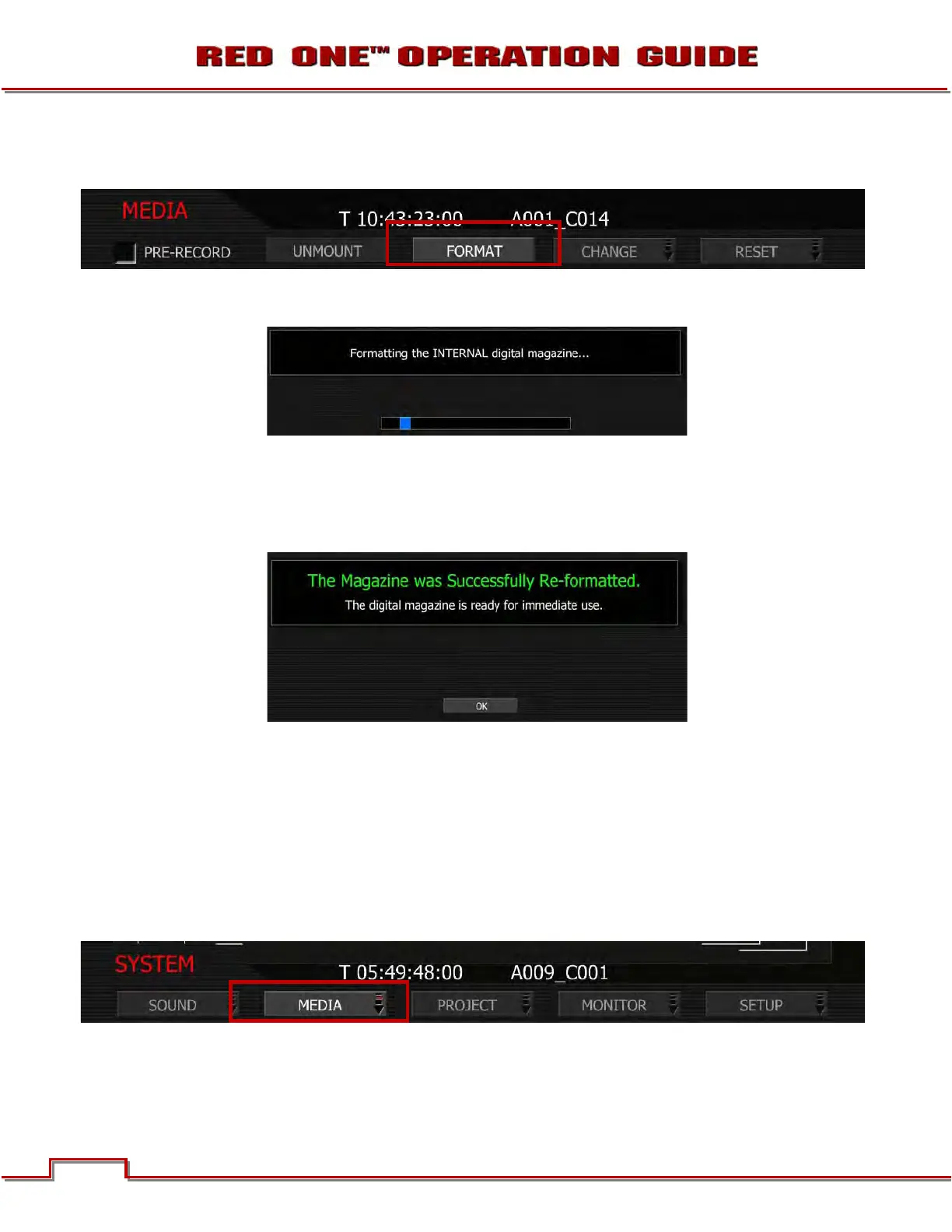
5. Select FORMAT and press Joystick in or down to enter. Camera LCD will display MAGAZINE FOR-
MAT.
- If the media IS blank, camera LCD will display “FORMATTING…” and all external monitors will
display:
- If the media IS NOT blank, refer to RE-FORMATTING MEDIA.
NOTE: If when selecting FORMAT, the display indicates FORMAT FAILED, refer to MEDIA ERRORS.
6. Once formatting is completed the camera LCD will display “FORMAT DONE” and all external monitors
will display:
7. Press Joystick in or down to select OK. Camera will return to normal operation.
RE-FORMATTING MEDIA
Re-formatting a previously used CF card or RED-DRIVE or RED-RAM magazine follows a similar proce-
dure to formatting.
1. Insert or connect media to camera. Refer to FORMATTING MEDIA.
2. To re-format the media push the
SYSTEM menu button.
3. Select MEDIA and press Joystick in or down to enter. Camera LCD will display MEDIA Menu.



 To Next Page