Build 21 v21.4.1
© 2007-2010 RED.COM INC. FEBRUARY 23, 2010
62 62
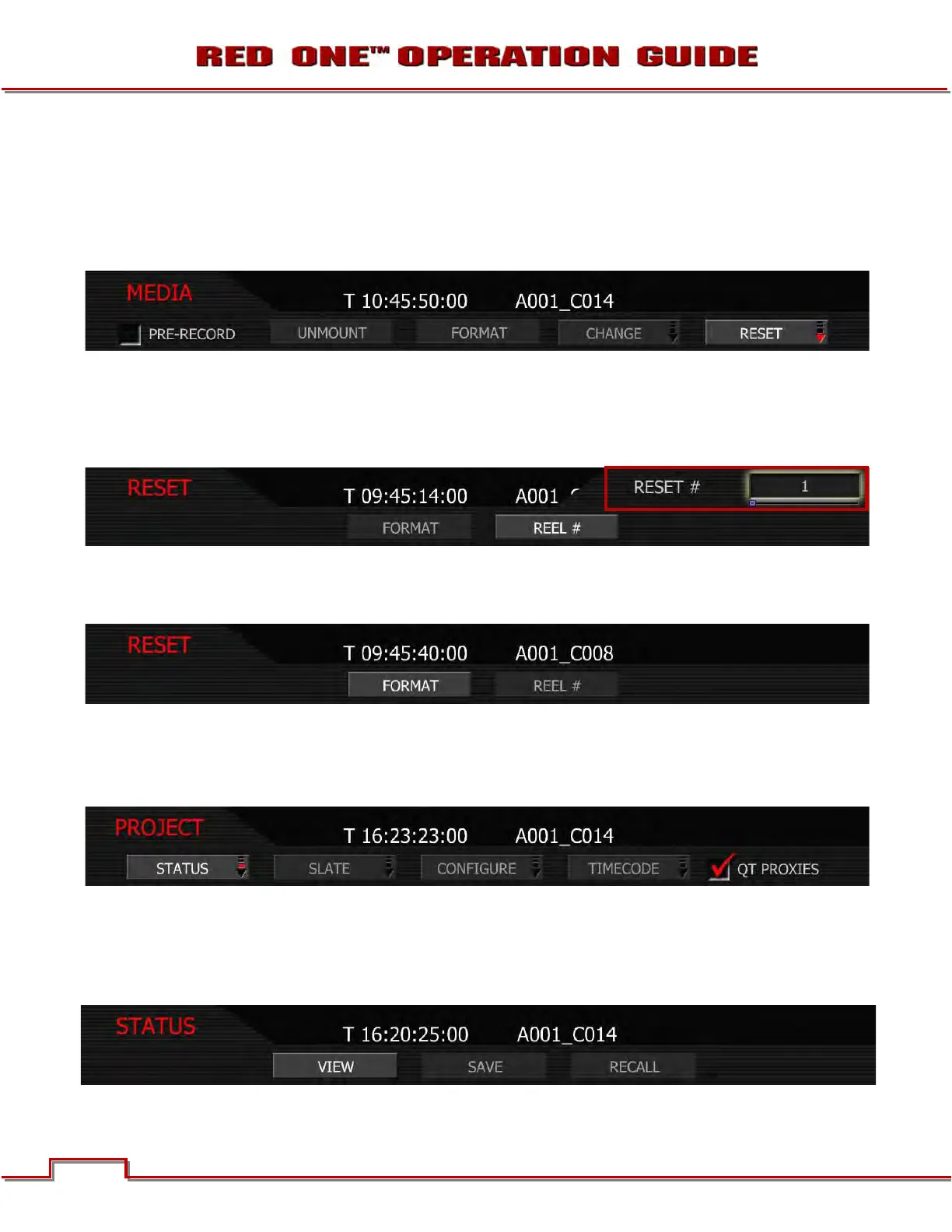
RESET
Select this function if you wish to reset the reel number counter used by the camera to allocate reel num-
bers when the media is formatted.
NOTE: To protect against duplicate magazine and file names, the camera inserts a random two di-
git alphanumeric number in the file and/or directory names.
1. Select REEL# and press in or down on joystick.
2. Twist joystick to change the highlighted RESET # box reel number between 1 and 999.
NOTE: The default reel number offered by the camera will be 1. The camera no longer resets this
value each time the Project Time Base (formerly Frame Rate) is changed.
3. Move Joystick to the left and select FORMAT. If the magazine is not empty, a warning and conforma-
tion screen will appear, push FORMAT or CANCEL as appropriate. For additional information, go to
APPENDIX B: MANAGING DIGITAL MEDIA.
PROJECT MENU
The project menu sets the operating parameters the camera will use for a given project. Options available
are STATUS, SLATE, CONFIGURE, TIMECODE, and QT PROXIES.
STATUS
Status menu allows the operator to view the current project settings and save them. If project settings
were previously saved, the operator may also recall the desired settings and set the camera to those set-
tings to replicate the desired look and feel.



 To Next Page