Build 21 v21.4.1
© 2007-2010 RED.COM INC. FEBRUARY 23, 2010
82 82
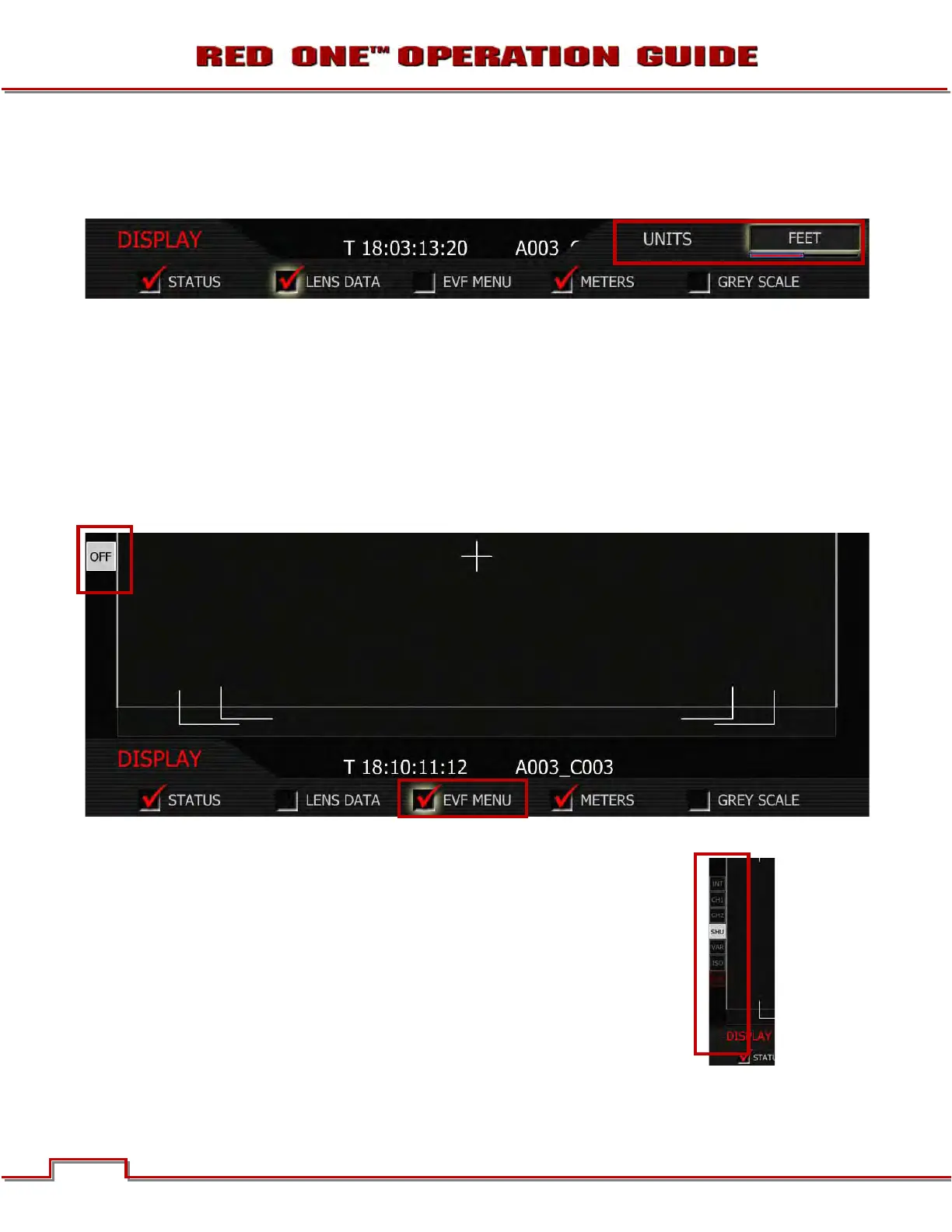
LENS DATA
When checked focus / zoom / iris data on all external monitors mid-upper edge will be displayed. Also
allows the user to choose if Distance is reported in Feet or Meters.
1. To change lens data preferences, push in or down on joystick to place checkmark in the LENS DATA
checkbox.
2. UNITS box will highlight.
3. Twist joystick to change the highlighted UNITS box to the desired setting.
4. Move joystick right, up or push in to set.
EVF MENU
When checked, activates the rotary switch on the EVF and displays a Gray “OFF” box on left side of EVF
and all external monitors.
Activating this feature allows adjustment of the following parameters directly using the rotary switch:
INT: Adjusts EVF backlight display intensity
CH1: Adjusts Ch 1 microphone audio level
CH2: Adjusts Ch 2 microphone audio level
SHU: Adjusts Shutter speed
VAR: Adjusts Varispeed frame rate
ISO: Adjusts Sensitivity rating of monitoring
OFF: EVF control – Active / Disabled



 To Next Page