Build 21 v21.4.1
FEBRUARY 23, 2010 © 2007-2010 RED.COM INC.
91
SETTING SYSTEM CLOCK
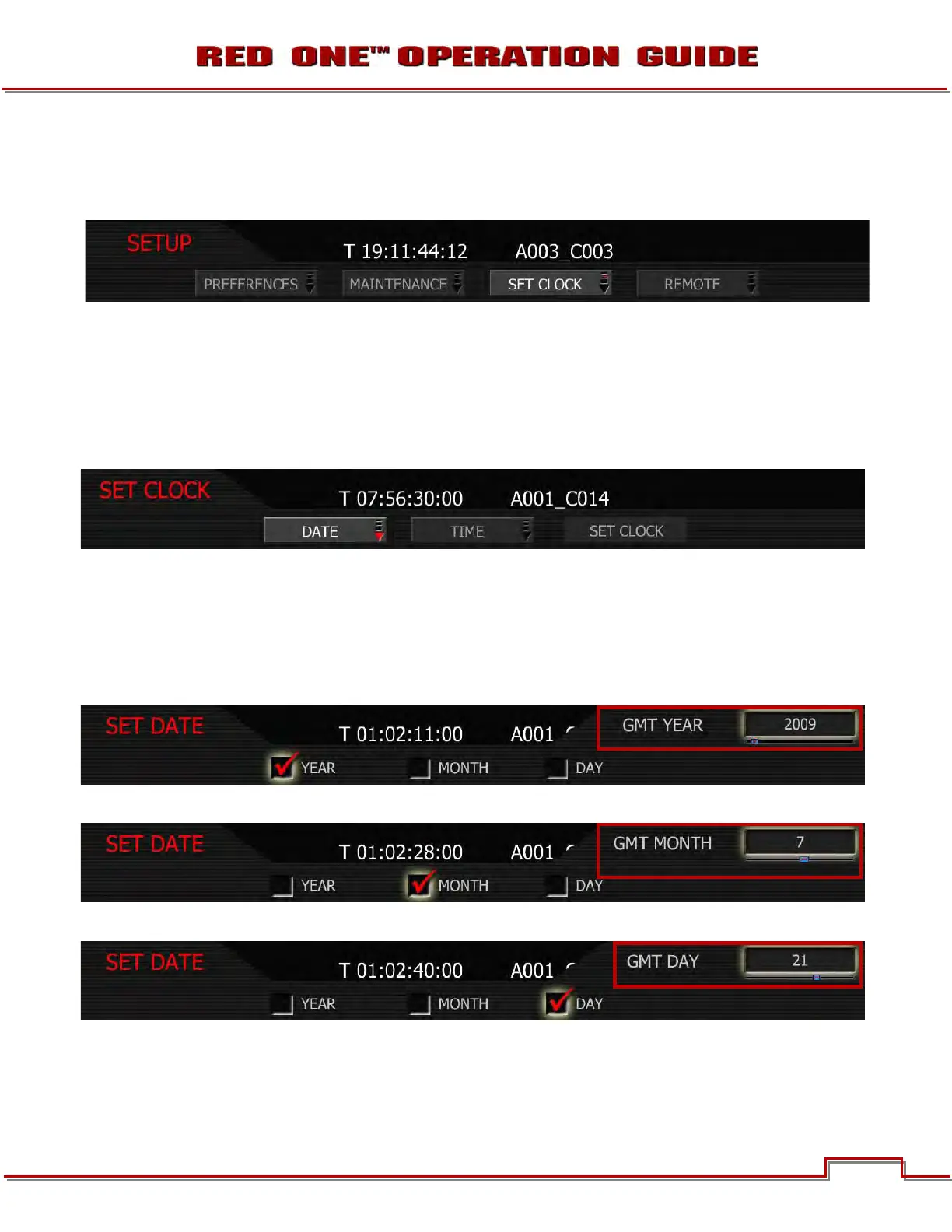
Set Clock allows the camera’s real time clock to be adjusted. Select SET CLOCK and push joystick in or
down to display SET CLOCK menu.
NOTE: Current GMT date and time can be found using this web site or equivalent service:
http://wwp.greenwichmeantime.com/info/current-time.htm
If camera Date
and Time are set to GMT, and then set TIMEZONE to –8 for West Coast US (Pacific) time
etc. Or set
Date and Time to local time, and set the TIMEZONE value to 0. To set TIMEZONE refer to
TIMEZONE under TIMECODE in NEW PROJECT section under SYSTEM MENU CONTROLS.
SET DATE
1. To change date, push in or down on joystick to place checkmark in the desired checkbox.
2. Box on lower right will highlight.
3. Twist joystick to change the highlighted box to the desired setting.
4. Move Joystick up or push in to set.
YEAR: allows the operator to enter a new value for the year between 2007 and 2020.
MONTH: allows the operator to enter a new value for the monthbetween 1 and 12.
DAY: allows the operator to enter a new value for the day between 1 and 31.



 To Next Page