Build 21 v21.4.1
FEBRUARY 23, 2010 © 2007-2010 RED.COM INC.
51
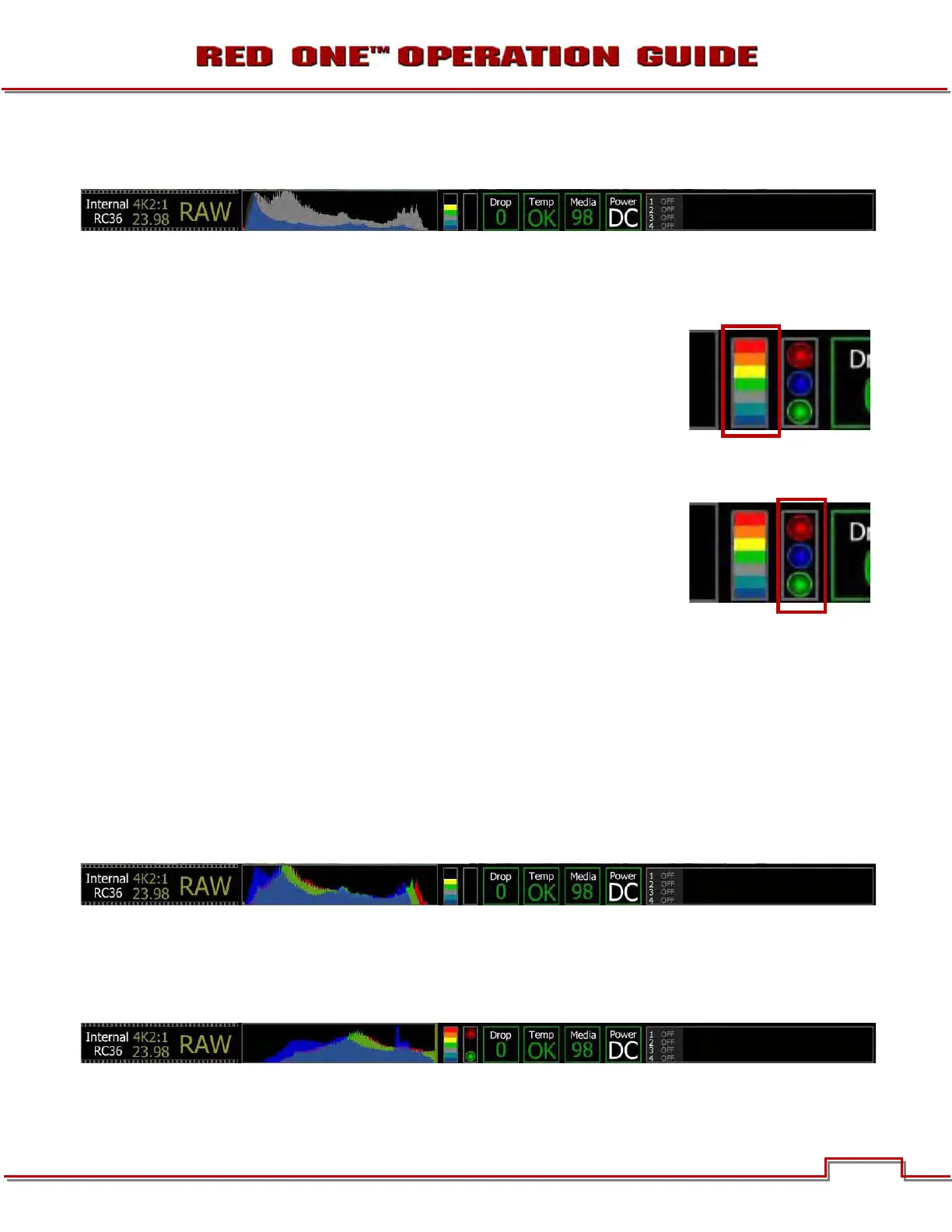
RAW HISTOGRAM: Displays the sensor exposure values (blue) over a colorless histogram of the RGB
monitor path (White).
NOTE: Histogram information is complemented by two additional meters, the Sensor Raw meter
and RGB Clip Meter.
SENSOR RAW METER
The Sensor Raw meter is a vertical color bar graph that indicates the true ex-
posure at the sensor. This meter is unaffected by White Balance, ISO, VIEW or
LOOK settings, and therefore represents a true exposure of the sensor at all
times. The meter is color coded identically to the False Color overlay, so if
False Color is enabled and VIEW is set to RAW, False Color and Sensor RAW
exposure indications will be identical.
RGB CLIP METER
The RGB Clip meter looks like a traffic light and indicates if Red, Blue or Green
channels of the RGB monitor path are clipping. The RGB Clip meter is affected
by White Balance, ISO, VIEW and LOOK settings, and normally monitors RGB
monitor path levels. Therefore it can also be used to check the HD-SDI outputs
are not clipping. However if VIEW is set to RAW, the RGB Clip meter monitors
sensor exposure and may be used to verify the sensor is not clipping in Red,
Blue or Green channels.
UNDER AND OVER EXPOSURE EXAMPLE
Any desired combination of False Color, Zebras, Histogram, Sensor RAW and RGB Clip information may
be used to judge ideal exposure. As a general rule the ideal histogram to aim for is both "fat" and "right
justified", with the sensor RAW meter indicating Green, Yellow or Orange.
In this example the camera is ideally exposed. The histogram is justified to the right, the Sensor RAW me-
ter indicates the sensor is not clipped, and the RGB Clip meter indicates the RGB monitor path is not
clipped. When the recorded clip is color corrected in post production, sufficient headroom exists such
that any highlight information should be displayable without clipping, and shadow information should be
displayable without significant noise.
In this example the camera is significantly over exposed. The histogram is piled up to the right, the Sensor
RAW meter indicates the sensor is clipped, and the RGB Clip meter indicates the red and green channels
in the RGB monitor path are clipped. When the recorded clip is color corrected in post production, high-
light information will probably be clipped, although shadow information will probably be displayed without
any significant noise.



 To Next Page