Build 21 v21.4.1
FEBRUARY 23, 2010 © 2007-2010 RED.COM INC.
61
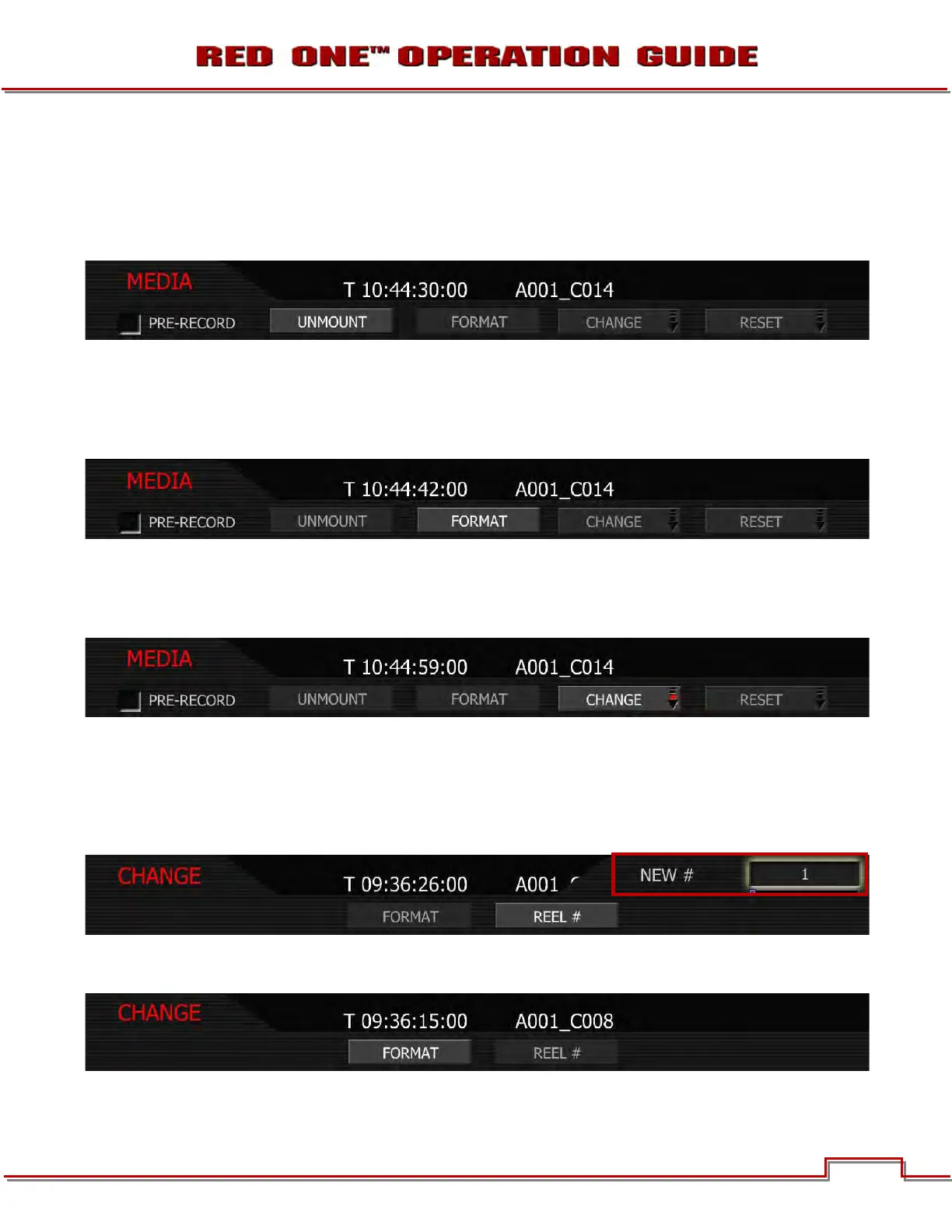
UNMOUNT
Select to un-mount digital media from the RED ONE camera in a failsafe manner. The camera operating
system will ensure that all files are closed, hard disk heads (if present) are parked, and REDFLASH CF
card, RED-DRIVE or RED-RAM magazine is properly powered down. For detailed instructions, go to AP-
PENDIX B: MANAGING DIGITAL MEDIA.
FORMAT
Select to format digital media. The camera will warn that “all data will be erased”, and formatting require
that a sequence of confirm commands are made before proceeding. For detailed instructions, go to AP-
PENDIX B: MANAGING DIGITAL MEDIA.
CHANGE
Select this function if you wish to change the reel number allocated by the camera when media is format-
ted.
1. Select REEL# and press in or down on joystick.
2. Twist joystick to change the highlighted NEW # box reel number between 1 and 999.
NOTE: The default reel number offered by the camera will be the last used value the camera used
as the reel number - e.g. if the last used reel number was 56, the change number suggested by the
camera will also be 56.
3. Move Joystick to the left and select FORMAT. If the magazine is not empty, a warning and conforma-
tion screen will appear, push FORMAT or CANCEL as appropriate.



 To Next Page