Build 21 v21.4.1
FEBRUARY 23, 2010 © 2007-2010 RED.COM INC.
39
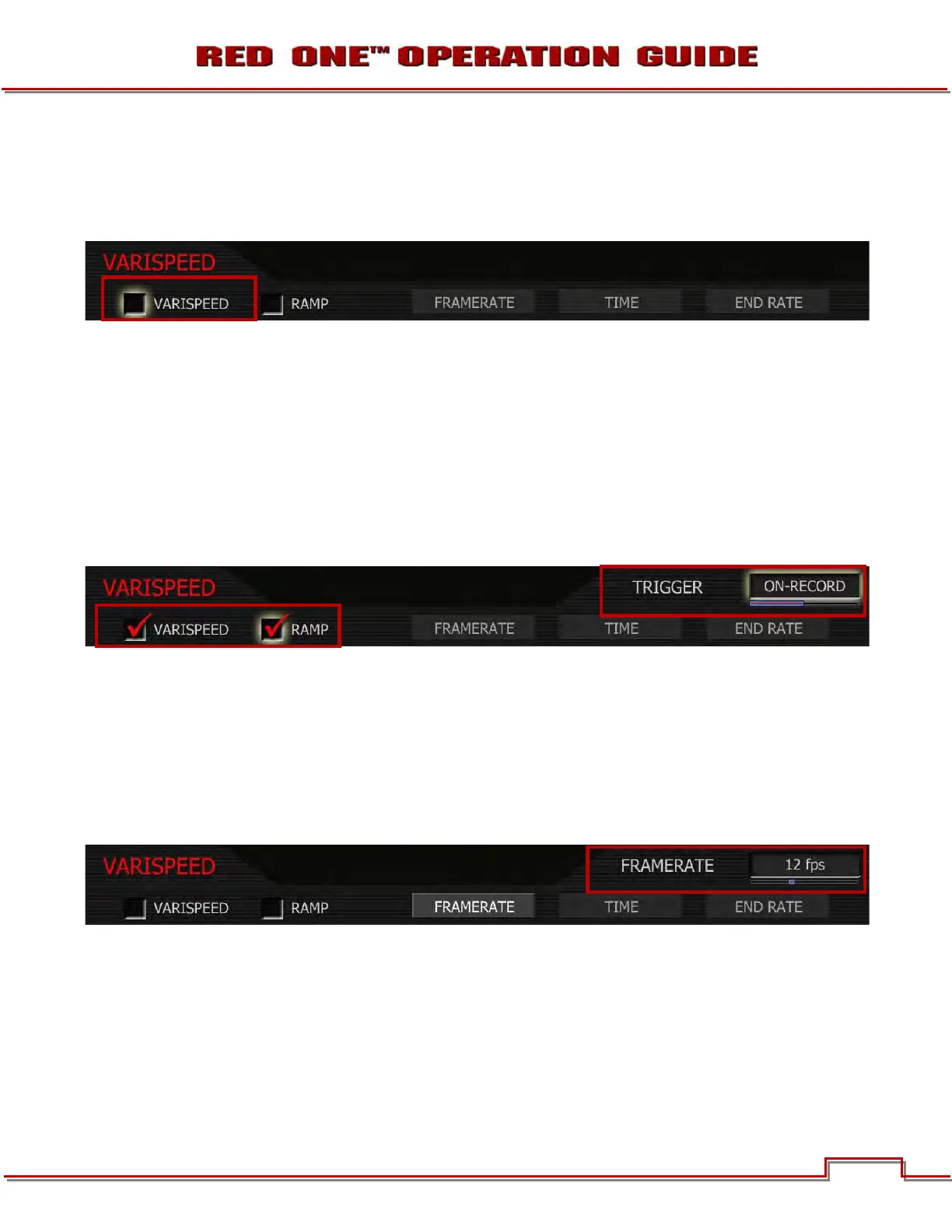
VARISPEED
Before recording, enable this function by placing a checkmark in the Varispeed checkbox. To select: Use
joystick to highlight VARISPEED checkbox. Push in or down on joystick to place checkmark in VARIS-
PEED checkbox.
RAMP
Enables a speed ramp; a transition over Time from the Frame Rate to an End Rate.
1. To select and adjust, use joystick to highlight RAMP checkbox.
2. Push joystick in or down to place checkmark in RAMP checkbox (VARASPEED checkbox will auto-
matically be checked).
3. TRIGGER box will highlight to allow you to choose between ON-RECORD and ON-EVENT.
4. Twist joystick to change the highlighted TRIGGER box to the desired setting.
5. Move joystick left or right to exit.
On-Record: On recording start, the capture frame rate will immediately start transitioning from the Frame
Rate to the End Rate.
On-Event: On recording start, the capture frame rate starts out at the Frame Rate, the start of the transi-
tion to the End Rate occurs only when an external GPI trigger has been received.
FRAME RATE
Enables the user to choose any single frame rate. To adjust: Select FRAMERATE and twist joystick to
change the highlighted FRAMERATE box to the desired setting.



 To Next Page