Saia-Burgess Controls AG
Manual I/O-modules for PCD1 │ PCD2 series │ Document 27-600 – Release ENG09 │ 2019-05-01
9-8
PCD2.G200
Preparing the PLC system
9
9.3.2.1.2 Conguring Analog Inputs
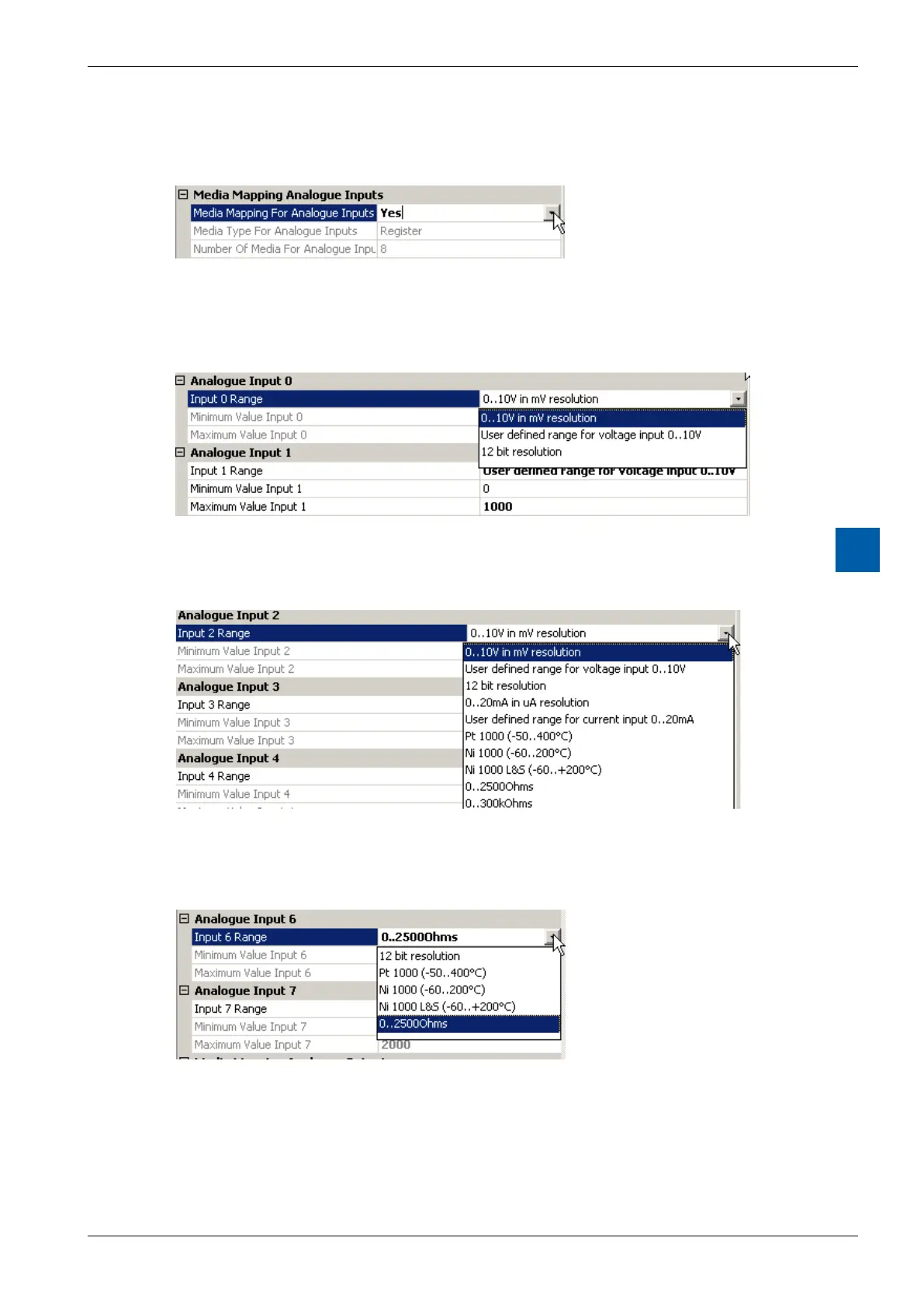
The Media Mapping for analog inputs and outputs has to be set to Yes:
Figure 7: Mapping Analogues Inputs
For each analog input there are several resolution options to select :
Analog inputs 0 and 1 can be set to 0…10000mVoruserdenedrangeortonon
converted 12 bit values 0…4095:
Figure 8: Range selection AI0 / AI1
The default user range is 0…1000
The Analog Inputs 2 to 5 (with the DIP switches) havethe following possibilities:
Figure 9: Range selection AI2…AI5
ThereisnoautomaticrecognitionwhenuploadingthecongurationfromtheCPU
since the DIP switch position can not be read by the CPU.
For the Analog Inputs 6 and 7 there are the following options:
Figure 10: Range selection AI6 / AI7


 To Next Page