Message:
Apply parking brake via button.
If the truck control unit detects a malfunction in
the parking brake, the truck cannot be switch-
ed off.
●
The message:
Apply parking
brake via button
is shown on the
display-operating unit.
●
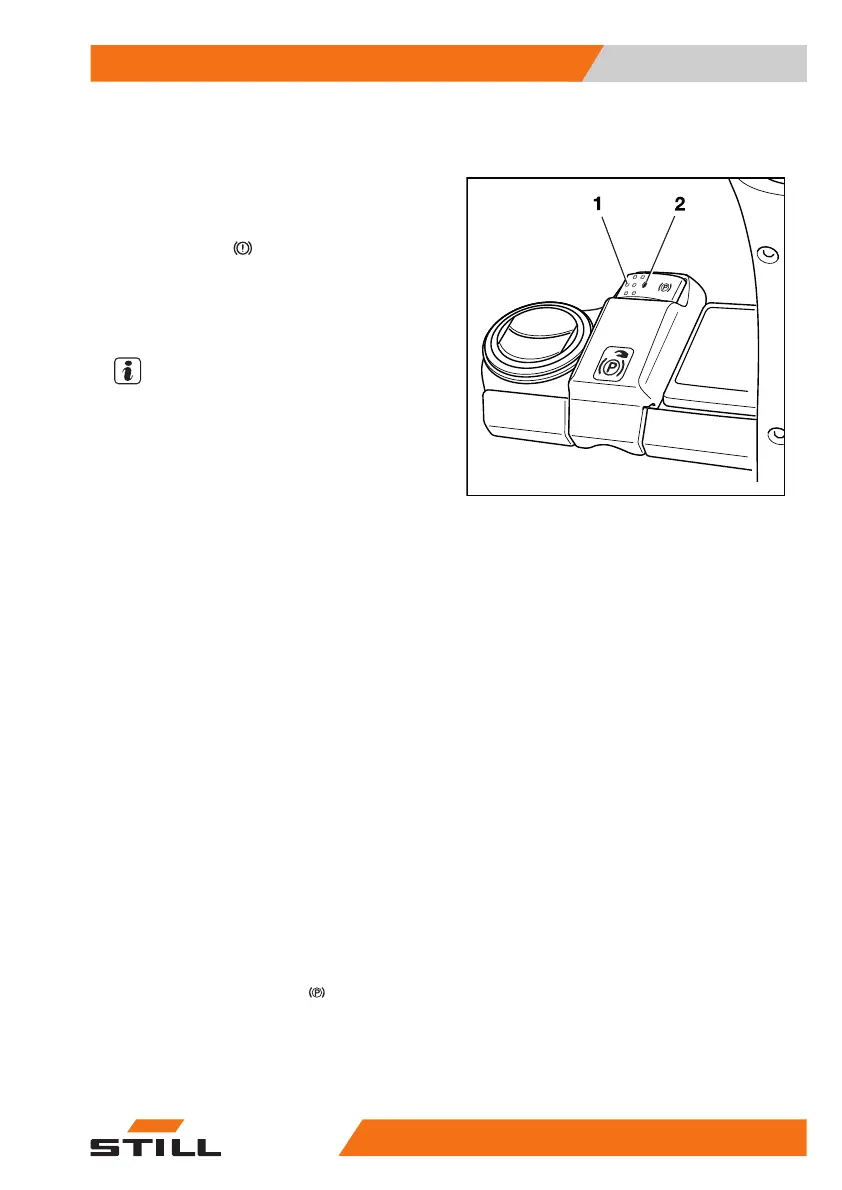
The LED (1) on the push button (2) flashes.
●
A warning signal sounds.
NOTE
If a truck with a faulty parking brake has to be
switched off, always secure the truck against
rolling away.
A possible cause of the malfunction is that the
parking brake cannot determine whether the
truck is stationary or still in motion. The follow-
ing section describes how to actuate the park-
ing brake when it is faulty:
Actuating a faulty parking brake when the
truck is stationary
There are two ways to apply the parking
brake:
– Press and hold the push button (1) for at
least five seconds and then release the
push button.
OR
– Press the push button (1) several times in
succession until a total of five seconds is
reached.
The parking brake is applied with an audible
sound. After the push button is released, the
parking brake should not make any further
sounds; if a sound is heard, this means the
push button was pressed for less than
five seconds. In this case, press the push but-
ton again to apply the parking brake again. If
necessary, repeat this process until the park-
ing brake is applied and the
symbol is dis-
played.
Actuating a faulty parking brake when the
truck is in motion
– Press the push button (1).
6219_003-006_V2
Operation
4
Driving
21156368011531 EN - 01/2021 - 05



 To Next Page