SVAN 948 USER MANUAL
4 - 55
The user can select the following results, which can be saved: PEAK, P–P, MAX and RMS in the
case of vibration measurement. The selection of the parameter from the CHANNEL x sub-list is made by
pressing the <
>, <
> push-buttons. After pressing the <ENTER> push-button any changes made in the
sub-list are confirmed and the sub-list is closed. The return to the BUFFERS SETUP sub-list ignoring any
changes made in the sub-list is made after pressing the <ESC> push-button.
In order to switch parameters in the buffer, the user has to place special character in the chosen
position; available values are: [√
√√
√] or [ ]. The selection of the required buffers parameter is made with the
<
>, <
> push-buttons. The user can pass to the selection of the next parameter in the CHANNEL x
sub-list pressing the <
>, <
> push-buttons. After pressing the <ENTER> push-button any changes
made in the sub-list are confirmed and the sub-list is closed. The return to the BUFFERS SETUP sub-list
ignoring any changes made in the sub-list is made after pressing the <ESC> push-button.
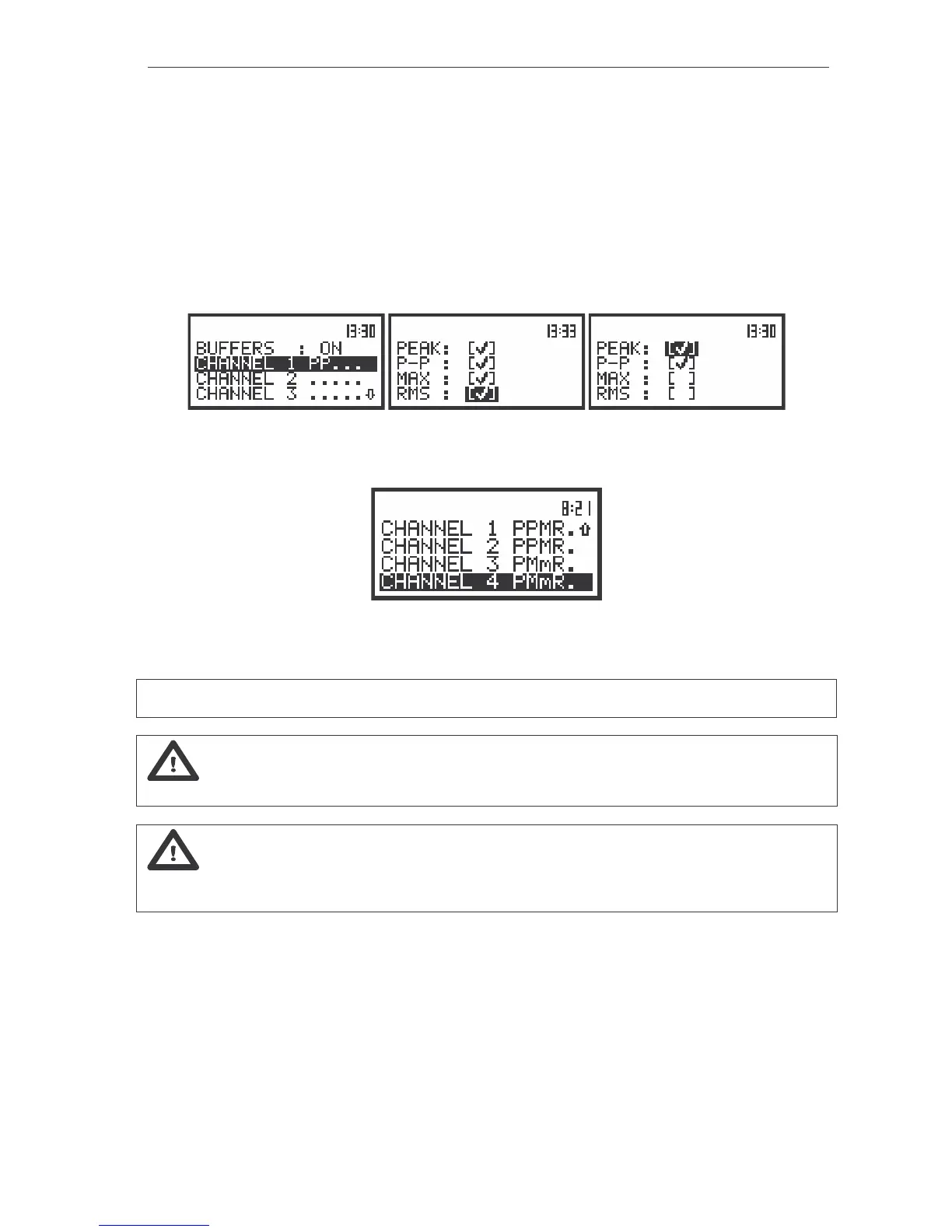
The view of the displays in the CHANNEL 1 sub-list; the selection of the parameters
to be saved in the buffer’s file
The view of the displays in the BUFFERS SETUP sub-list; the all the parameters were selected
to be saved in the buffer’s file; in CHANNEL 1 and 2 vibration and in CHANNEL 3 and 4 sound parameters
Notice: The change of the channels parameters is not possible when the measurement is
performed. The user has to finish the current measurement.
Notice: Setting BUFFER:OFF results in bypassing the storing of the given channel’s results
in the buffer’s file. It creates more space in the buffer for other channels (see Chapter 5 for details).
Notice: The buffer is updated in the time periods (steps) defined in the BUF. STEP (path:
MENU / INPUT / MEASURE SETUP / BUF. STEP). The way the measurement results are stored is described
in Chapter 5.
Selection of 1/1 OCTAVE analysis parameters for vibration signal - SPECTRUM
The SPECTRUM sub-list (path: MENU / INPUT / 1/1 OCTAVE SETUP / CHANNEL x / SPECTRUM) is a
context element, which appears on the INPUT sub-list in 1/1 OCTAVE or 1/3 OCTAVE mode. Using the
SPECTRUM sub-list one can select in 1/1 OCTAVE analysis the result which has to be saved in the
buffer’s file of the instrument.



 To Next Page