14
www.teejet.com
MATRIX
®
Pro 570GS
•
MATRIX
®
Pro 840GS
HOME GUIDANCEFULL SCREEN IMPLEMENTINTRODUCTION GNSS RATE CONTROL APPENDIXSETUP
►BoomPilot start mode – used to establish whether
BoomPilot will be controlled by speed or by the BoomPilot
icon
►BoomPilot icon – used to activate the guidance screen icon
for manually controlling on-screen application painting
4. Press NEXT PAGE arrow to set up specic implement
options. See the Implement chapter for details.
5. Press RETURN arrow or CONFIGURATION side tab
to return to the main Conguration screen.
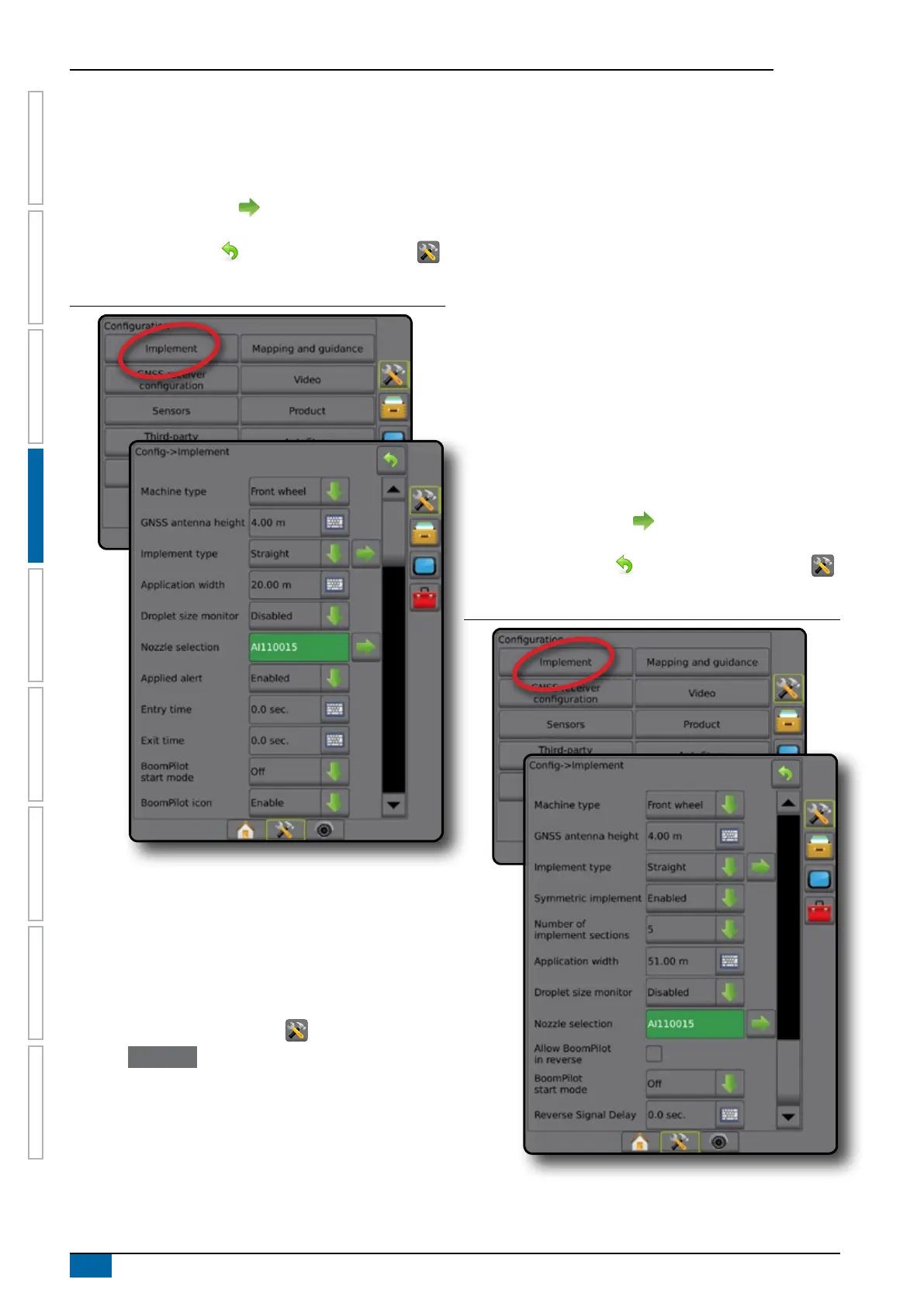
Figure 4-6: Implement – Single Section Setup
Multiple sections with SDM/SFM setup
Multiple Sections with SDM/SFM Setup is used when a Section
Driver Module (SDM) or Switch Function Module (SFM) is on the
system. The boom or delivery area can include up to 15 sections
of varying width and (in spreader mode) length. Additional options
available with an SDM include Application Overlap, Application
Delay, and Staggered Mode.
1. Press CONFIGURATION side tab .
2. Press Implement .
3. Select from:
►Machine type [when available] – used to select the type of
machine that most closely represents your machine
►GNSS antenna height [when available] – used to measure
the height of the antenna from the ground
►Implement type – used to select the layout of the sections
for the applied product location
►Symmetric implement – used to establish if sections are
paired and therefore share the same width, offset, and
length values
►Number of implement sections – used to select the number
of implement sections
►Application width [Straight or Staggered Implement Type] –
used to enter the total width of all sections of the implement
►Working width [Spreader Implement Type] – used to enter
the total width of the implement
►Droplet size monitor [when available] – used to enable
droplet size monitoring for up to ve preselected sprayer
nozzles
►Nozzle selection [straight or staggered implement type] –
used to select the type of sprayer nozzle
►BoomPilot start mode – used to establish whether
BoomPilot will be controlled by speed or by the BoomPilot
icon
►BoomPilot icon – used to activate the guidance screen icon
for manually controlling on-screen application painting
4. Press NEXT PAGE arrow to set up specic implement
options. See the Implement chapter for details.
5. Press RETURN arrow or CONFIGURATION side tab
to return to the main Conguration screen.
Figure 4-7: Implement – Multiple sections with SDM or SFM setup



 To Next Page