30
www.teejet.com
MATRIX
®
Pro 570GS
•
MATRIX
®
Pro 840GS
HOME GUIDANCEFULL SCREEN IMPLEMENTINTRODUCTION GNSS RATE CONTROL APPENDIXSETUP
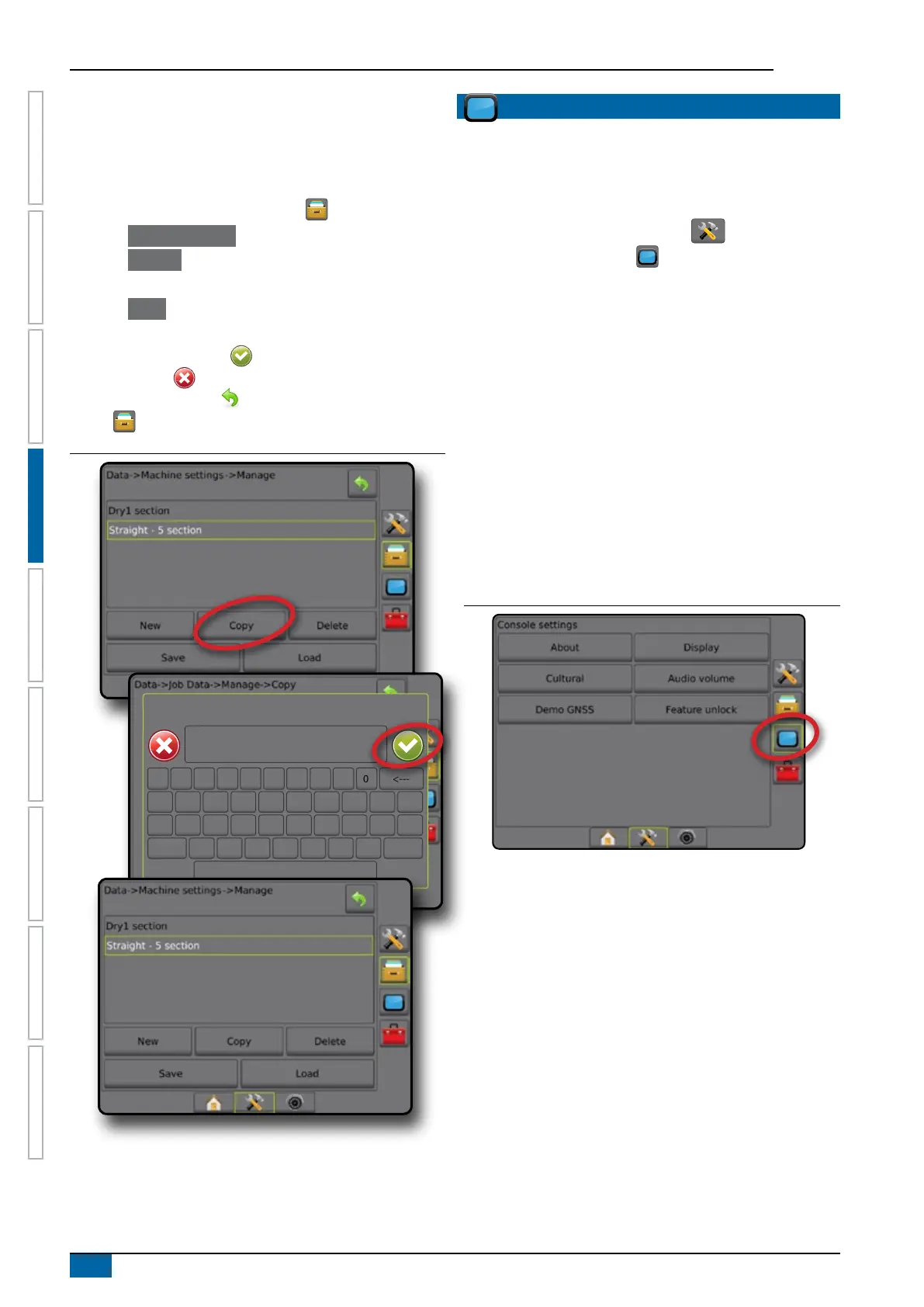
Copy machine prole
The copy machine prole option is used to duplicate the selected
machine prole for recall of that prole at a later use. Machine
proles can be used to transfer settings to another console of the
same make and model with the same attached hardware.
1. Press DATA MANAGEMENT side tab .
2. Press Machine settings .
3. Press Manage .
4. Select the machine prole to be copied into a new prole.
5. Press Copy .
6. Name the new prole.
7. Press the ACCEPT icon to save the new prole or the
CANCEL icon to leave the keyboard without saving.
8. Press RETURN arrow or DATA MANAGEMENT side
tab to return to the main Data management screen
Figure 4-40: Machine settings – copy profile
New machine settings name
1 5 92 6 03 74 8
q
Caps
Alt
t
f
v
o
k
Shift
w
a
z
y
g
b
p
l
e
s
x
u
h
n
r
d
c
i
j
m
<---
CONSOLE
Console Setup is used to congure the display and cultural
settings, unlock advanced features and play back demo GNSS
data. Information about other devices attached to the system can
be found in the About section.
1. Press SYSTEM SETUP bottom tab .
2. Press CONSOLE side tab .
3. Select from:
►About – used to display the system software version as well
as the software versions of modules connected to the CAN
bus
►Display – used to congure colour scheme and LCD
brightness, establish screenshot availability, and calibrate
the touchscreen
►Cultural – used to congure units, language, and time zone
settings
►Audio Volume – used to adjust the volume level of the audio
speaker
►Demo GNSS – used to start playback of simulated GNSS
data
►Feature Unlock – used to unlock advanced features
Figure 4-41: Console options



 To Next Page