72
www.teejet.com
MATRIX
®
Pro 570GS
•
MATRIX
®
Pro 840GS
HOME SETUPFULL SCREEN IMPLEMENTINTRODUCTION GNSS RATE CONTROL APPENDIXGUIDANCE
Next guideline feature
If more than one guideline is saved, the Next guideline feature
will become available. By pressing the Next guideline option,
the vehicle will be directed to the next guideline saved in the
console.
• Next straight guideline – shows the next straight AB or
Azimuth degree guideline saved in the current job.
• Next curved AB guideline – shows the next Curved AB
guideline saved in the current job.
• Next circle pivot guideline – shows the next Circle pivot AB
guideline saved in the current job.
• Next adaptive curve guideline – shows the next Adaptive
Curve AB guideline saved in the current job.
NOTE: Offset to adjacent guidelines will be calculated using
the guidance width. See “Configuration->Mapping and
guidance” in the System setup chapter.
To change to other available guidelines:
1. Press NAVIGATION AND GUIDANCE OPTIONS tab to
display navigation options.
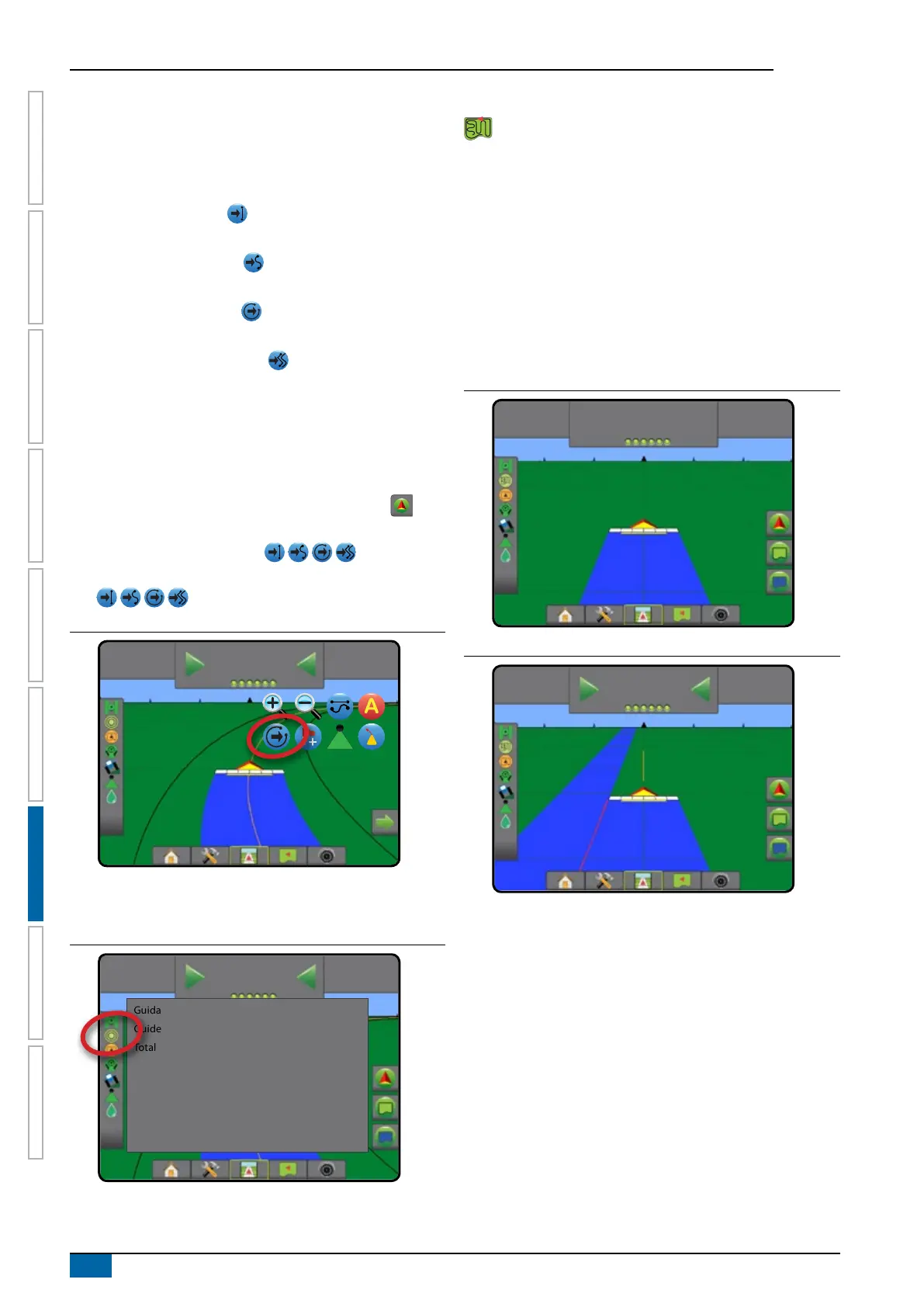
2. Press NEXT GUIDELINE icon .
Toggle between all guidelines by pressing the NEXT GUIDELINE
icon again.
Figure 7-14: Next guideline
-13
7.2
km/h
0.0
To view which guideline is active, press the Guidance mode icon
on the Status bar.
Figure 7-15: View which guideline is active
-13
7.2
km/h
0.0
Guidance pattern: Circle pivot guidance
Guideline name: Stream Edge
Total number of guidelines: 4
Last pass guidelines
Last pass guidance offers true last-pass navigation. The
console will automatically detect the nearest applied area
and establish parallel guideline based on that area.
NOTE: Last pass guidance may not be available depending on
assisted/automatic steering system installed.
To activate Last pass guidelines:
1. Drive to a desired location to apply the rst pass.
2. Travel next to the applied area.
3. The console will begin providing navigation information.
NOTE: If a boundary is established but no application occurred
during the boundary process, guidance will not initiate.
Figure 7-16: Apply first pass
15:22
7.2
km/h
Figure 7-17: Follow guidance
16:16
7.2
km/h
0.0



 To Next Page