56
www.teejet.com
MATRIX
®
Pro 570GS
•
MATRIX
®
Pro 840GS
HOME SETUP GUIDANCEFULL SCREENINTRODUCTION GNSS RATE CONTROL APPENDIXIMPLEMENT
Nozzle selection / current nozzle
To establish the nozzle presets and current nozzle, see "Nozzle
Selection" in this chapter.
Input/output module pressure sensor
When a Pressure sensor interface kit is present, Pressure sensor
options are used to enter the sensor manufacture's maximum
pressure rating and set high and low user determined pressure
alarms.
NOTE: For more information, see "Sensors" in the Setup chapter
of this manual.
Operation
Status bar
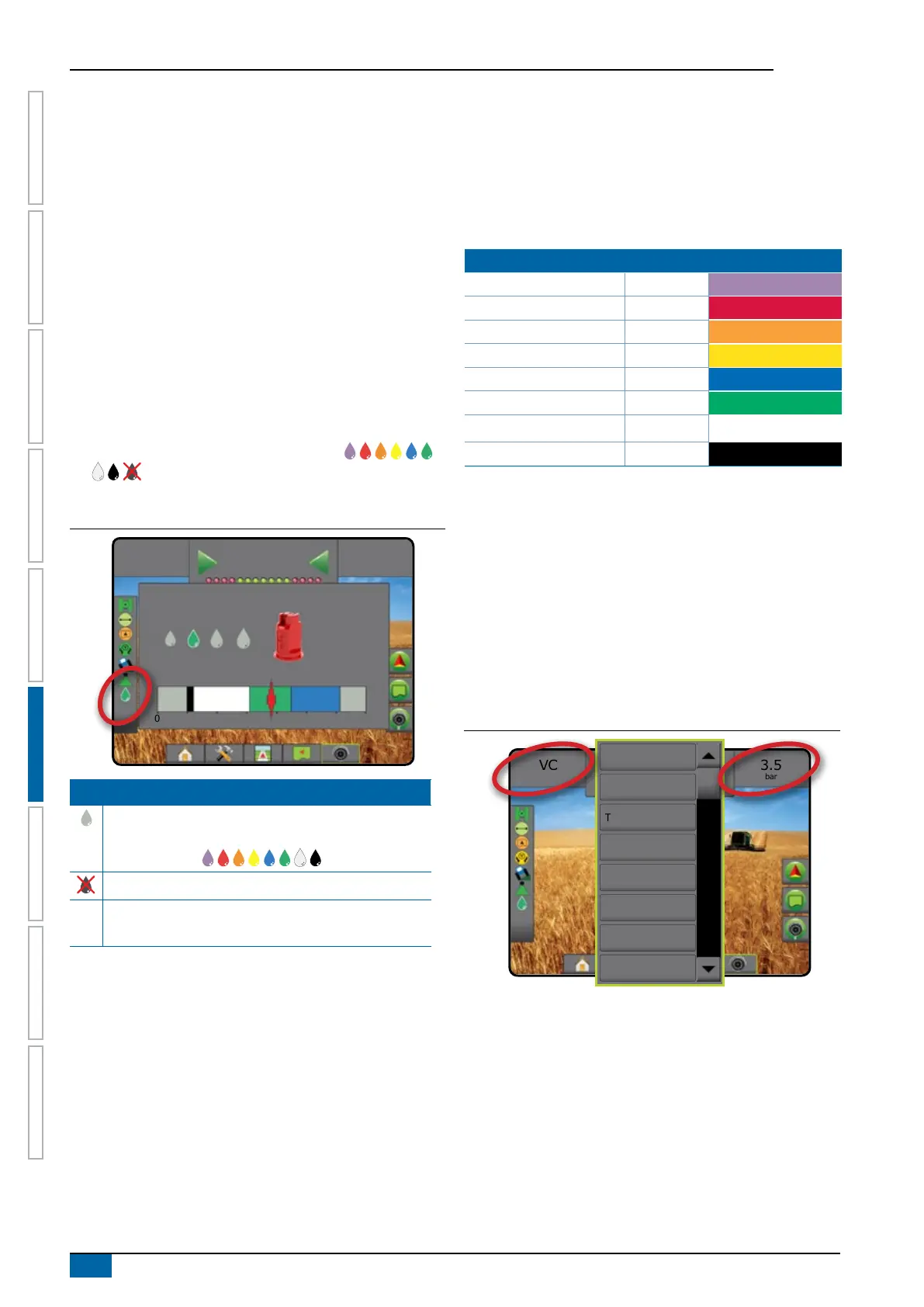
Droplet/Pressure status displays information regarding the current
status of the droplet size and system pressure.
1. Press DROPLET/PRESSURE STATUS icon
.
2. Press the screen anywhere to return to the guidance screen.
Figure 6-35: Droplet/pressure status
VC
3.5
bar
Mark A
AIXR TeeJet® AIXR11004
Very coarse
0 1 2 3 4 5 6 bar
3.5
bar
Droplet/pressure status
Coloured = Engaged. The colour of the droplet is
directly associated with the current droplet size. Colour
options include:
Crossed out = Disabled
No icon = no Pressure Sensor Interface Kit is installed
on system
Droplet size chart
When choosing a spray nozzle that produces droplet sizes in
one of the eight droplet size classication categories, always
remember that a single nozzle can produce different droplet size
classications at different pressures. A nozzle might produce
medium droplets at low pressures, while producing ne droplets as
pressure is increased.
Category Symbol Colour Code
Extremely ne XF Violet
Very ne VF Red
Fine F Orange
Medium M Yellow
Coarse C Blue
Very coarse VC Green
Extremely coarse XC White
Ultra coarse UC Black
Guidance bar
The Guidance bar keeps you informed of your choice of selectable
information including current system pressure and current droplet
size.
1. Press SELECTABLE INFORMATION box.
2. Select from:
►System pressure – displays the current system pressure
►Droplet size – displays the current nozzle droplet size
3. Press outside the selection box to return to the Guidance
screen.
Figure 6-36: Guidance bar selectable information
3.5
bar
VC
Mark A
Speed
Total applied area
Time
System pressure
Droplet size
Heading
Application time
Swath number



 To Next Page