64
www.teejet.com
MATRIX
®
Pro 570GS
•
MATRIX
®
Pro 840GS
HOME SETUPFULL SCREEN IMPLEMENTINTRODUCTION GNSS RATE CONTROL APPENDIXGUIDANCE
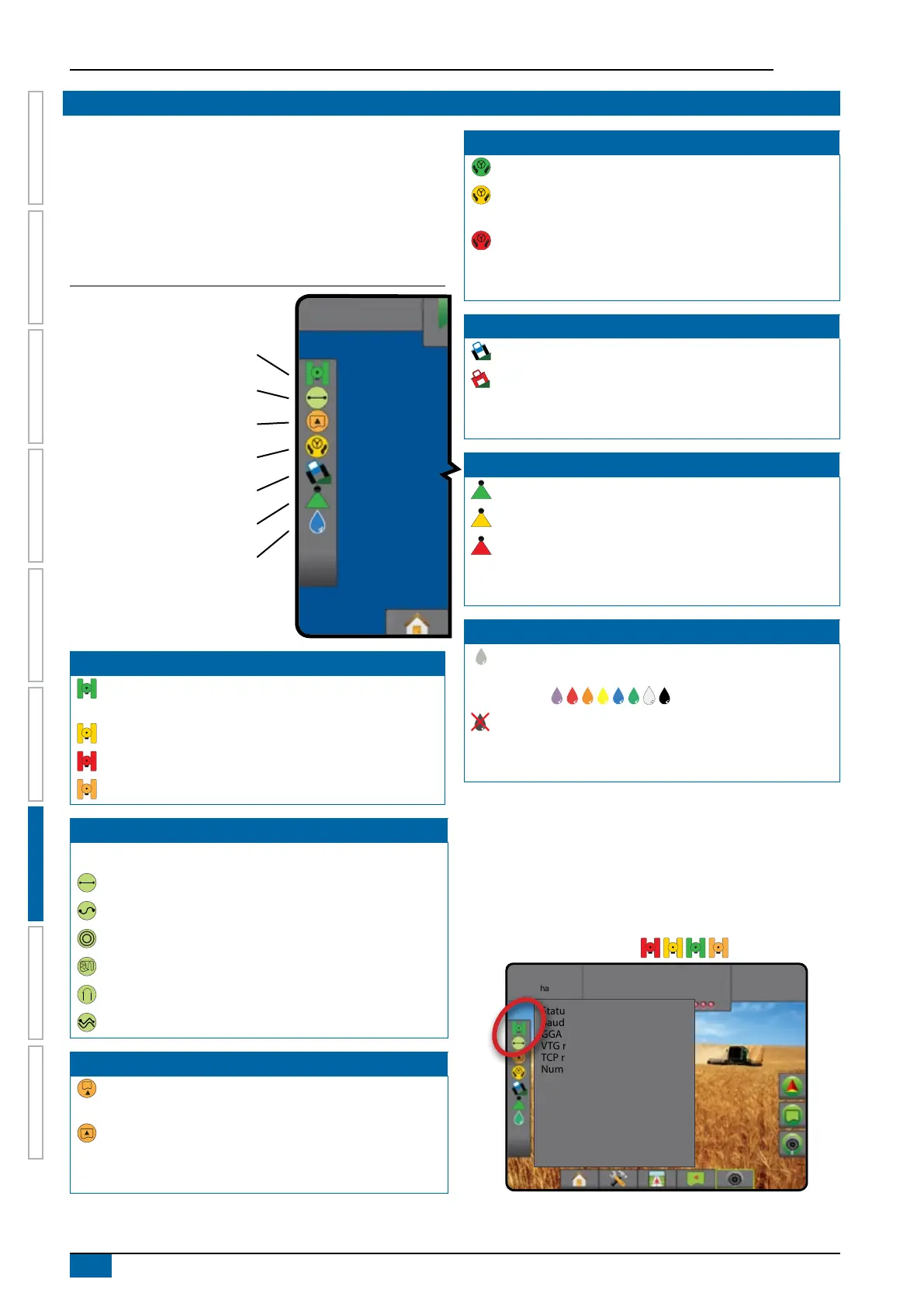
STATUS BAR
The status bar provides information on GNSS status, guidance
mode, boundary area, assisted/auto steering engagement, tilt
correction, implement control status, droplet/pressure status,
nozzle ow status, and rate control status.
When an icon is pressed, the related status information is
displayed.
Figure 7-5: Status bar
Tilt correction status
BoomPilot status
Droplet/Pressure status
GNSS status
Guidance mode
Exterior bounded area status
Assisted/auto steering status
GNSS Status
Green = GPS, GLONASS, or SBAS (with or without DGPS
Required)
Yellow = GPS only
Red = no GNSS
Orange = Glide/clearpath
Guidance mode
No icon = no guidance
Straight AB guidance
Curved AB guidance
Circle pivot guidance
Last pass guidance
NextRow guidance
Adaptive curve guidance
Exterior Bounded Area Status
Outside exterior boundary = travelling outside exterior
bounded area
Inside exterior boundary = travelling inside exterior
bounded area
No icon = no exterior boundary established
Assisted/Auto Steering Status
Green = engaged, actively steering
Yellow = enabled, all conditions have been met to allow for
assisted/auto steering
Red = disabled, all conditions have not been met to allow
for assisted/auto steering
No icon = no assisted/auto steering system installed
Tilt Correction Status
Coloured = engaged, actively applying tilt correction
Red = disabled
No icon = no tilt gyro module installed on system, or tilt is
associated with assisted/auto steering system
BoomPilot Status
Green = automatic
Yellow = all on
Red = off/manual
No icon = single section (no SmartCable or SDM installed
on system)
Droplet/Pressure Status
Coloured = engaged. The colour of the droplet is directly
associated with the current droplet size. Colour options
include: .
Crossed out = disabled
No icon = no Pressure Sensor Interface Kit installed, no
pressure sensor monitor on the DCM
Status/Information Screens
GNSS status
GNSS status displays information regarding current GNSS status,
including data rates, number of satellites in view, HDOP and PRN
status, receiver and version, satellite quality and ID, and UTM
zone.
1. Press GNSS STATUS icon .
27.00
ha
10.0
km/h
Mark A
Status: Good GNSS
Baud rate: 115200
GGA rate: 10 Hz
VTG rate: 10 Hz
TCP rate: 10 HZ
Number of satellites: 8
HDOP: 1
PRN: 138
GGA quality: 2
Receiver: 7
Receiver version: 010201
UTM zone: 11
Model: LXGMTS



 To Next Page