20
www.teejet.com
MATRIX
®
Pro 570GS
•
MATRIX
®
Pro 840GS
HOME GUIDANCEFULL SCREEN IMPLEMENTINTRODUCTION GNSS RATE CONTROL APPENDIXSETUP
Sensors
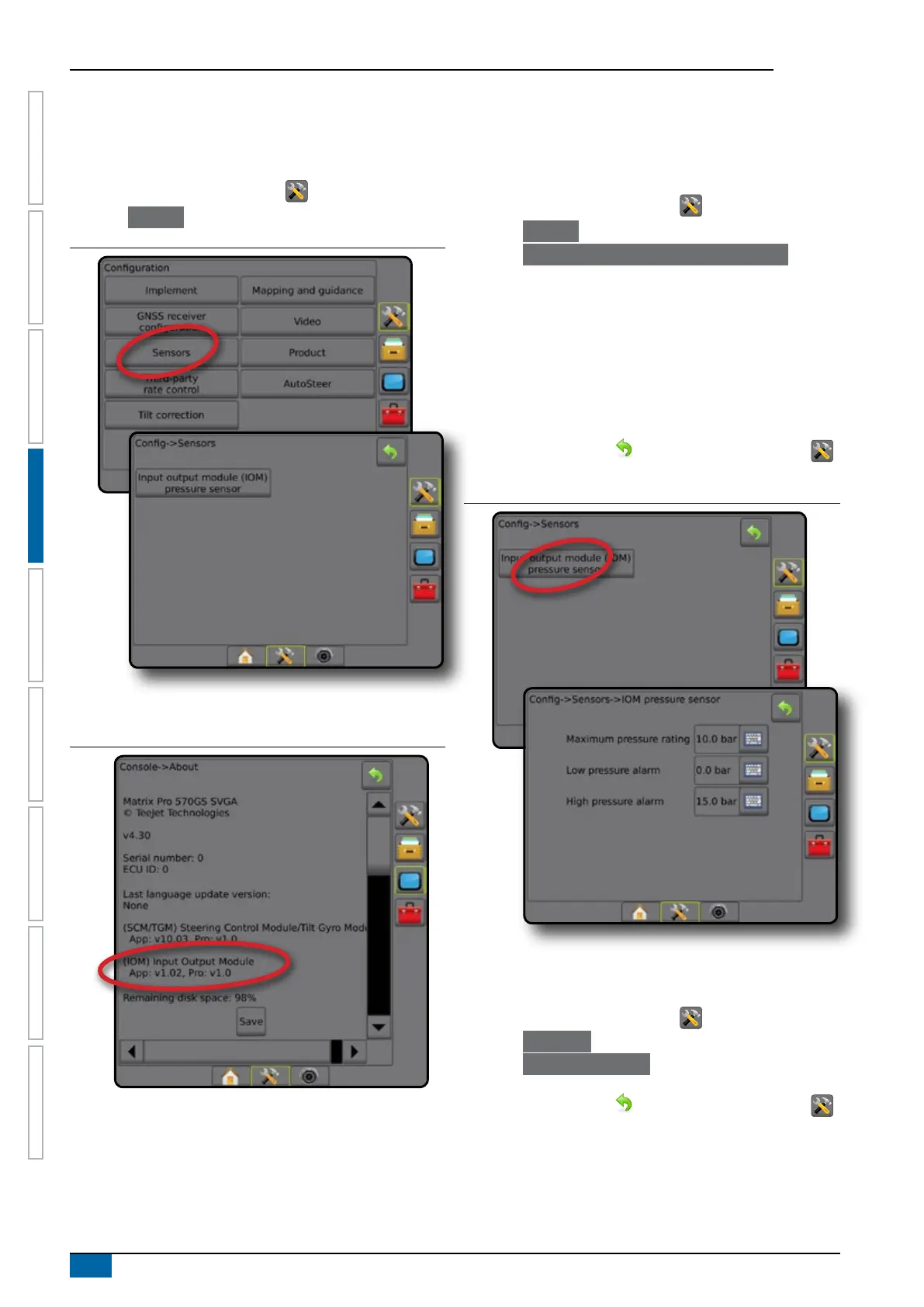
When a Pressure sensor interface kit (specically, an Input Output
Module (IOM)) is on the system, options to set up and congure
the sensor will be available.
1. Press CONFIGURATION side tab .
2. Press
Sensors .
Figure 4-17: Sensors
The Pressure sensor interface kit is recognized on the console
About screen as an input/output module (IOM).
Figure 4-18: Input/output Module
Sensors unavailable
If a Pressure sensor interface kit is not installed, setup options will
not be available.
Input/output module pressure sensor
When a Pressure sensor interface kit is present, Pressure sensor
options are used to enter the sensor manufacture's maximum
pressure rating and set high and low user determined pressure
alarms.
1. Press CONFIGURATION side tab .
2. Press Sensors .
3. Press Input Output Module (IOM) Pressure Sensor .
4. Select from:
►Maximum pressure rating – used to establish the maximum
pressure rating of the pressure sensor as recommended by
the manufacturer
►Low pressure alarm – used to enter the user determined
low pressure point at which the alarm will sound
►High pressure alarm – used to enter the user determined
high pressure point at which the alarm will sound
5. Press RETURN arrow or CONFIGURATION side tab
to return to the main Conguration screen.
Figure 4-19: Input/Output monitor pressure sensor options
Droplet size monitor
If a Pressure sensor interface kit is being used, the Droplet size
monitor options will be available.
1. Press CONFIGURATION side tab .
2. Press Implement .
3. Press Droplet Size Monitor .
4. Select if droplet size monitor is enabled or disabled.
5. Press RETURN arrow
or CONFIGURATION side tab
to return to the main Conguration screen.



 To Next Page