22
www.teejet.com
MATRIX
®
Pro 570GS
•
MATRIX
®
Pro 840GS
HOME GUIDANCEFULL SCREEN IMPLEMENTINTRODUCTION GNSS RATE CONTROL APPENDIXSETUP
AutoSteer
When a Steering control module (SCM or SCM Pro) is present,
Assisted/Auto Steering options will be available.
NOTE: For detailed setup instructions, refer to your specific
assisted/auto steering installation manual.
AutoSteer setup is used to enable/disable and calibrate assisted/
auto steering.
● FieldPilot [using a SCM] – used to establish valve setup
settings, steering settings, steering wheel and steering
angle sensor settings, and to perform valve tests or valve
diagnostics
● FieldPilot Pro / UniPilot Pro [using a SCM Pro] – used
to manage vehicle settings, calibrate sensors, select QI
values, as well as establish transport mode and service
mode
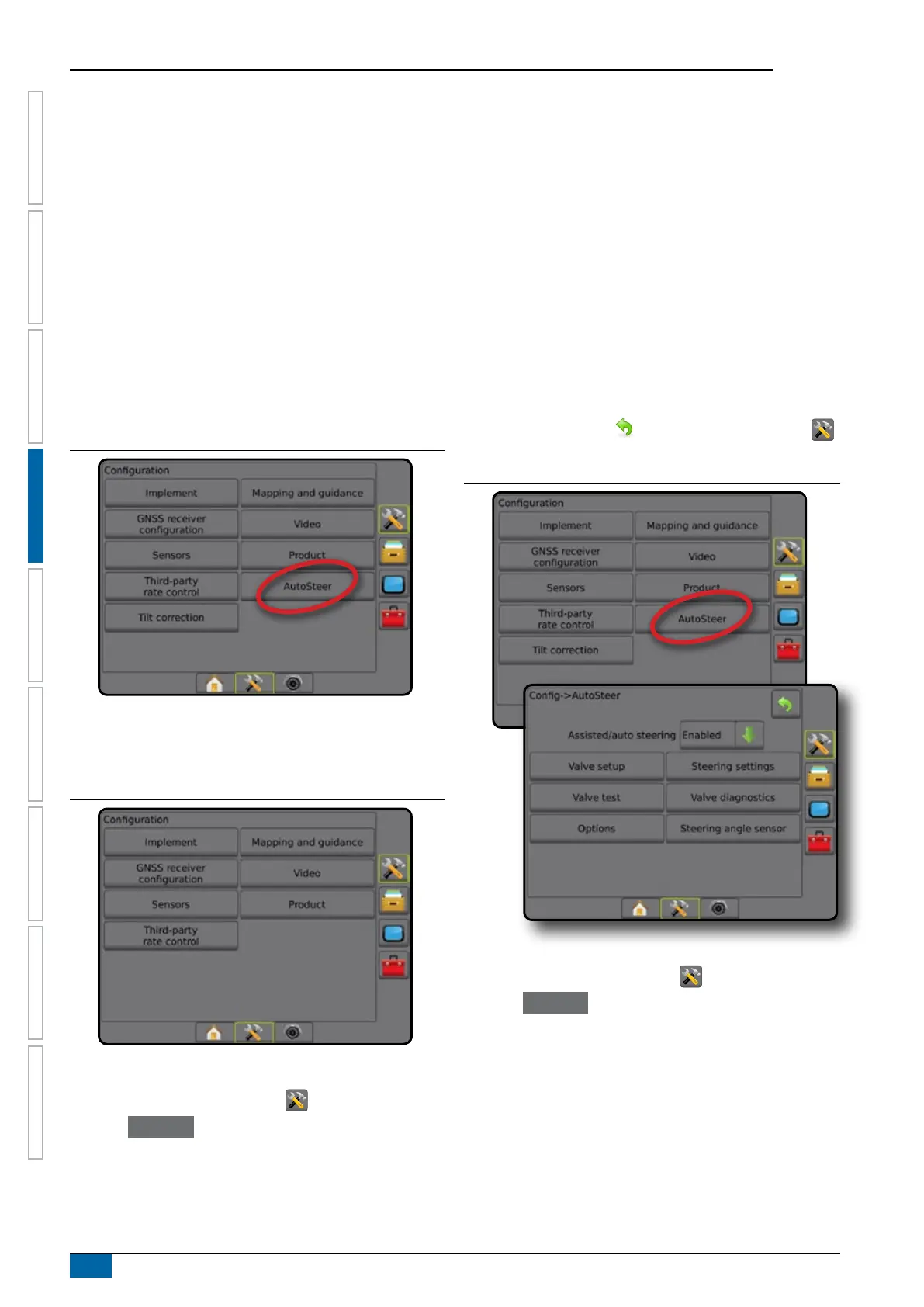
Figure 4-23: AutoSteer
Assisted/Auto steering unavailable
If an Assisted/auto steering system is not installed, setup options
will not be available.
Figure 4-24: Assisted/Auto steering not detected
FieldPilot [using a SCM]
1. Press CONFIGURATION side tab .
2. Press
AutoSteer .
3. Select if assisted/auto steering is enabled or disabled.
4. When enabled, select from:
►Valve setup – used to congure Valve type, Valve
frequency, Minimum duty cycle left/right and Maximum duty
cycle left/right
►Steering settings – used to establish Coarse Steering
Adjustment, Fine Steering Adjustment, Deadband, and
Lookahead
►Valve test – used to verify if steering is directed correctly
►Valve diagnostics – used to test the valves to see if they are
connected properly
►Options: Steering wheel sensor – used to select whether
the steering disengage sensor is magnetic or pressure
sensor based
►Steering angle sensor – used to establish and calibrate
the Steering angle sensor (SAS) as the primary feedback
sensor for auto steering
5. Press RETURN arrow or CONFIGURATION side tab
to return to the main Conguration screen.
Figure 4-25: AutoSteer
FieldPilot Pro / UniPilot Pro [using a SCM Pro]
1. Press CONFIGURATION side tab .
2. Press
AutoSteer .
3. Select from:
►Manage vehicles – allows the operator to select, edit, copy,
delete, or export/import vehicle proles as well as perform
a vehicle and sensor calibration for the current vehicle;
perform tilt calibration only (this option is available only after
the active vehicle has completed the initial calibration); and
make adjustments to steering response, line acquisition,
heading aggressiveness, reverse response and motor
aggressiveness (for UniPilot Pro).



 To Next Page