25
98-05273-EN R7
MATRIX
®
Pro 570GS
•
MATRIX
®
Pro840GS
HOMEGUIDANCE FULL SCREENIMPLEMENT INTRODUCTIONGNSSRATE CONTROLAPPENDIX SETUP
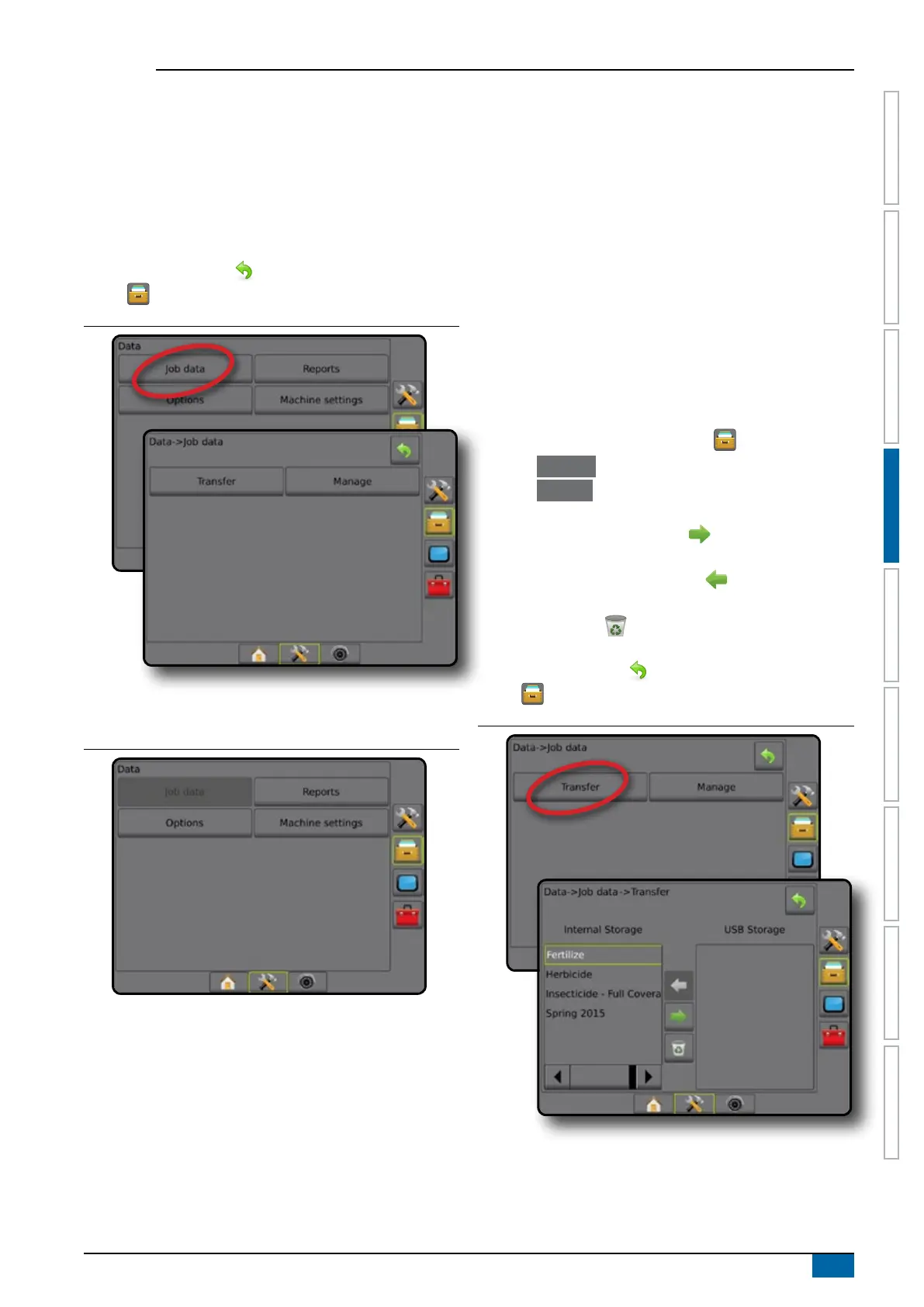
3. Select from:
►Transfer – when in advanced job mode, allows the transfer
of selected jobs to or from a USB drive, as well as deleting
jobs
►Manage – when in advanced job mode, allows the creation
of a new empty job, copying of a selected job's Guidelines,
Boundaries, Applied Data, Prescription Map and/or
polygons to a new job, as well as deleting a selected job
4. Press RETURN arrow or DATA MANAGEMENT side
tab to return to the main Data Management screen.
Figure 4-29: Job data options
Job data unavailable
When in simple job mode, job data options will not be available.
Figure 4-30: Job data unavailable
Transfer
When in advanced job mode, the job data transfer screen
allows the transfer of selected jobs to or from a USB drive, as
well as deleting jobs.
Jobs transferred to a USB storage device can be opened and
updated using Fieldware Link. In Fieldware Link a user can input
client, farm and eld data as well as copy/edit jobs for reuse of
boundaries and guidelines. From Fieldware Link, jobs can be
ported back to a USB storage device to be moved back onto the
console internal storage for use.
NOTE: When a job is active/started, Transfer options are not
available for selection. Stop the current job to enable
the function.
Jobs transferred to a storage device are removed from the
console and are no longer available for use.
1. Press DATA MANAGEMENT side tab .
2. Press Job Data .
3. Press Transfer .
4. Select from:
►Move job data to USB storage – used to move job data
from internal storage to USB storage
►Move job data to Internal storage
– used to move job
data from USB storage to internal storage
►Delete job data – used to delete job data from internal
storage
5. Press RETURN arrow
or DATA MANAGEMENT side
tab to return to the main Data Management screen.
Figure 4-31: Job data – transfer



 To Next Page