57
98-05273-EN R7
MATRIX
®
Pro 570GS
•
MATRIX
®
Pro840GS
HOMESETUPGUIDANCE FULL SCREEN INTRODUCTIONGNSSRATE CONTROLAPPENDIX IMPLEMENT
BOOMPILOT SECTION CONTROL
Depending on if there is a section control system present and,
when present, what kind of section control is being used as
well as what options are enabled, there are multiple options for
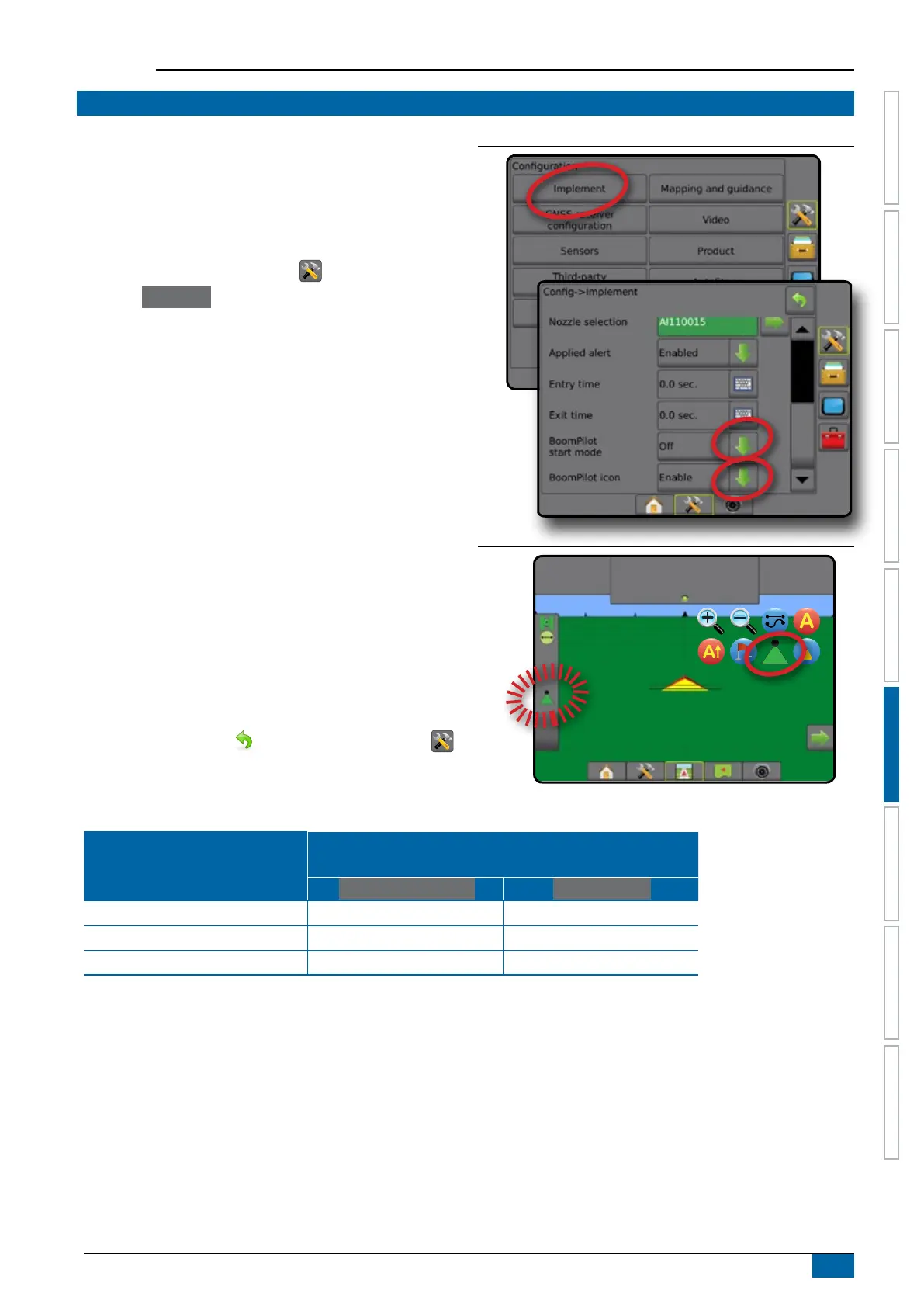
BoomPilot section control. The settings of BoomPilot Start Mode
and BoomPilot Icon change how section control is handled on the
guidance screens.
1. Press CONFIGURATION side tab .
2. Press
Implement .
3. Select from:
►BoomPilot start mode – used to establish if automatic
BoomPilot activation is controlled automatically by speed
or manually using the BoomPilot icon in the navigation and
guidance options on the guidance screens
◄Automatic – automatic section control will be controlled
by speed
◄Off – automatic section control is disabled and can
be manually controlled by the BoomPilot icon in the
navigation and guidance options on the guidance
screens
►BoomPilot icon – used to establish if the BoomPilot icon
is available in the navigation and guidance options on the
guidance screens for manually controlling BoomPilot
◄Enable – BoomPilot icon will be available in the
navigation and guidance options on the guidance
screens to control automatic section control
◄Disable – BoomPilot icon will not be available in the
navigation and guidance options
4. Press RETURN arrow or CONFIGURATION side tab
to return to the main Conguration screen.
Figure 6-37: BoomPilot options
Figure 6-38: BoomPilot icon on Guidance screen
0.0
km/h
0.00
ha
Mark A
Availability with different hardware systems
Hardware on System
Available on Conguration-> Implement menu
and works when on guidance screens
BoomPilot start mode BoomPilot icon
SDM/SFM Only (no TeeJet ASB SwitchBox) Yes Yes
SDM + TeeJet ASB Switchbox No No
SFM + ISM Yes Yes



 To Next Page