manner with the base 10 in the start and stop ranges
Note: The log mode is only valid in the case of sweeping frequency.
3.7.8 Max-Min
Set ON or OFF:
Display the maximum and minimum values of the
parameter curve results
Do not display the maximum and minimum values of the
parameter curve results
3.7.9 Ordinate range setting
The ordinate range is used to limit the drawing range of trace sweep.
The instrument defaults to automatic coordinates. Only when the user locks the coordinates, this
item needs to be set manually. Similarly, the maximum value should be greater than the minimum
value, otherwise an error message will be displayed.
3.8 User Correction
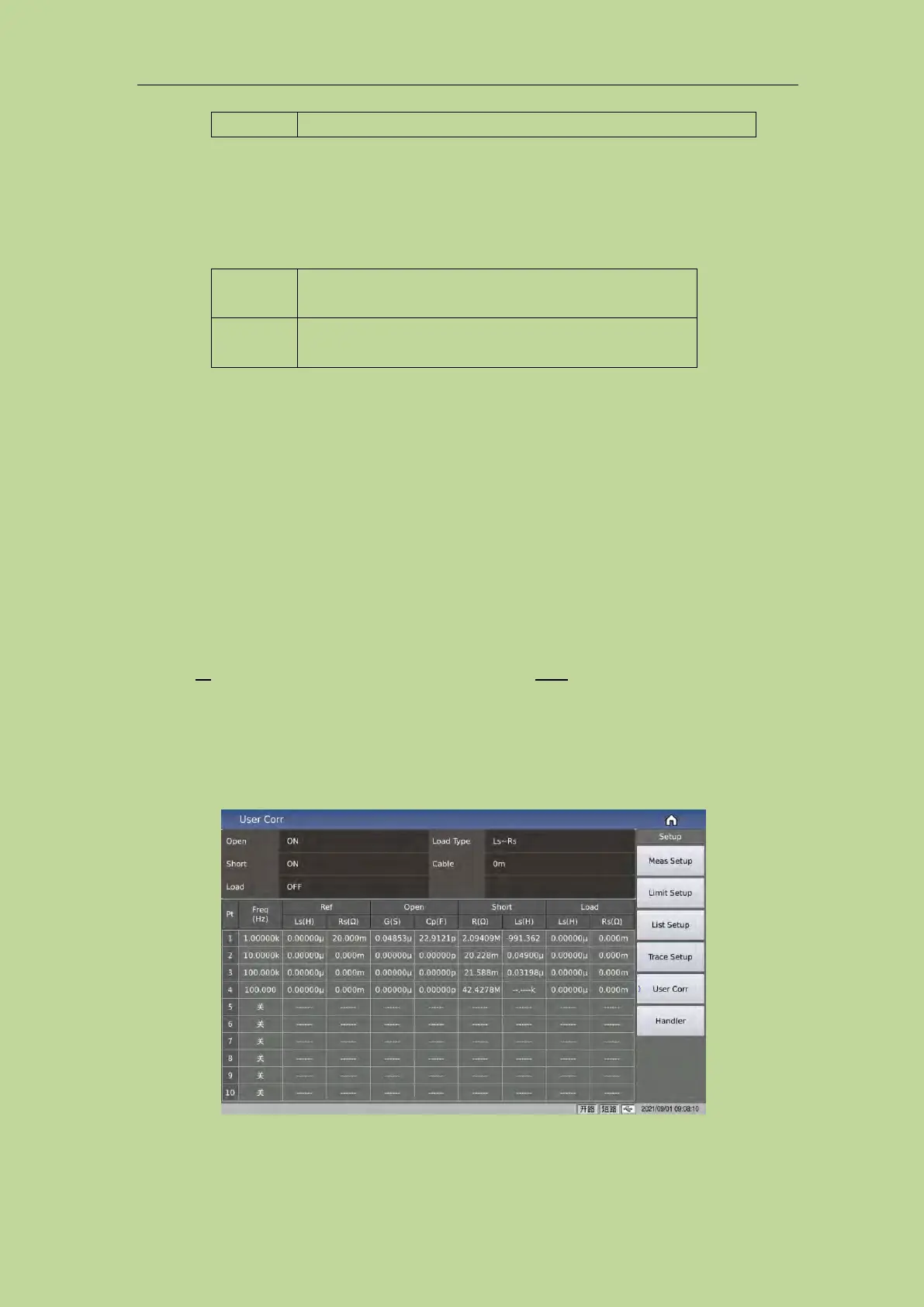
10 user Pt are provided on the <User Corr> page. In the Freq domain, you can set whether the
calibration data of the corresponding point is turned on. After turning on, manually enter the
frequency corresponding to the calibration, and then use the soft key Open to execute open
correction, short correction, and load correction for the set frequency.
Press the menu key [Setup], and press the soft key User Corr to enter the <User Corr> page.
As shown in Figure 3-8-1:
Figure 3-8-1 User correction
The open, short and load correction functions on the <User Corr> page can be used to eliminate
distributed capacitance, parasitic impedance and other measurement errors.



 To Next Page