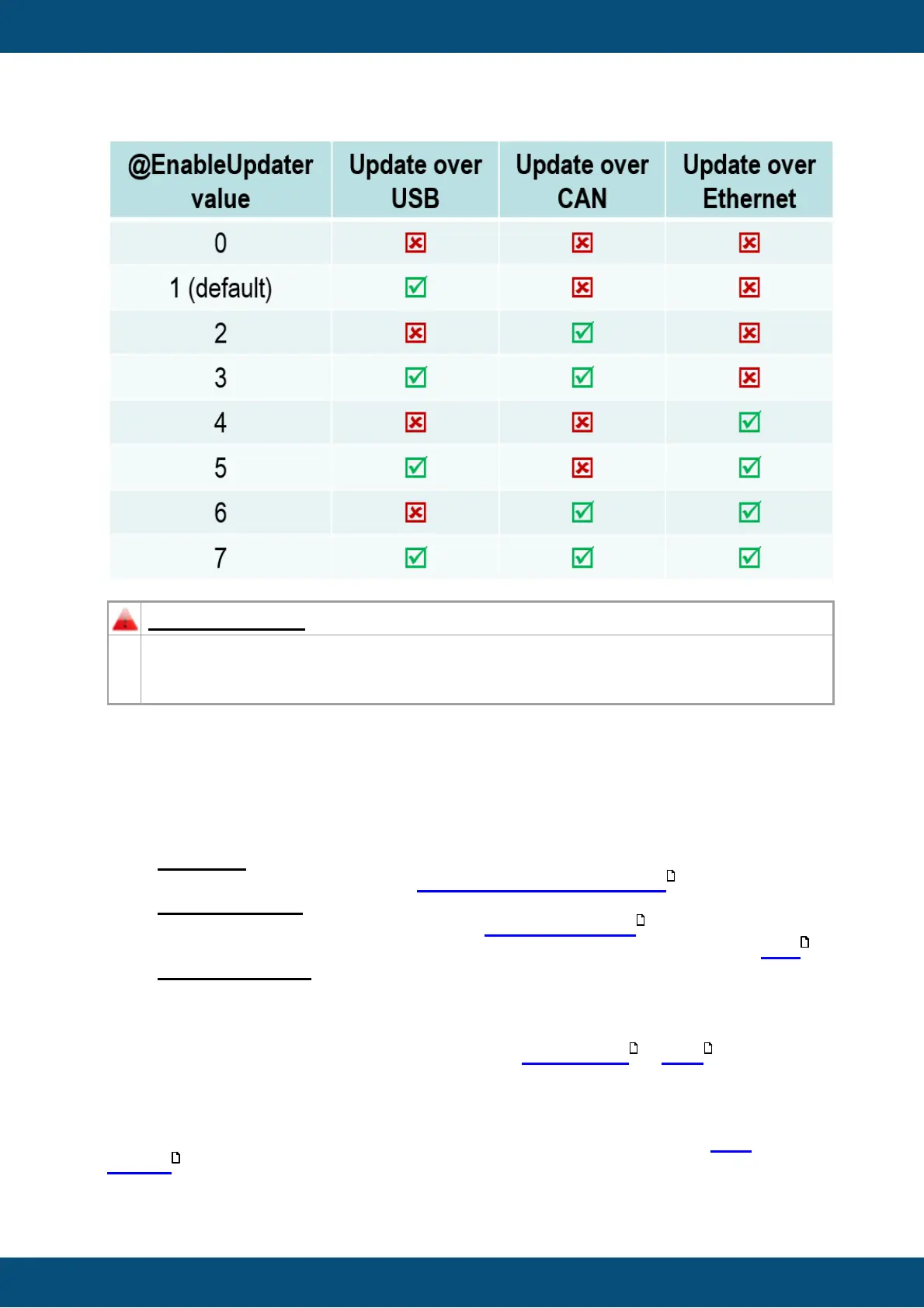
Please be aware, if you set the pre-defined variable to '0x0', the Updater on the
device is disabled and NO project update is possible anymore. Please always add a
possibility to change the value of the pre-defined variable in your project.
The CAN update is disabled by default on the device. This is important to protect the CAN
network and to avoid undesired CAN traffic.
If you want to activate update over CAN please follow these steps:
1. Common:
a. Please first read the chapter: Disclaimer about using CAN
2. Project settings:
a. If CAN shall be activated, the variable @EnableUpdater must be set properly
in the project. The value must be set to 0x2 or 0x3 (Please have a look here )
3. Updater settings:
You need to enable the update by changing the @EnableUpdater variable. If the
existing project on the device allows such a setting, you can make it on the device.
Otherwise:
a. The first project update has to be done via USB update . Here you have to
check or edit the CAN settings you want to use.
b. Transfer project to USB drive
c. Update device via USB.
Now the ClientUpdater on the device should be enabled for CAN and the CAN
Update mode can be used for future project updates.



 To Next Page