Technical Description TITANUS MICRO·SENS
®
2 – 12 Data: 01/09 MS_A_02-a-en-e
2.2.4 Diagnostics tool
TITANUS
®
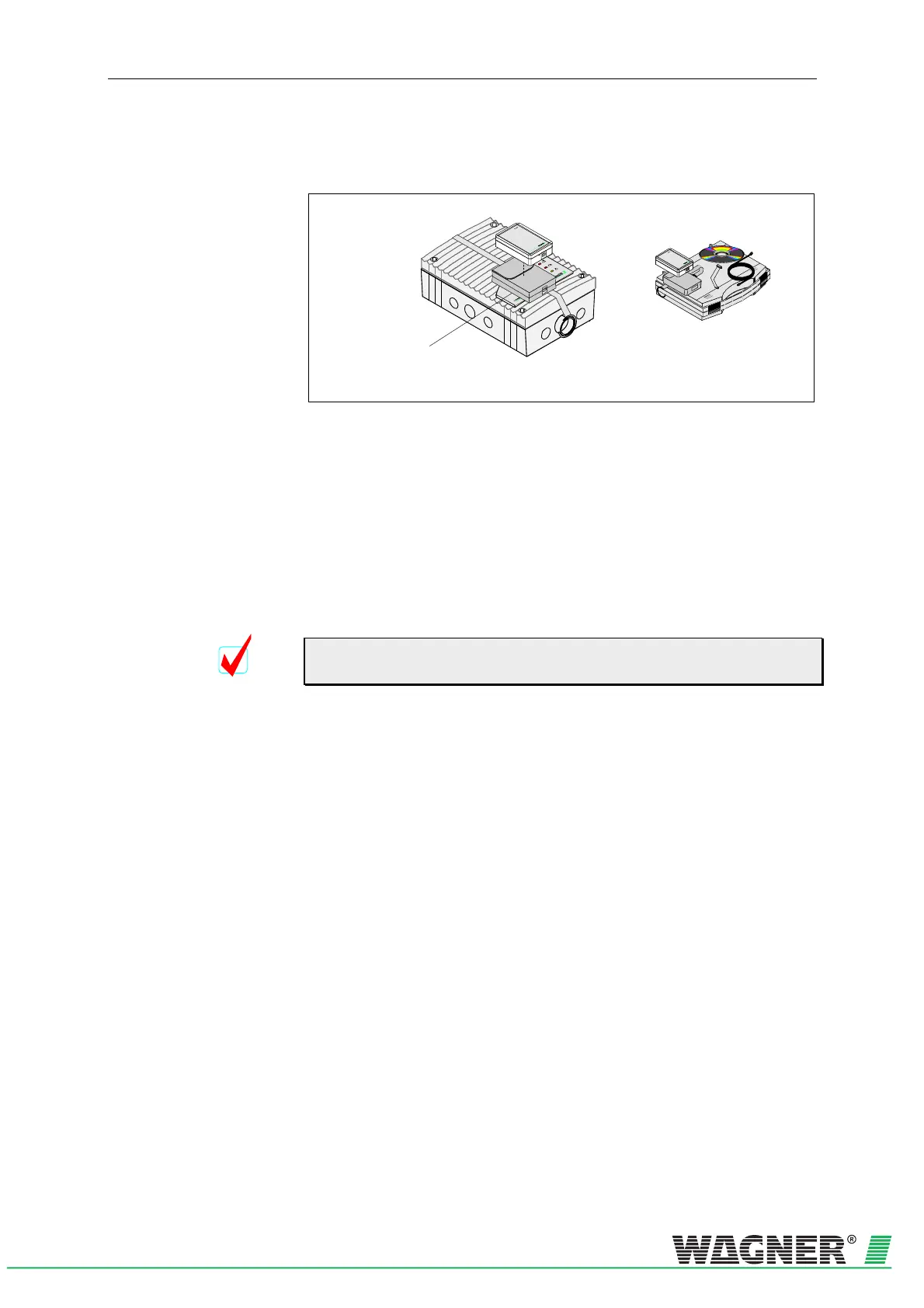
Diagnostics tool
Infrared interface for
“DIAG 3” connection
Fig. 2.14: Diagnostics tool for inputting and reading off device data
Using the DIAG 3 diagnosis tool, the device configuration for the
TITANUS MICRO·SENS
®
can be changed during commissioning. For
maintenance and servicing, there is the option with the diagnosis soft-
ware to display the stored and current device status and error messages
from the TITANUS MICRO·SENS
®
on a PC or laptop. For the data trans-
fer to the diagnostics equipment the infrared interface of the TITANUS
MICRO· SENS
®
is used. There is a USB cable for transferring data from
the diagnostics equipment to the PC/laptop connection.
It is recommended that the commissioning status are read out, checked
and recorded.
Diagnosis messages can be deleted at any time using the DIAG 3 diag-
nosis tool. If they are not deleted, the messages are stored in the
TITANUS MICRO·SENS
®
for 72 hours. This allows for evaluation of
short, sporadic faults (e.g. in changed operating conditions).
TIP


 To Next Page