Version 16.10 AF-6600 AF-5000 Series Install Manual 165
Admin Settings Menu
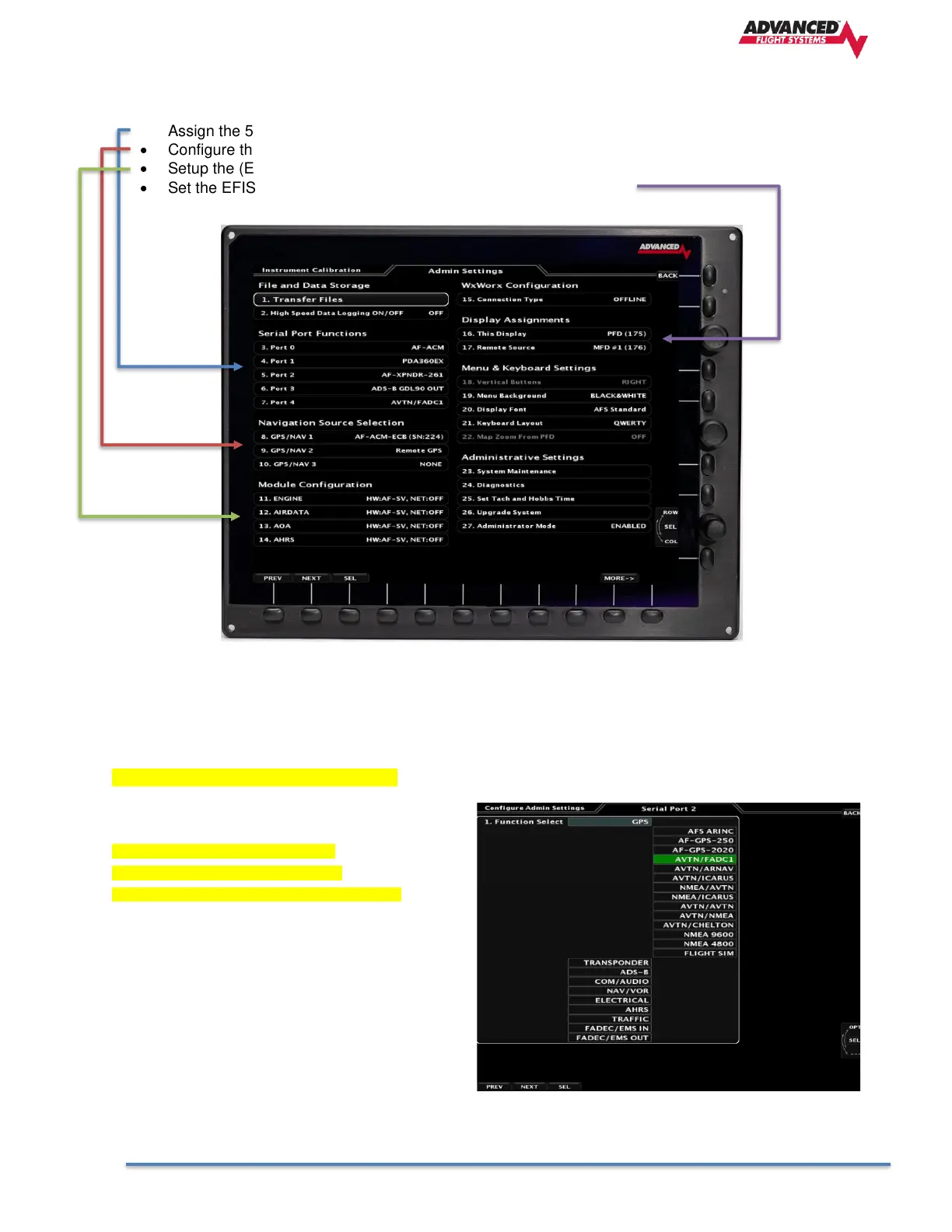
The Admin Settings menu is where you:
• Assign the 5 EFIS RS-232 Serial Ports
• Configure the Navigational Sources
• Setup the (Engine, AIRDATA,AOA, AHRS) Modules
• Set the EFIS Ethernet IP Address (PFD:175, MFD:176, MFD2:177)
EFIS RS-232 Serial Ports
Using your system block diagram (schematic) that shows which device is wired to each EFIS serial port
select the correct data format. Use the lower knob to select the desired serial port and press in to display the
available options. The serial port settings are grouped by (GPS, Transponder, ADS-B, COM/AUDIO,
NAV/VOR, Electrical, AHRS, Traffic, FADEC/EMS In, FADEC/EMS Out)
Most commonly used options highlighted.
GPS Options
AFS ARINC Legacy AFS ARINC Adaptor
AF-GPS-250 Dynon GPS 250
AF-GPS-2020 Dynon GPS 2020
AVTN/FADC1 Avidyne IFD or Garmin GTN
AVTN/ARNAV Aviation Data in, EI Fuel data out
AVTN/ICARUS Aviation Data in, ICARUS data out
NMEA/AVTN NMEA Data in, Aviation data out
NMEA/ICARUS NMEA Data in, ICARUS data out
AVTN/AVTN Aviation Data in, Aviation data out
AVTN/NMEA Aviation Data in, NMEA data out
AVTN/CHELTON Aviation Data in, Chelton out
NMEA 9600 NMEA 9600 Data in
NMEA 4800 NMEA 4800 Data in
FLIGHT SIM Data from XPlane or Microsoft Flight Sym



 To Next Page