Version 16.10 AF-6600 AF-5000 Series Install Manual 201
Fuel Tank Level Gauges
The AF-6600 / AF-5000 EFIS supports up to 4 fuel tank gauges. The aircraft fuel tanks should be
connected like this:
• Fuel Tank 1 Left Main Tank
• Fuel Tank 2 Right Main Tank
• Fuel Tank 3 Left Aux Tank
• Fuel Tank 4 Right Aux Tank
If you have AUX tanks without sending units they should be configured with the instrument turned
OFF and the Tank Size configured. This will enable the Fuel Computer to properly track the amount
of fuel used.
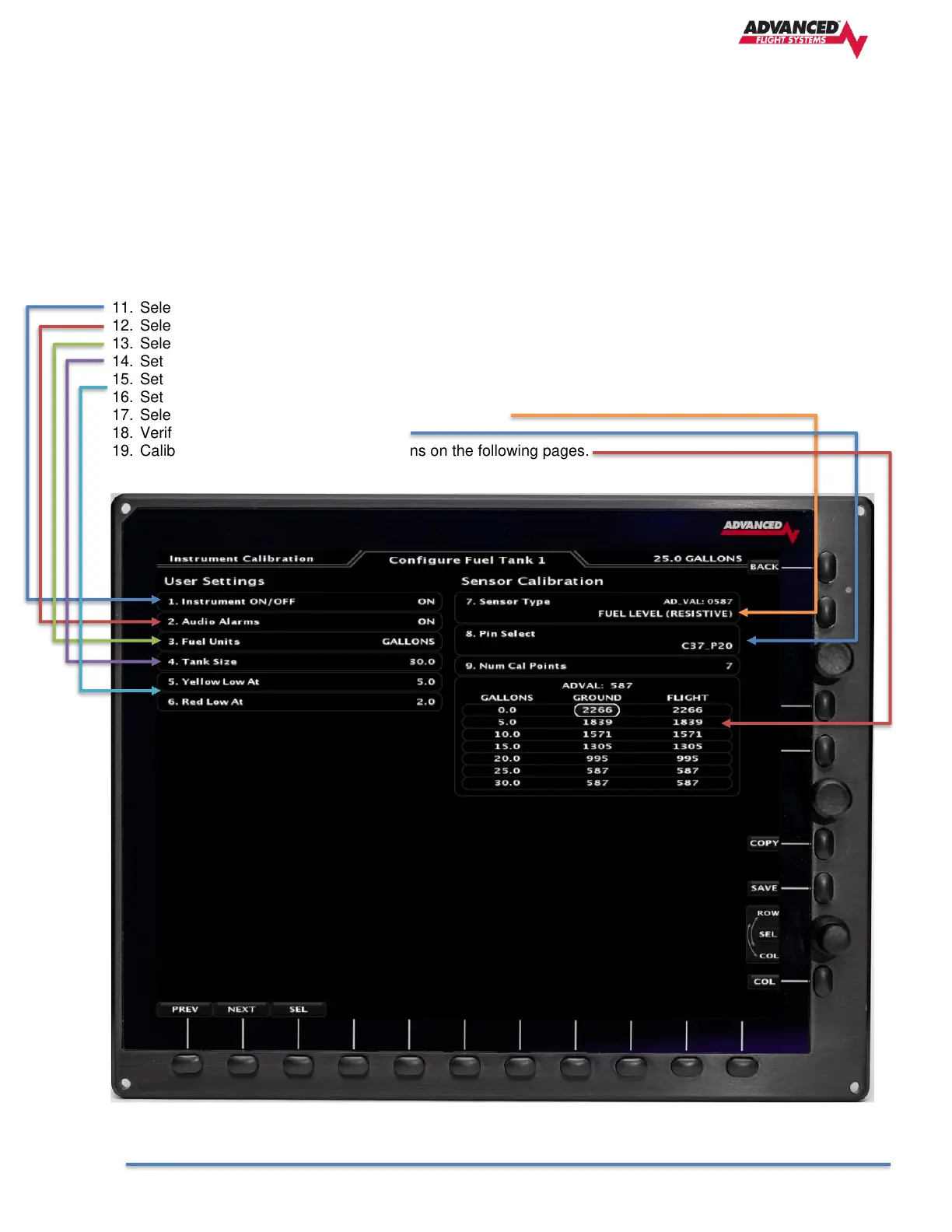
11. Select Instrument ON or OFF All the unused fuel tank gauges should be configured to OFF
12. Select Audio Alarms ON
13. Select Tank Units (Gallons or Liters)
14. Set Tank Size
15. Set Yellow Low value
16. Set Red Low value
17. Select tank sending unit type (Float or Capacitance)
18. Verify correct SV-EMS pin is selected.
19. Calibrate Fuel Tank using the instructions on the following pages.



 To Next Page