Version 16.10 AF-6600 AF-5000 Series Install Manual 90
Garmin 430W/530W
See Appendix M: EFIS/ARINC/AP Troubleshooting Guide
The 430W/530W should be wired for RS-232 Aviation format to serial port #1 along with their ARINC lines
connected to the AF-ARINC module. See APPENDIX M, drawing number:
53620WD
EFIS Main Cable 430W RS-232 Connection
Pin 10 TXD --------------- 4001-57 RX
Pin 22 RXD --------------- 4001-56 TX
The 430W/530W needs the following software configuration settings:
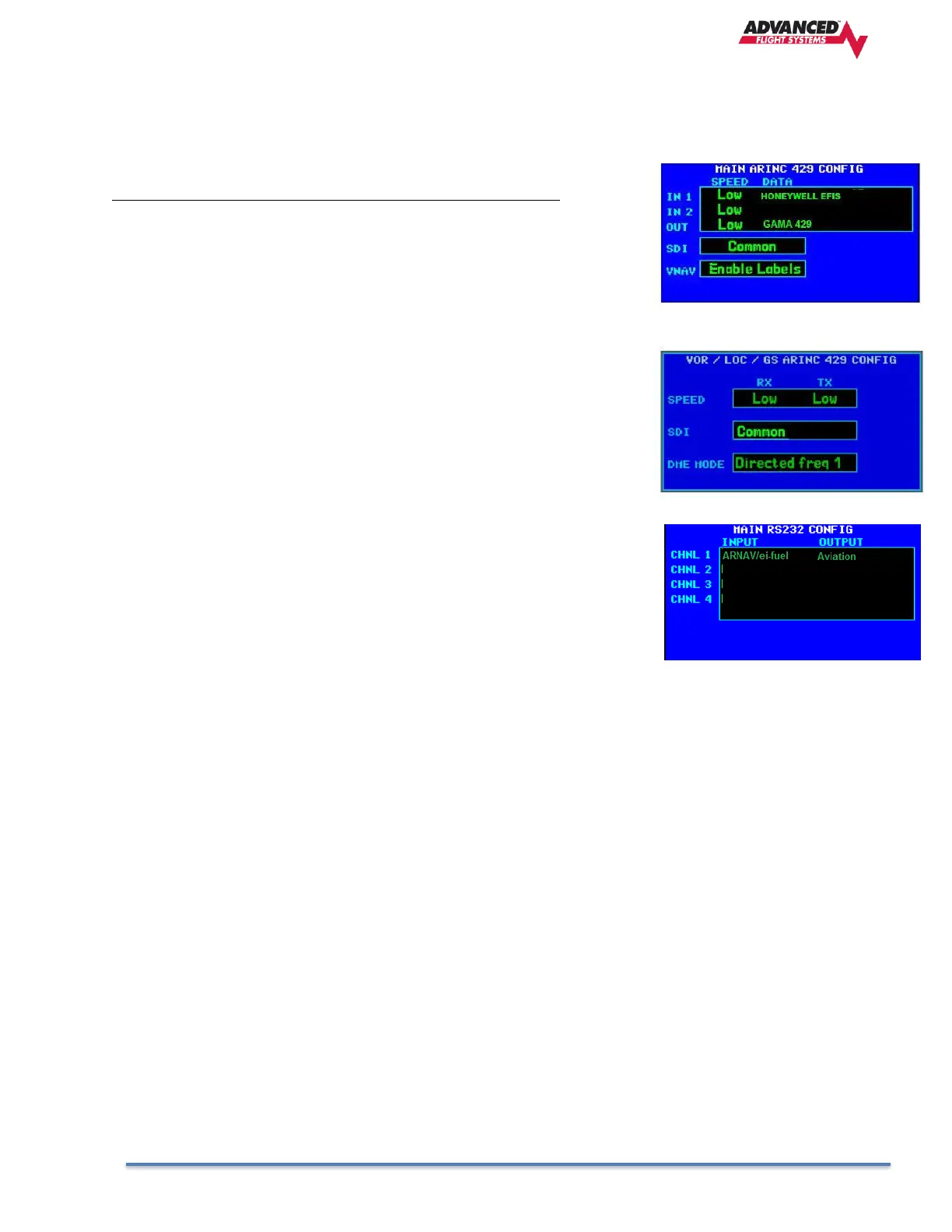
1. MAIN ARINC 429 CONFIG
Power up the 430W while holding the ENTER button and press
[ENT] -> [ENT] to get to the Main ARINC 429 Config page.
Configure the 430W using these settings. OUT must be set to
GAMA 429.
2. VOR / LOC / GS ARINC 429 CONFIG
Turn the inside right knob around 14 clicks to configure the
VOR/LOC/GS ARINC 429 to the following settings.
3. Serial Ports
Select ARNAV/ei-fuel for the input and Aviation as the output.
If you have serial port #2 wired to the Transponder the output
should be set to ADSB+



 To Next Page