Version 16.10 AF-6600 AF-5000 Series Install Manual 223
Switch Inputs
Each EFIS screen has 3 hardware inputs that can be used to monitor an external switch. To activate the
hardware input the input pin must be pulled to ground.
The three input pins are located on the EFIS MAIN D-SUB 25 Connector.
Input Pin
1 17
2 20
3 8
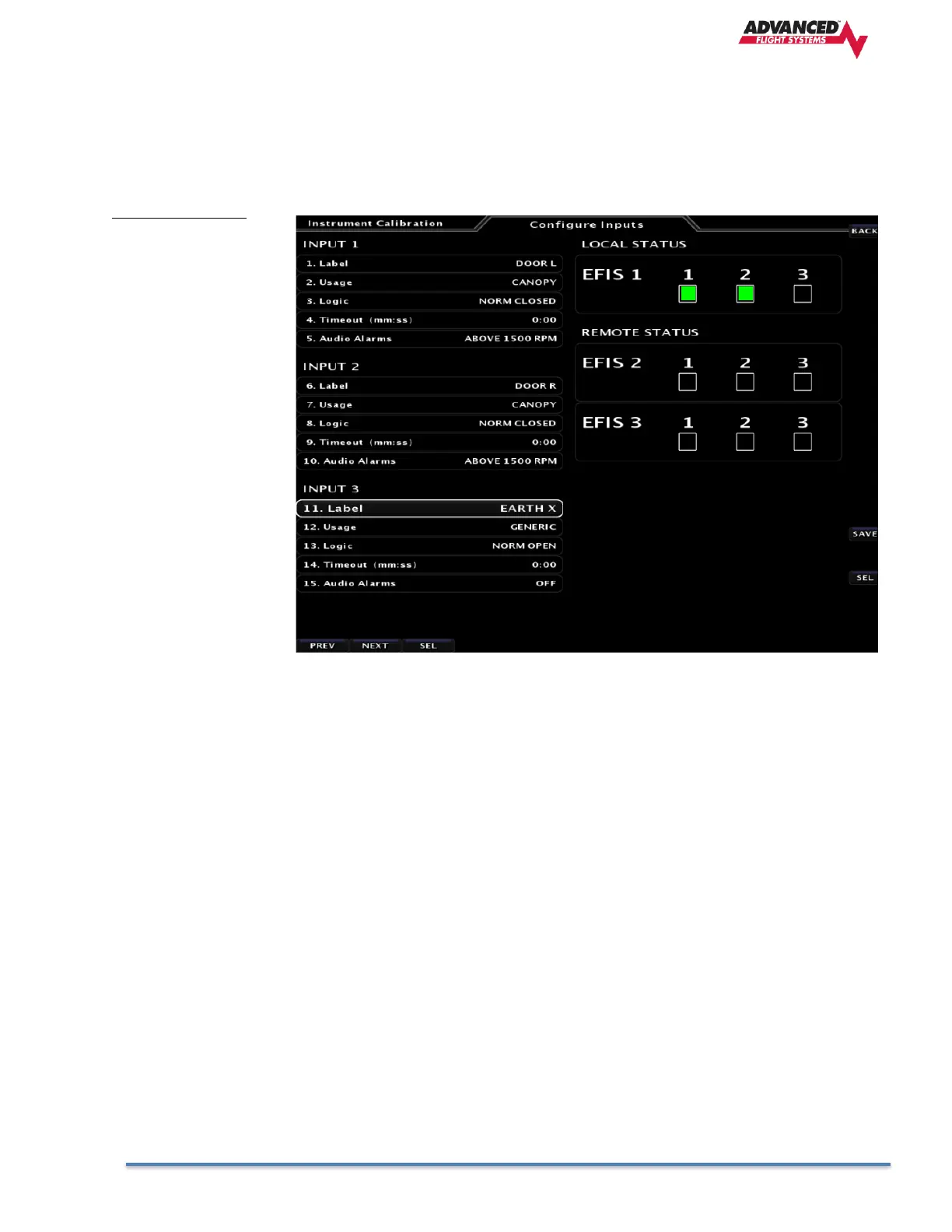
The Inputs will display the text on the EFIS Screen when an Input is either grounded or open. A normally
open or normally closed switch is selectable in the Inputs menu. You can test the inputs from the CAL >
Configure Inputs Menu. There is also a timer feature that will alarm after a set time is reached. If any input
other than FUEL TANK XFR is selected, the timer will zero after the input is disabled. In the case of a FUEL
TANK XFR input, the timer will only clear after a power cycle. This allows the pilot to have the total duration
of the fuel tank transfer for the entire flight (to allow for multiple tank transfers).
The example picture shows Input #1 connected to the Pilot Door with a limit switch to ground. Input
#2 is connected to the Copilot Door limit switch connected to ground. Input #3 is connected to the
monitor line of an EarthX Lithium battery.



 To Next Page