Version 16.10 AF-6600 AF-5000 Series Install Manual 260
APPENDIX Q: Verifying ADS-B Output Data
The Dynon/Trig remote Transponder will only output ADS-B data when the Transponder has a valid GPS position
signal. When the Transponder does not have a valid GPS position the EFIS Transponder status will show ALT and will
be sending only mode C data.
When the Transponder has a valid GPS position and the aircraft is on the ground the EFIS Transponder status should
show GND mode. When the Transponder is in GND mode it will be sending valid ADS-B data without Baro Pressure
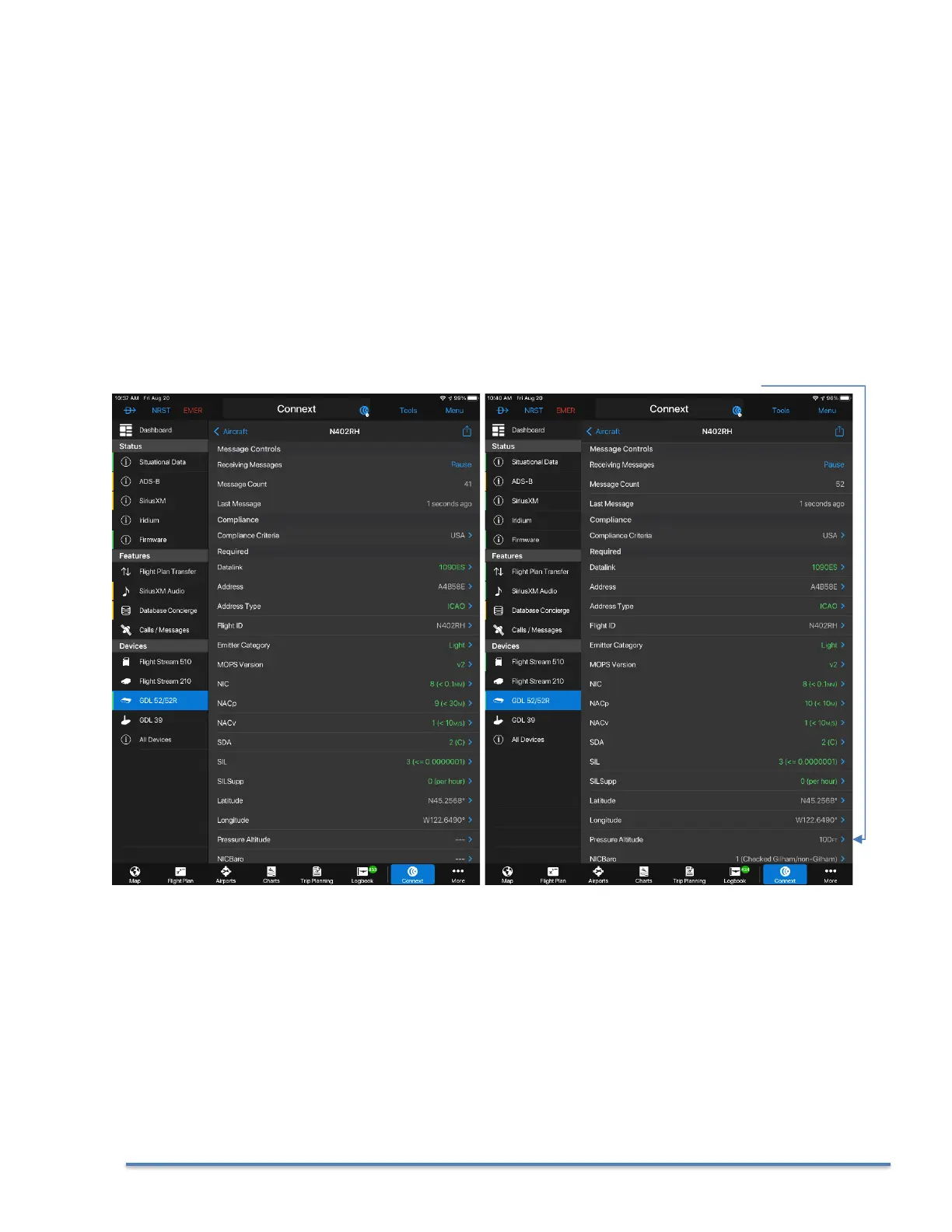
Altitude data. If you have access to a Garmin GDL portable ADS-B receiver and the Garmin Pilot AP you can verify the
aircraft’s data output.
You can force the Transponder to ALT mode on the ground by changing the ALT/GND switch setting to NONE in
the CAL > Transponder menu and pressing the ALT button on the normal EFIS Transponder menu.
Garmin Pilot Screen Captures with a GDL-52 Portable ADS-B receiver
Transponder in GND Mode Transponder in ALT Mode with valid GPS Data
Sending Baro Pressure Altitude data



 To Next Page