Version 16.10 AF-6600 AF-5000 Series Install Manual 20
2 Advanced SV-Network Planning
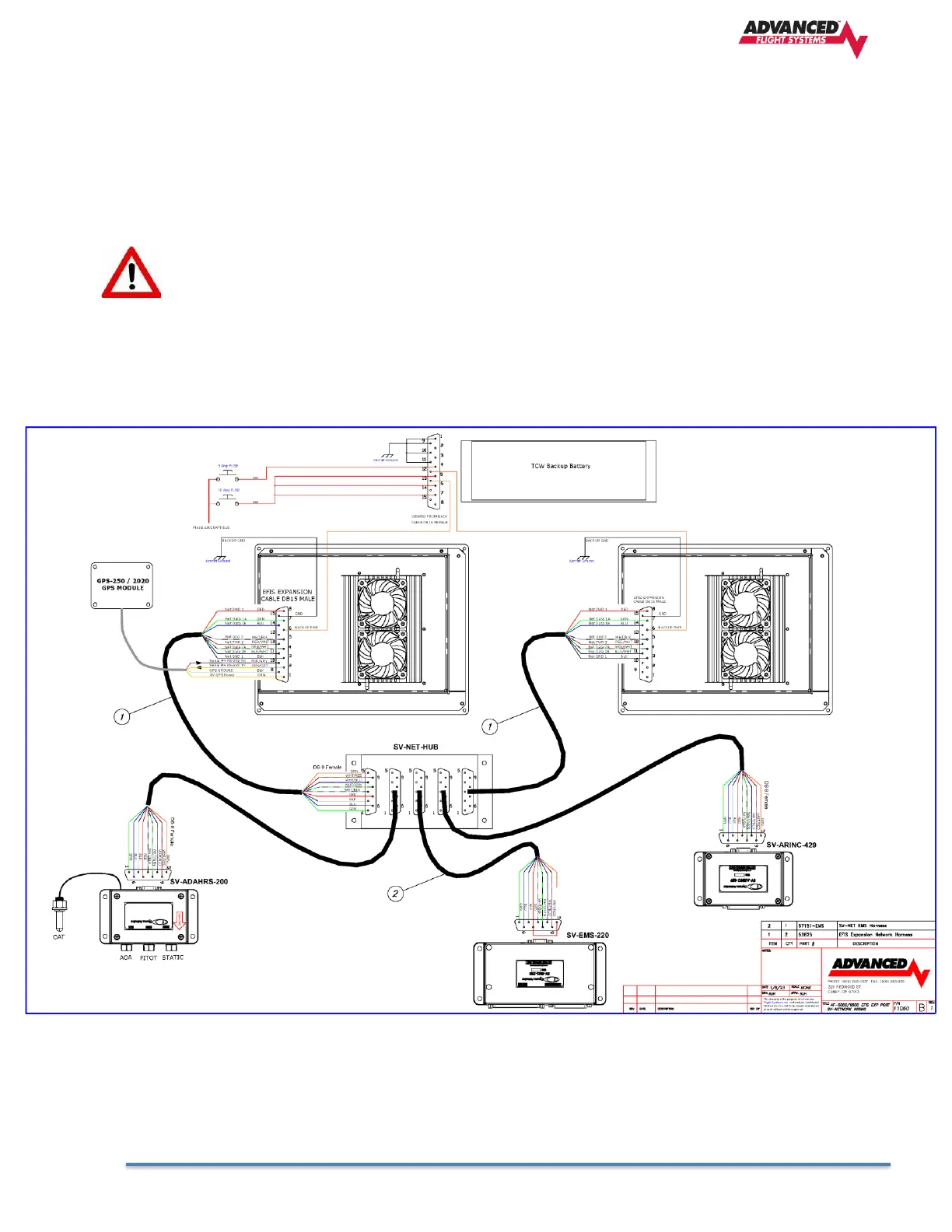
All of the AF-6600 or AF-5000 EFIS screens in the instrument panel should be connected to the SV-Network. The EFIS
screens SV-Network connection is made using pins in the EFIS Expansion DSUB-15 pin connector. If you are using
circuit breakers and not using the Advanced Control Module (ACM) you should us our expansion EFIS harness P/N:
53625 . The P/N: 53625 Harness converts the SV-Net pins in the EFIS Expansion connector to the standard SV-NET 9
pin male connector that will plug into a SV-NET 5 Port hub.
The EFIS Expansion 15 pin connector also contains the pins for RS-232 serial port #4 and the
backup battery power to the EFIS. The EFIS Expansion harness has male pins and live backup
+12V power when connected to the backup battery. You should be careful to not touch any of the
of the harness connector pins to anything grounded to the airframe. If the harness backup battery
power pin gets shorted to ground it will blow the fuse in the side of the TCW Backup Battery. The
best practice is to always disconnect the TCW Backup battery connection before connecting
the Expansion harness to the EFIS.
2.1 SV-Network Wiring to AF-6600 / AF-5000 EFIS without an ACM



 To Next Page