Version 16.10 AF-6600 AF-5000 Series Install Manual 220
Aileron Trim
The Aileron Trim display is designed to read trim servo position data from a trim position sensor wired to an
SV-EMS input or from an ACM/VPX unit. The EFIS Trim display can be configured to be always on the
EFIS or to only display when the trim servo is moving or 5 seconds after it has moved. When the EFIS is
wired to a Dynon SV-AP-PANEL the EFIS has the ability to control the Trim motor speed based on airspeed.
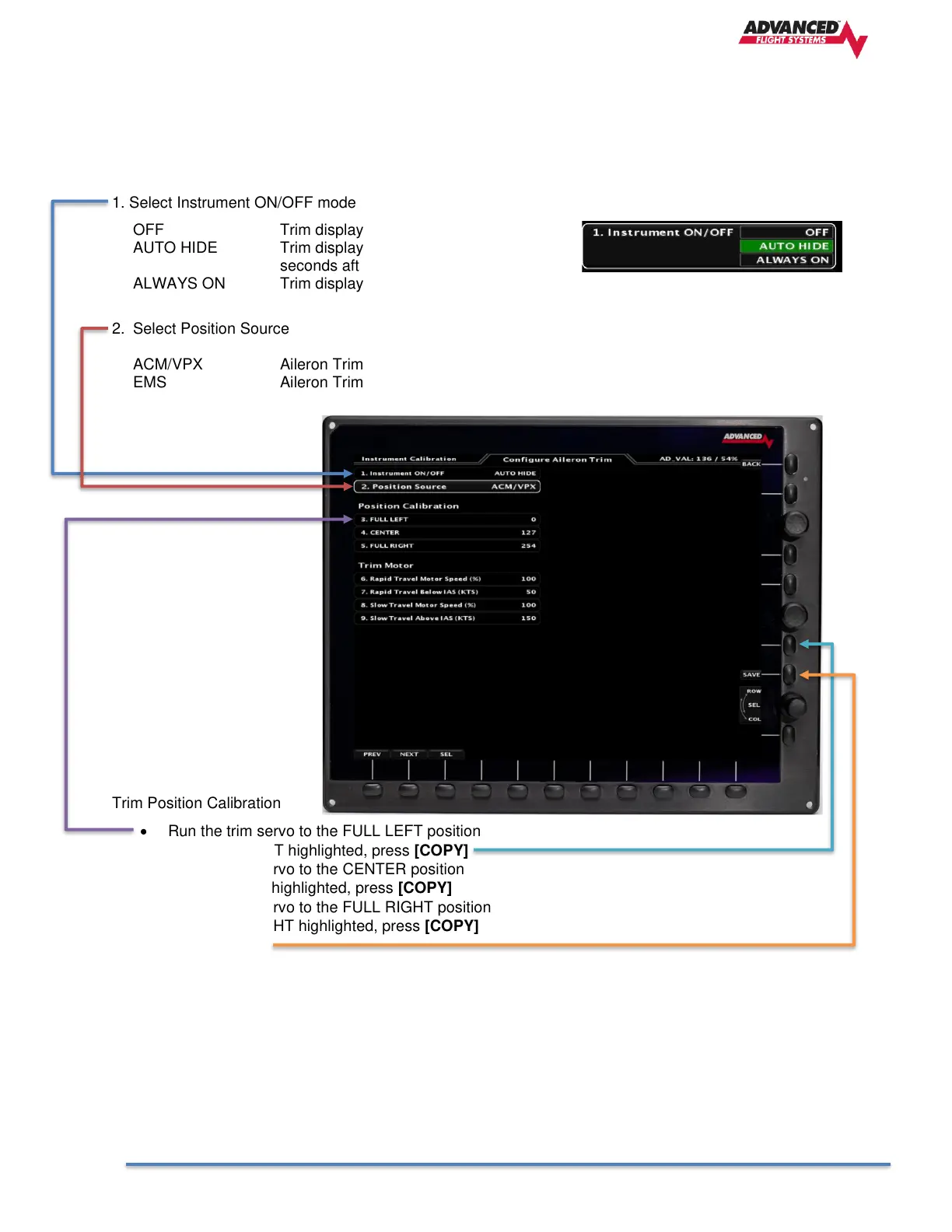
1. Select Instrument ON/OFF mode
OFF Trim display turned OFF
AUTO HIDE Trim displayed when moving and for 5
seconds after.
ALWAYS ON Trim display is always ON
2. Select Position Source
ACM/VPX Aileron Trim Servo Sensor wired ACM
EMS Aileron Trim Servo Sensor wired to EMS Pin input.
Trim Position Calibration
• Run the trim servo to the FULL LEFT position
• With FULL LEFT highlighted, press [COPY]
• Run the trim servo to the CENTER position
• With CENTER highlighted, press [COPY]
• Run the trim servo to the FULL RIGHT position
• With FULL RIGHT highlighted, press [COPY]
• Press [SAVE]
Trim Motor Speed
The EFIS has settings that control how fast the trim motor runs based on airspeed. The actual motor speed
will be a linear interpolation between the Rapid and Slow settings. You should configure the following
settings:
6. Rapid Travel Motor Speed (%)
7. Rapid Travel Below IAS (KTS)
8. Slow Travel Motor Speed (%)
9. Slow Travel Above IAS (KTS)



 To Next Page