Version 16.10 AF-6600 AF-5000 Series Install Manual 191
Configuring EFIS Engine Gauges
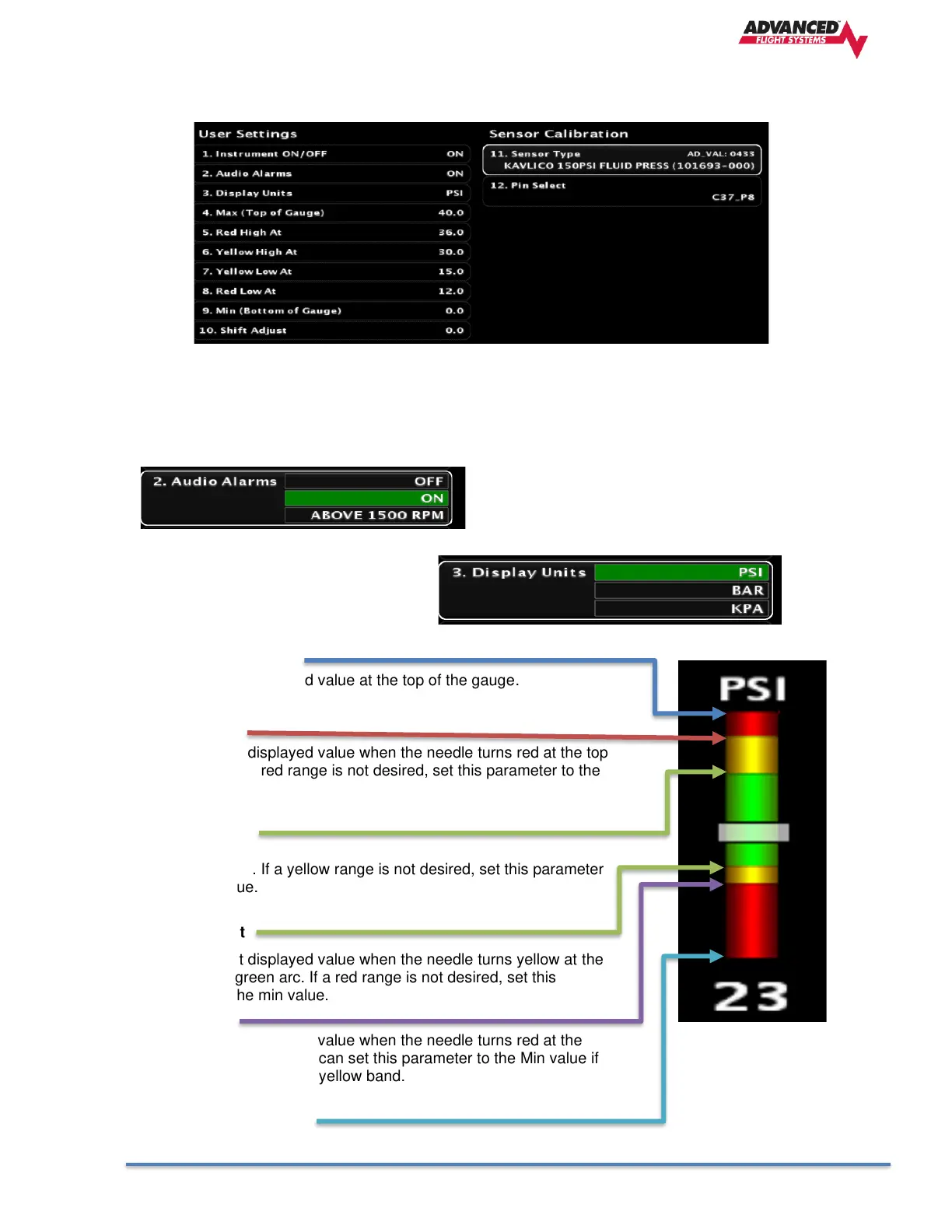
Each engine gauge has several User Settings that should be set for your aircraft and engine.
1. Instrument ON/OFF
Configure the Instrument to be ON or OFF (not used)
2. Audio Alarms
Enables Audio Alarms
No Audio Alarm
Alarm when engine is running
Alarm when RPM is above 1500 RPM
3. Display Units
Select gauge units (Metric or Inch)
4. Max (Top of Gauge)
The instrument displayed value at the top of the gauge.
5. Red High At
The instrument displayed value when the needle turns red at the top
of the gauge. If a red range is not desired, set this parameter to the
max value.
6. Yellow High At
The instrument displayed value when the needle turns yellow at the
top of the gauge. If a yellow range is not desired, set this parameter
to the max value.
7. Yellow Low At
The instrument displayed value when the needle turns yellow at the
bottom of the green arc. If a red range is not desired, set this
parameter to the min value.
8. Red Low At
The instrument displayed value when the needle turns red at the
bottom of the gauge. You can set this parameter to the Min value if
you do not want a bottom yellow band.
9. Min (Bottom of Gauge)
The instrument value at the bottom of the gauge.



 To Next Page