Version 16.10 AF-6600 AF-5000 Series Install Manual 63
Selectable Auto Mute (music only)
Press the squelch knob to toggle whether or not music is muted by intercom conversation as well as by
non-muting input and radio activity. This allows you to set the music and aux muting input to not mute
as you sing along or occasionally chat over the intercom:
• When Auto Mute is DISABLED: Only audio activity from radios and non-muting inputs will mute
music.
• When Auto Mute is ENABLED: Audio from radios, non-muting inputs, AND intercom
conversation will mute music.
Fail-safe Operation
When power is lost or the AF-INTERCOM-2S is powered off, the primary radio is connected directly to
the pilot’s headset. If the pilot headset is a stereo headset, you will only hear radio audio in one ear.
Intercom conversation and audio from other radios and inputs (including music) will not be heard
when in this unpowered fail-safe mode.
Radio Push-to-Talk (PTT) Behavior and Priority
When the pilot or co-pilot presses their PTT switch, only the person pressing their PTT is heard over the
radio.
If the pilot and co-pilot PTT buttons are both depressed, the pilot PTT takes priority. Only the pilot’s
voice is transmitted over the radio. Additionally, the pilot PTT will take priority from the co-pilot even if
the co-pilot PTT is already depressed.
Dual Radio Operation
If you have two COM radios, you will have installed an external switch that chooses which radio
transmits when you press the PTT switch.
Use your radio volume control to control which radio(s) you wish to hear at any given moment.
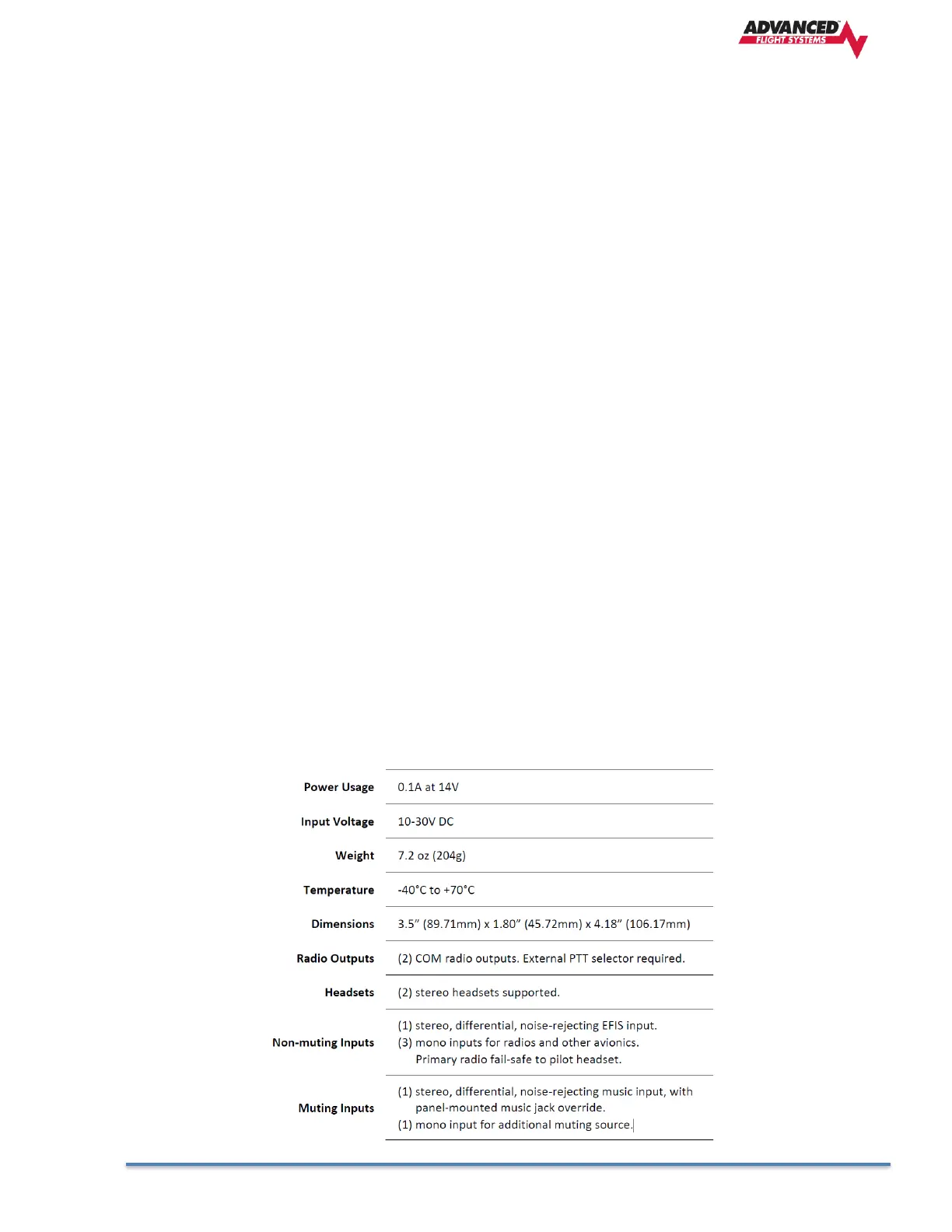
AF-Intercom Specifications



 To Next Page