170 BD FACSAria User’s Guide
• Open an experiment, if one is not already open, and create a sort
layout for any of the tubes.
• In the Sort Layout window, click the Access Stage button ( ) to
move the stage to the front of the sort collection chamber.
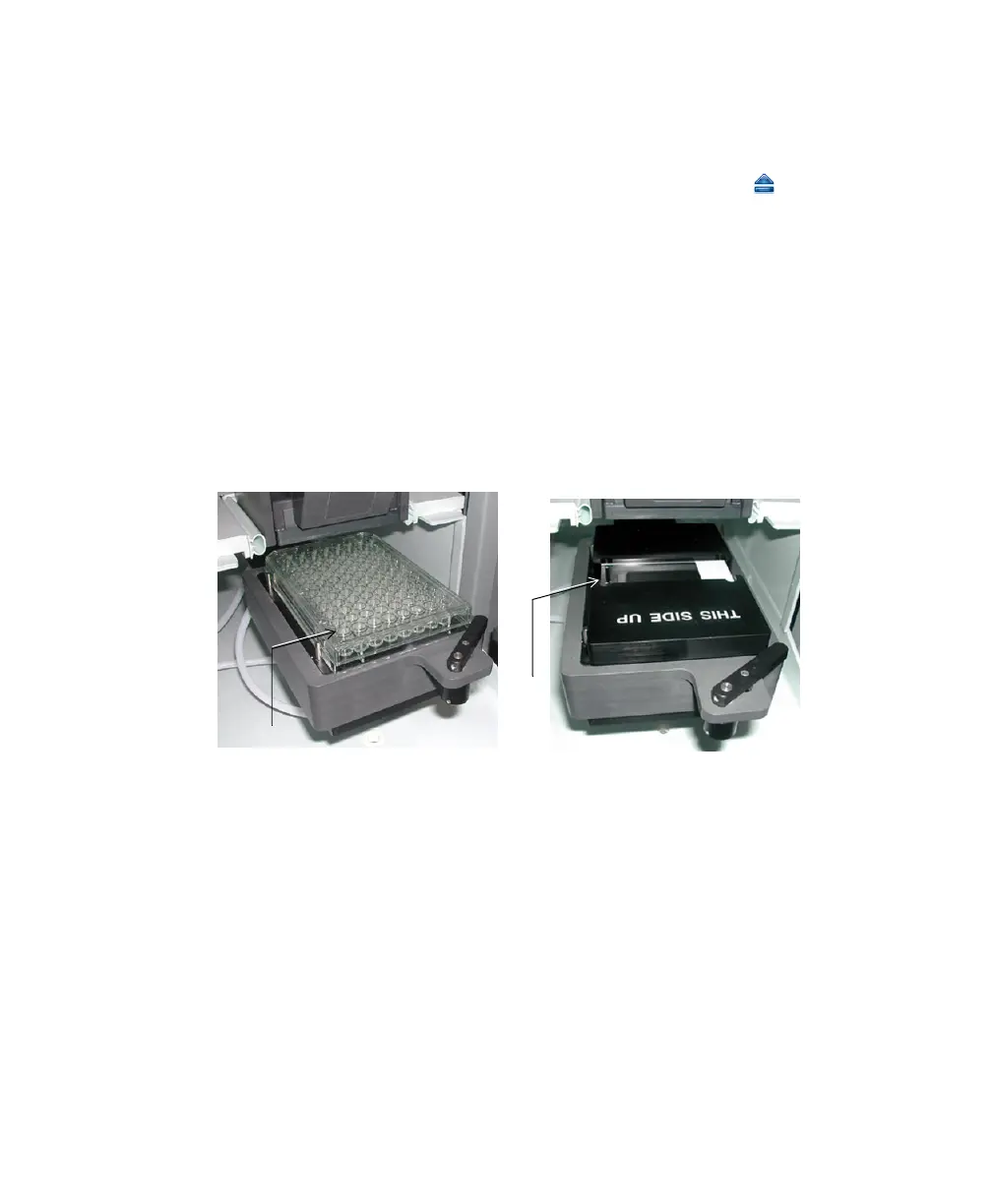
3 Install the required collection device on the stage (Figure 5-6).
• If you are sorting into a plate, install the plate with well A1 toward the
front of the stage.
• If you are sorting onto a slide, install the slide-adapter tray with the
printed side up. If your slide has a frosted end, place the frosted end to
the right.
Figure 5-6 ACDU stage set up with plate (left) and slide (right)
Sorting starts on the front left corner of the device (A1 location), and
proceeds from front to back, and then from left to right, sorting in a
serpentine motion. Thus, for a plate, sorting proceeds from well A1–A12,
B12–B1, C1–C12, and so on.
When sorting onto a slide, sorting proceeds in rows across the short end of
the slide, and in columns along the long end of the slide. Make sure that
you set up your sort layout accordingly. See Figure 5-7 on page 171.
well A1
well A1



 To Next Page