Chapter 6: Shutdown and Maintenance 207
Figure 1-11 on page 32). Tighten the screws when the stream is centered in the
aspirator. For further assistance, see Troubleshooting the Stream on page 220.
Adjusting the Nozzle Orifice
Once a nozzle’s orifice is aligned to the cuvette, the nozzle should not need to be
adjusted. However, if the satellite drops are not merging properly after installing
a new nozzle, you will need to turn the cam on the adjustable nozzle until you
find the proper setting for your cytometer cuvette.
1 Turn off the stream and open the flow cell access door.
2 Remove the nozzle.
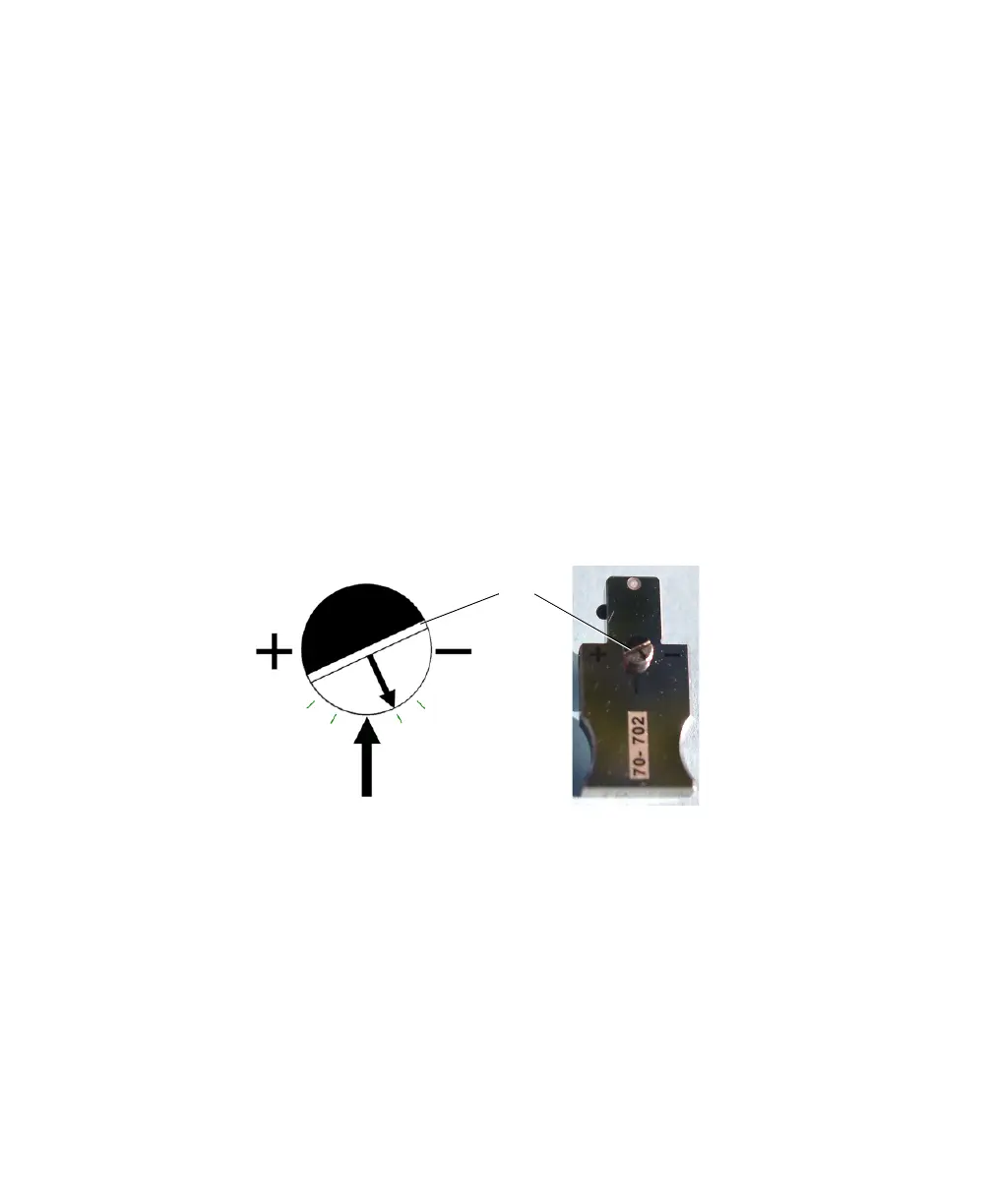
3 Turn the cam until the small arrow is approximately 1/4 of the distance
between the large arrow and the negative symbol (-1/4 in Figure 6-8).
Figure 6-8 Adjusting the nozzle
Use the coated screwdriver (Part No. 336984) provided with the nozzle to
turn the cam.
4 Insert the nozzle, turn on the stream, and observe the satellite drop
formation.
NOTE Make sure there are no bubbles in the flow cell to interfere with
drop formation. If you see bubbles, turn off the stream, wait a few seconds,
and turn on the stream again.
-1/4
-1/2
+1/4
+1/2
cam



 To Next Page