EasyManua.ls Logo

BD FACSAria - Troubleshooting the Breakoff

BD FACSAria
276 pages
Print Icon
To Next Page IconTo Next Page
To Previous Page IconTo Previous Page
Loading...
224 BD FACSAria User’s Guide
Troubleshooting the Breakoff
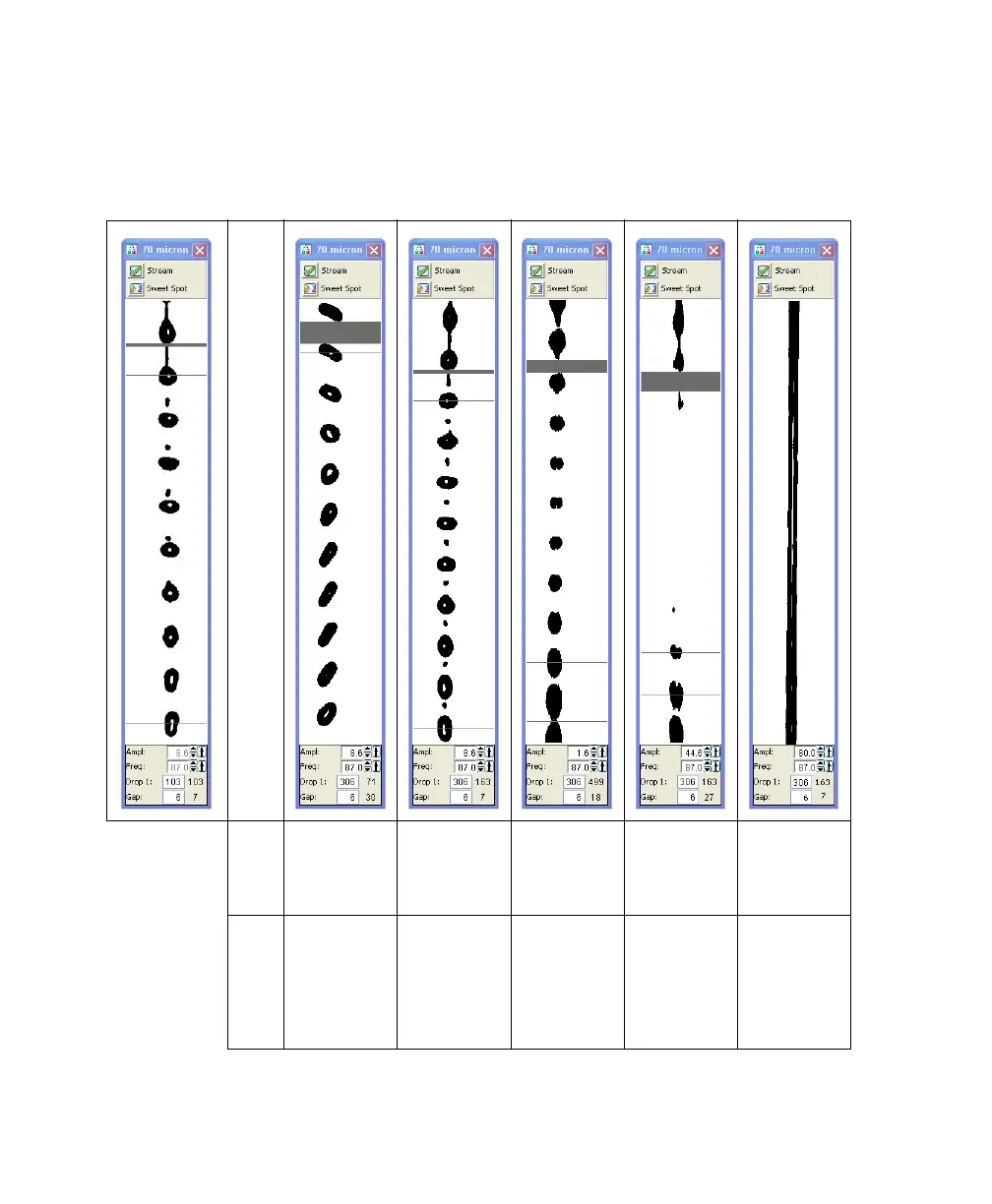
Use the following examples to help troubleshoot problems with the breakoff image.
Abnormal Stream Image
Normal stream
image
Possible
Causes
Nozzle
inserted
improperly
Nozzle inserted
improperly or
orifice is off
center
Partial clog Wet or dirty
strobe lens
Attenuation is
on at wrong
pressure
Recommended
Solutions
Remove the
nozzle and
re-insert it.
Remove the
nozzle, adjust
the opening,
and re-insert it.
Remove the
nozzle, clean
it, and then
re-insert it.
Clean the lens
as described in
Cleaning the
Camera
Windows on
page 211.
Turn off
attenuation in
the Side
Stream
window.

Table of Contents

Other manuals for BD FACSAria

Related product manuals