Honeywell Bendix/King AV8OR Handheld User’s Guide
D200803000008 Flight Plan Function
Rev 5 Mar 2012 Page 2-69
© Honeywell International Inc. Do not copy without express permission of Honeywell
Tap the MORE INFO soft key to view additional data about the WPT.
The NEXT soft key will show if additional pages are available. When
finished, tap the CLEAR soft key to return to the Waypoint Entry
page.
If the WPT is not correct, tap on the CANCEL soft key to return to
the virtual keyboard page.
If the correct WPT is shown, tap on the OK soft key to save the first
WPT on the flight plan.
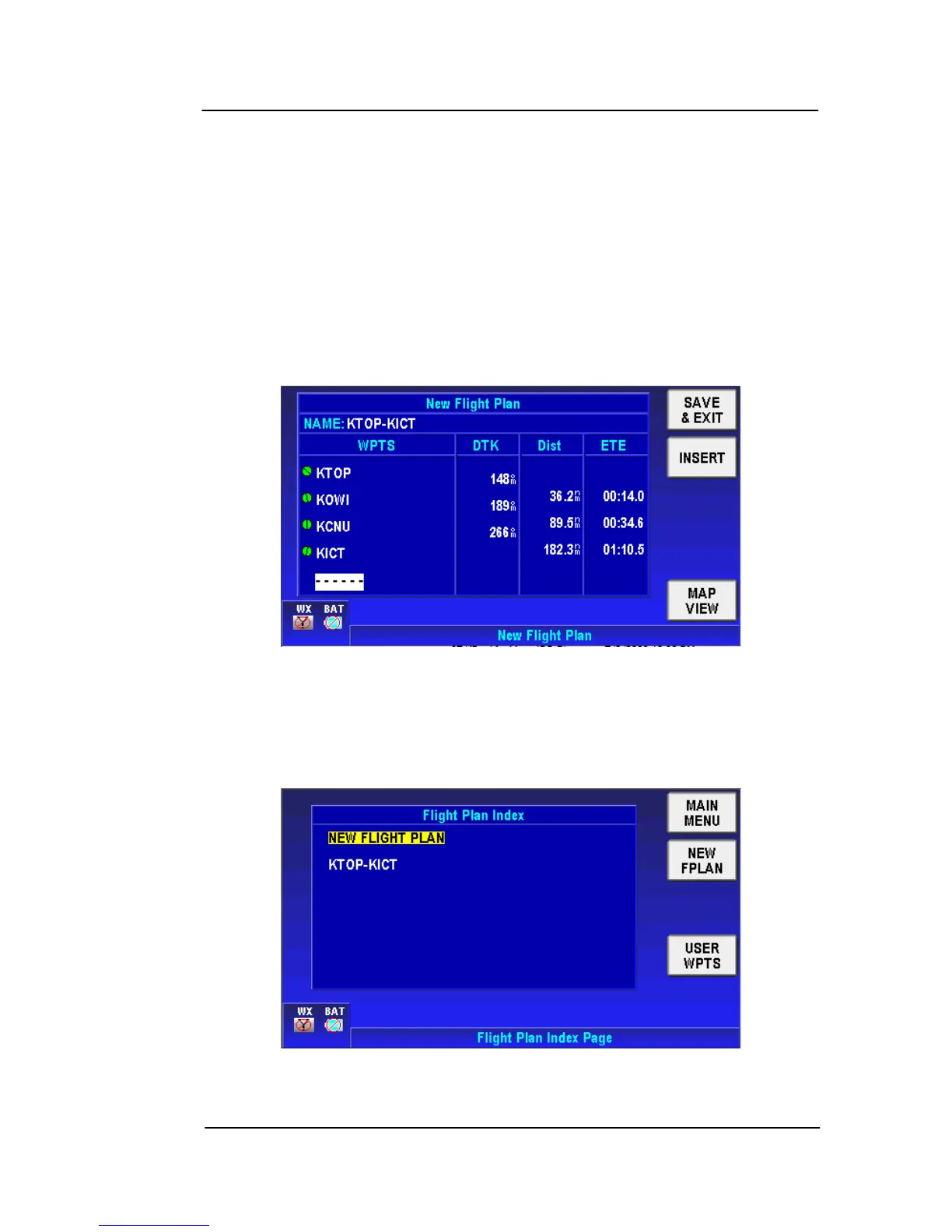
Tap on the INSERT soft key to add additional WPTs to the flight plan
and do the same steps as shown in the figure above to accept each
WPT until all the WPTs are entered.
Figure 2-91: All WPTs Entered into Flight Plan
Tap on the SAVE & EXIT soft key to save the flight plan. The flight
plan now displays on the Flight Plan Index page.
Figure 2-92: Flight Plan Saved



 To Next Page