Honeywell Bendix/King AV8OR Handheld User’s Guide
VFR Moving Map Function D200803000008
Page 2-38 Rev 5 Mar 2012
© Honeywell International Inc. Do not copy without express permission of Honeywell
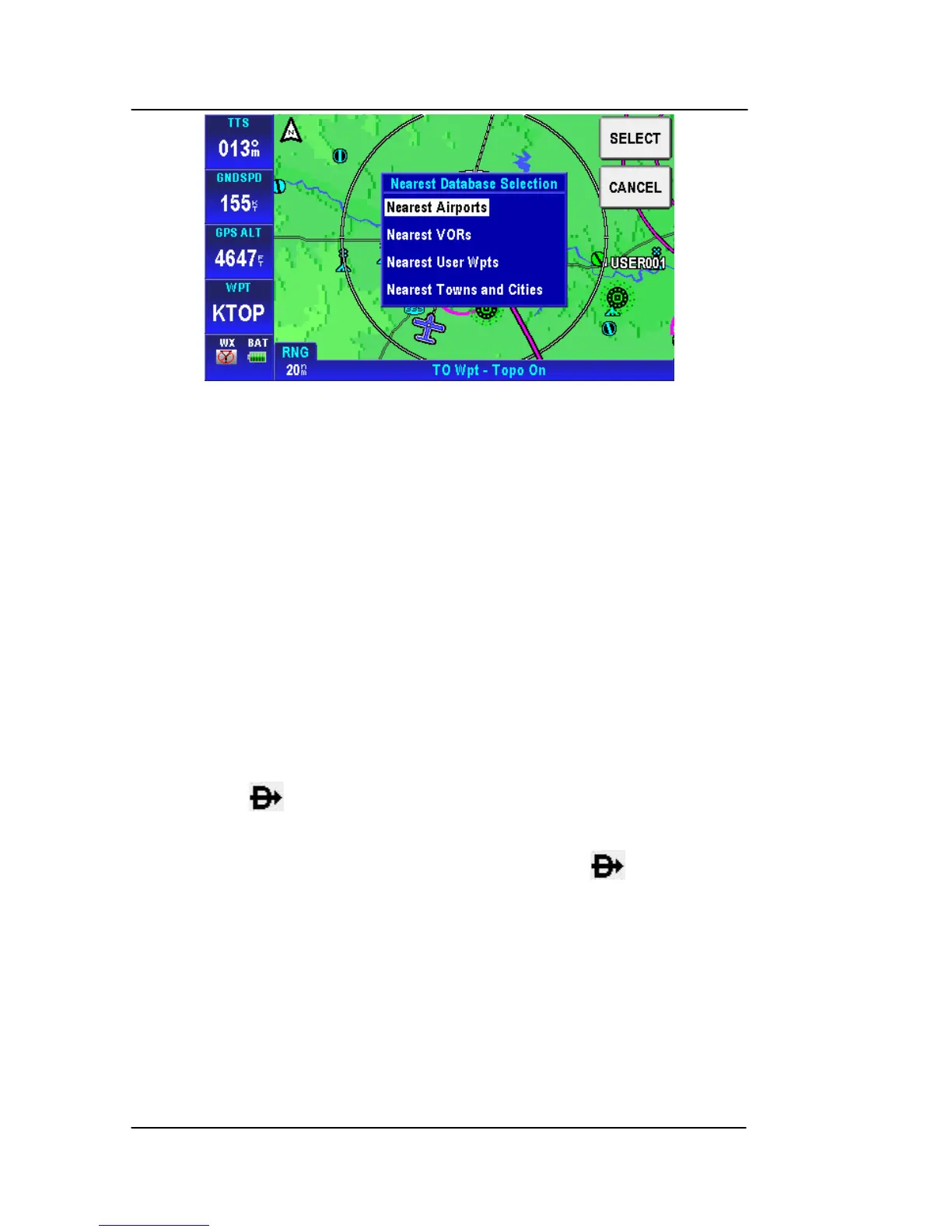
Figure 2-42: Map – Nearest Database Selection
Tapping the NEAREST soft key on the Map page shows the
Nearest Database Selection menu. In the menu you can select;
Nearest Airports, Nearest VORs, Nearest User WPTs or Nearest
Towns and Cities as a destination.
The 40 nearest Airports/Helipads, VORs or User Waypoints or a
combination of them that are nearest to the aircraft’s current position
are accessible through the Nearest Database Selection menu.
To select an item as your destination from the Nearest Database
Selection Menu:
Tap the NEAREST soft key in MAP mode.
Double tap the nearest selection or tap it once and tap the SELECT
soft key to select the nearest type. Select the nearest airport, VOR,
User Wpt or Town or City from the list to highlight the selection and
then tap the soft key to set a direct to course from the aircrafts
present position to the selected destination.
To cancel the active Direct-To navigation, tap the soft key, tap
the Clear soft key on the virtual keyboard and then tap the Enter soft
key.



 To Next Page