Honeywell Bendix/King AV8OR Handheld User’s Guide
D200803000008 Appendix
Rev 5 Mar 2012 Page 6-9
© Honeywell International Inc. Do not copy without express permission of Honeywell
CONNECTION TO AN EXTERNAL WEATHER
SOURCE
Bendix/King KDR-610 Setup
To configure the AV8OR to receive weather data from the KDR-610,
perform the following steps:
From the Aviation Main Menu, tap the soft key to open the
System Setup Menu.
Highlight the Device Setup option and tap the SELECT soft key to
show the Device and Port Setup page.
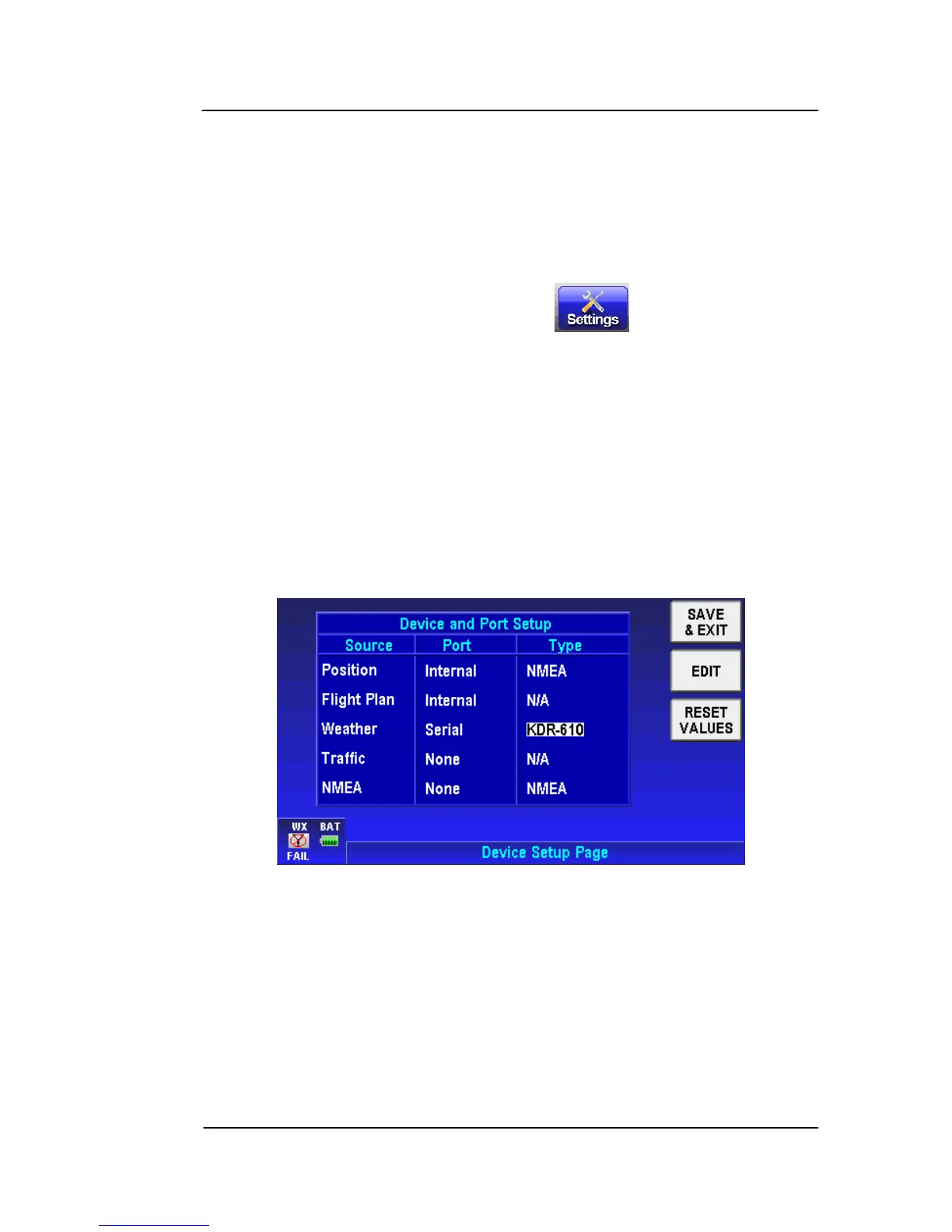
On the Device and Port Setup page, the configuration steps are:
• If the Position Source is set to Serial, it must be changed to
Internal or Bluetooth since there is only one RS232 port
available.
• Set the Weather Port to Serial.
• Set the Weather Type to “KDR-610”. When finished the Device
and Port Setup page should look like Figure 6-4.
Figure 6-4:
Weather Setup – KDR-61
0
The output of the KDR 610 is RS 422. You must use an RS 422 to
RS 232 converter to change the KDR 610 differential outputs to the
single ended levels that the AV8OR requires. This converter is
installed between the KDR 610 and the AV8OR.



 To Next Page