Honeywell Bendix/King AV8OR Handheld User’s Guide
System Setup Function D200803000008
Page 2-166 Rev 5 Mar 2012
© Honeywell International Inc. Do not copy without express permission of Honeywell
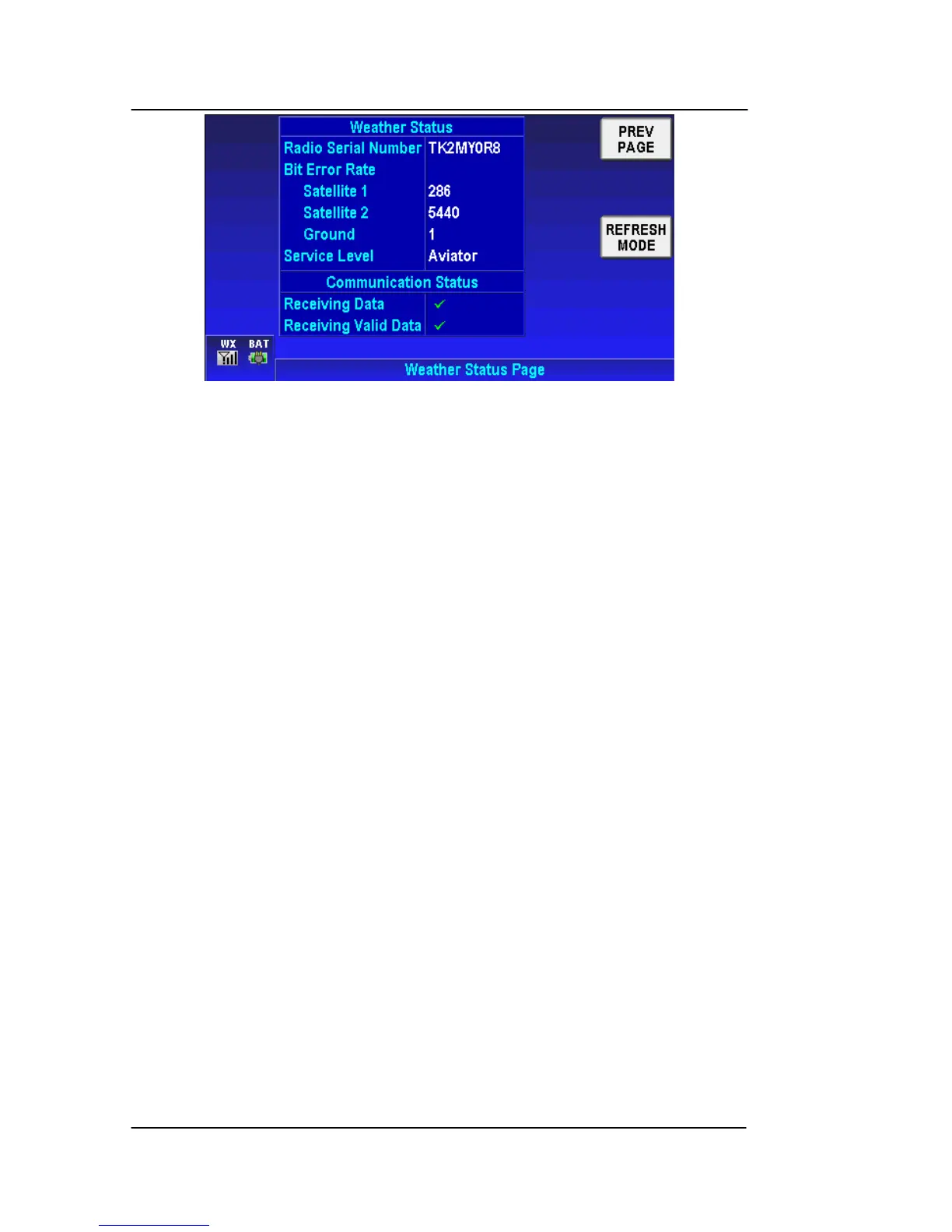
Figure 2-218: System Setup – Weather Status Page
The Weather Status column has the following fields:
• Radio Serial Number – The ID of the XM receiver
• Bit Error Rate – The rate of errors being received. The bit
error rate for at least the ground station of one of the
satellites needs to be below 60 to get a good signal.
• Service Level – The subscription level of service that the
customer has purchased.
The Communication Status column has the following fields:
• Receiving Data – A check mark indicates that data
(communication) is being received from the XM receiver. A
red “X” indicates that data is not being received.
• Receiving Valid Data - A check mark indicates that valid
data (processed and useable weather data) is being
received from the XM receiver. A red “X” indicates that
received data is not valid.
NOTE: If a green check mark is displayed under “Receiving Data”
and a Radio Serial number is displayed, then there is valid
communication between AV8OR and the weather receiver.
A red X under “Receiving Valid Data” indicates a critical
problem. It could mean a subscription problem (try the
Refresh Mode update procedure listed below) or a weather
receiver failure.
When the XM receiver is first powered up, it may take 15 seconds
or longer to see the following indications:



 To Next Page