Honeywell Bendix/King AV8OR Handheld User’s Guide
VFR Moving Map Function D200803000008
Page 2-12 Rev 5 Mar 2012
© Honeywell International Inc. Do not copy without express permission of Honeywell
ring is at one-half the displayed range value. These rings are turned
on or off in System Setup-MAP SETUP page.
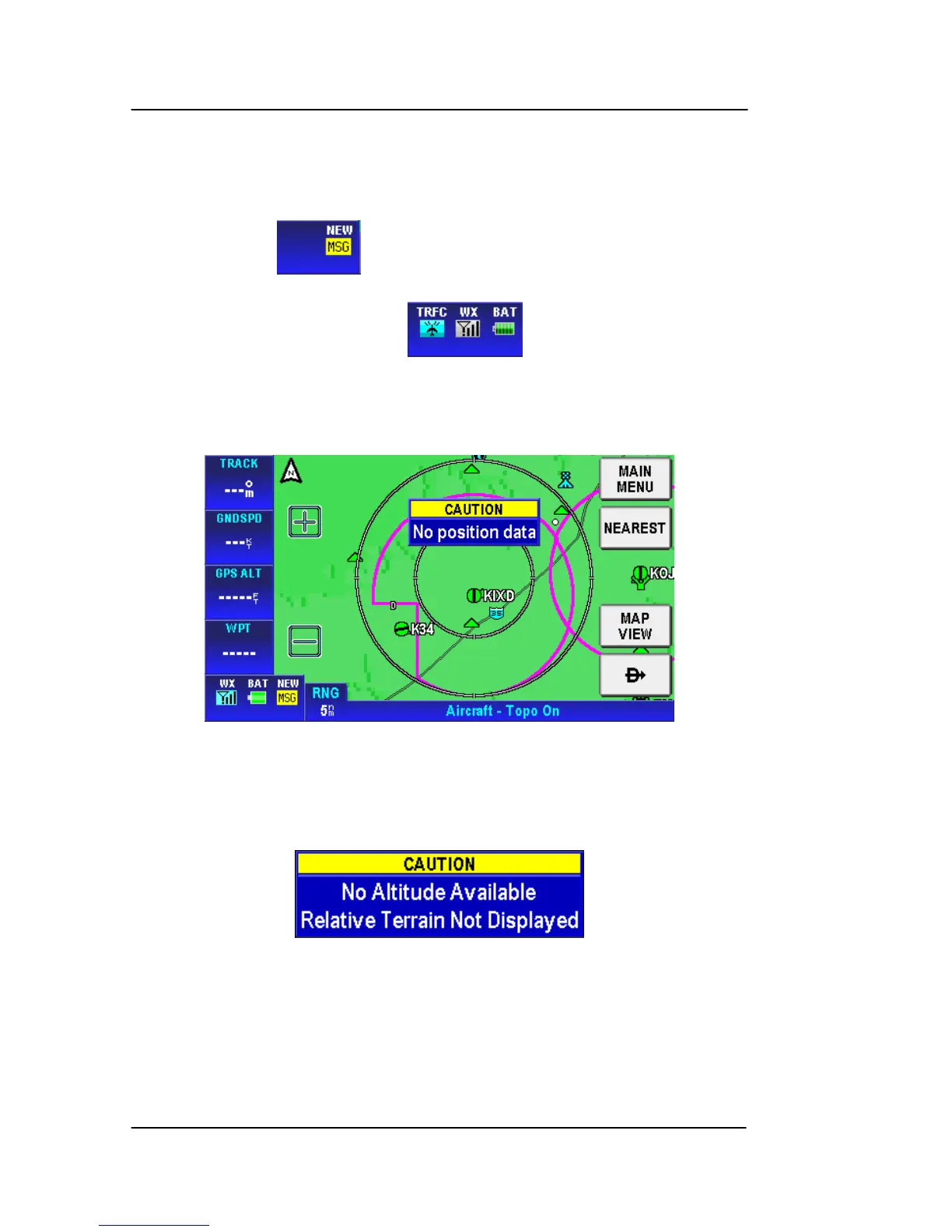
Status window (10): When there is a new aircraft status, a flashing
icon is displayed in the status window in the left bottom of the data
window column . The status window also shows the battery
condition and the status of the XM weather receiver (if installed) and
traffic information (if installed) . .
Caution: When AV8OR has lost its GPS position fix, a blue “No
position data” caution message is displayed across the screen and
the aircraft symbol is not displayed.
Figure 2-17: Map – No position data CAUTION
If no altitude data is available and the map display option is set
to Relative Terrain Map, then a “No Altitude Available” message
is displayed.
Figure 2-18: Map – No Altitude Available CAUTION
FAST ACCESS
Fast acce
ss lets you ra
pidly change between the configured primary
information pages (Map, Weather or Traffic) or rapidly access the
Map page. There is an area within and above the Title Window that



 To Next Page