89000109-002 xVue Touch Installation Manual
Rev 2 Page 6-16
© Honeywell International Inc. Do not copy without express permission of Honeywell.
For Use in Non-Certified Aircraft
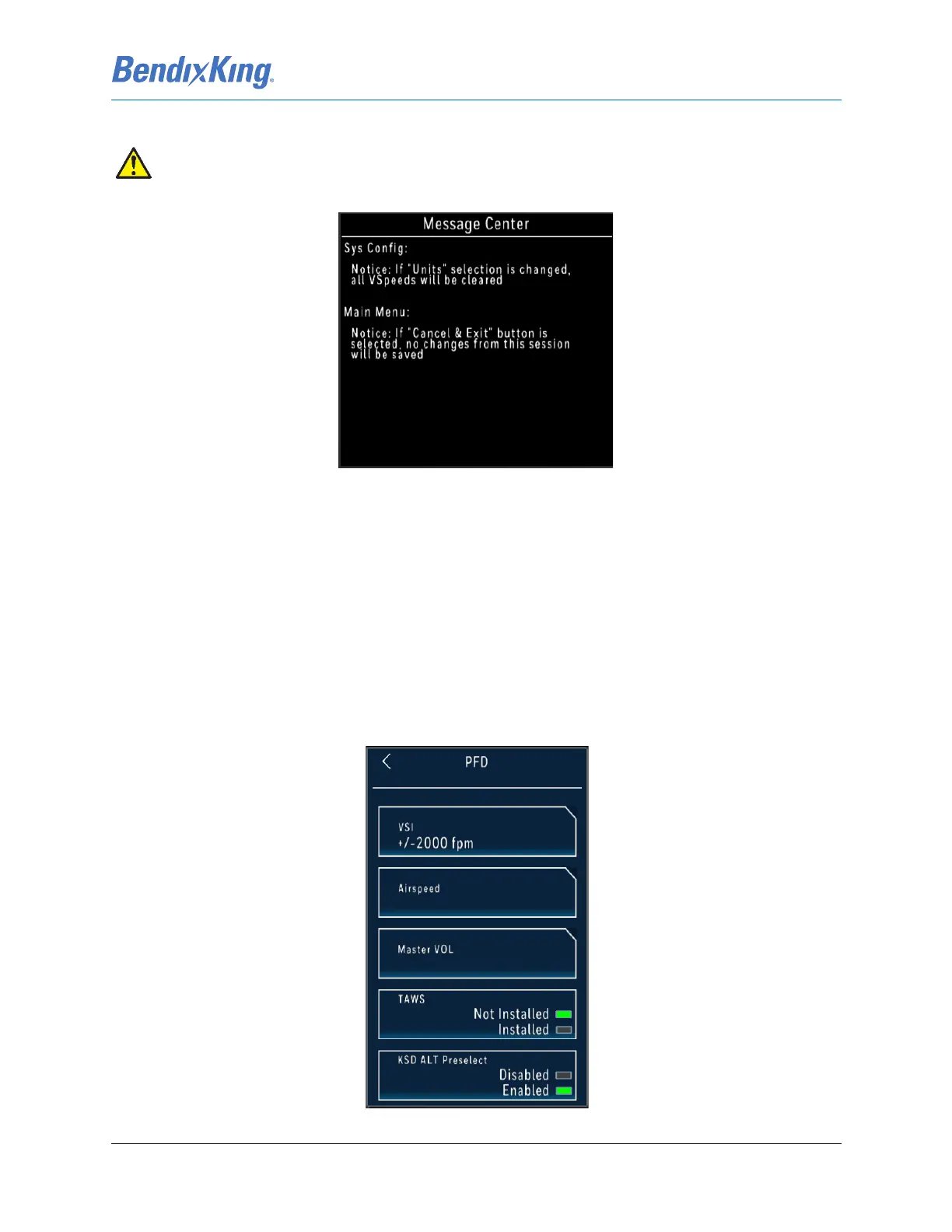
Figure 6-22 Message Center Caution for V-Speed Unit Changes
(2) Press the Back-Arrow button to return to the System Config sub-menu, Figure 6-8.
(3) Press the Back-Arrow button to exit the System Config sub-menu and return to the Installer Main
Menu, Figure 6-7.
6.2.2 PFD Configuration Setup
The PFD button allows the technician to configure the following parameters, as shown in Figure 6-23:
(1) Vertical Speed Indicator (VSI)
(2) Airspeed
(3) Master Audio Volume
(4) Terrain Awareness and Warning System (TAWS)
(5) KSD ALT Preselect
Figure 6-23 PFD Sub-Menu
CAUTION
ALL V-SPEED VALUES ARE CLEARED WHEN THE UNITS ARE TOGGLED.



 To Next Page