89000109-002 xVue Touch Installation Manual
Rev 2 Page 7-18
© Honeywell International Inc. Do not copy without express permission of Honeywell.
For Use in Non-Certified Aircraft
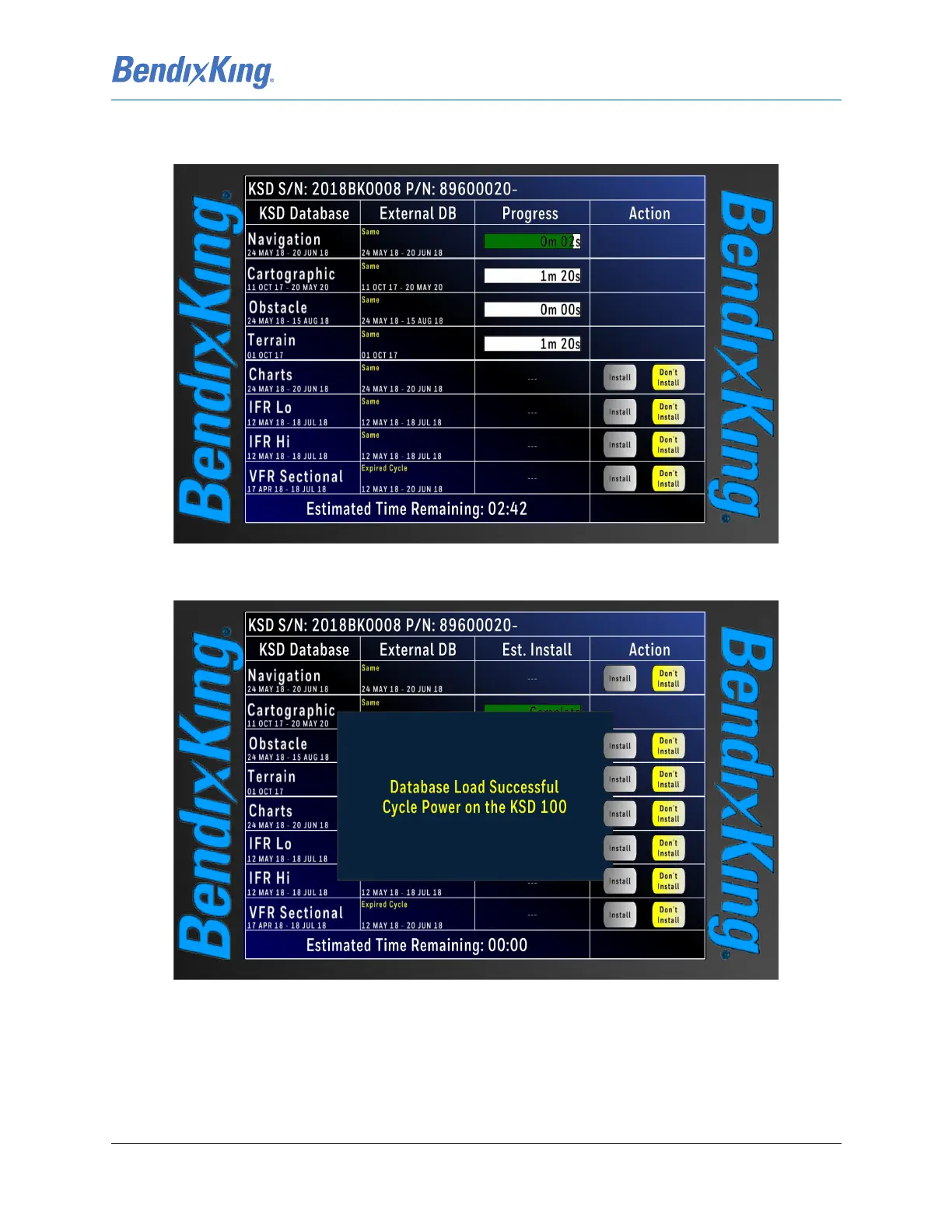
(11) During the loading process the Progress column displays the installation progress and the time
remaining is displayed for each remaining database to be loaded, shown in Figure 7-19.
Figure 7-19 Database Loading in Progress Screen
(12) When the database loading is complete, a pop-up window is displayed as shown in Figure 7-20.
Figure 7-20 Database Loading Complete
(13) Remove the USB drive, remove power from the KSD 100EXP, wait 10 seconds, and power the
KSD back on.
(14) Review and acknowledge the updated dates and effectivity ranges shown on the Database
Acknowledge Screen (refer to Figure 6-3).



 To Next Page