89000109-002 xVue Touch Installation Manual
Rev 2 Page 6-46
© Honeywell International Inc. Do not copy without express permission of Honeywell.
For Use in Non-Certified Aircraft
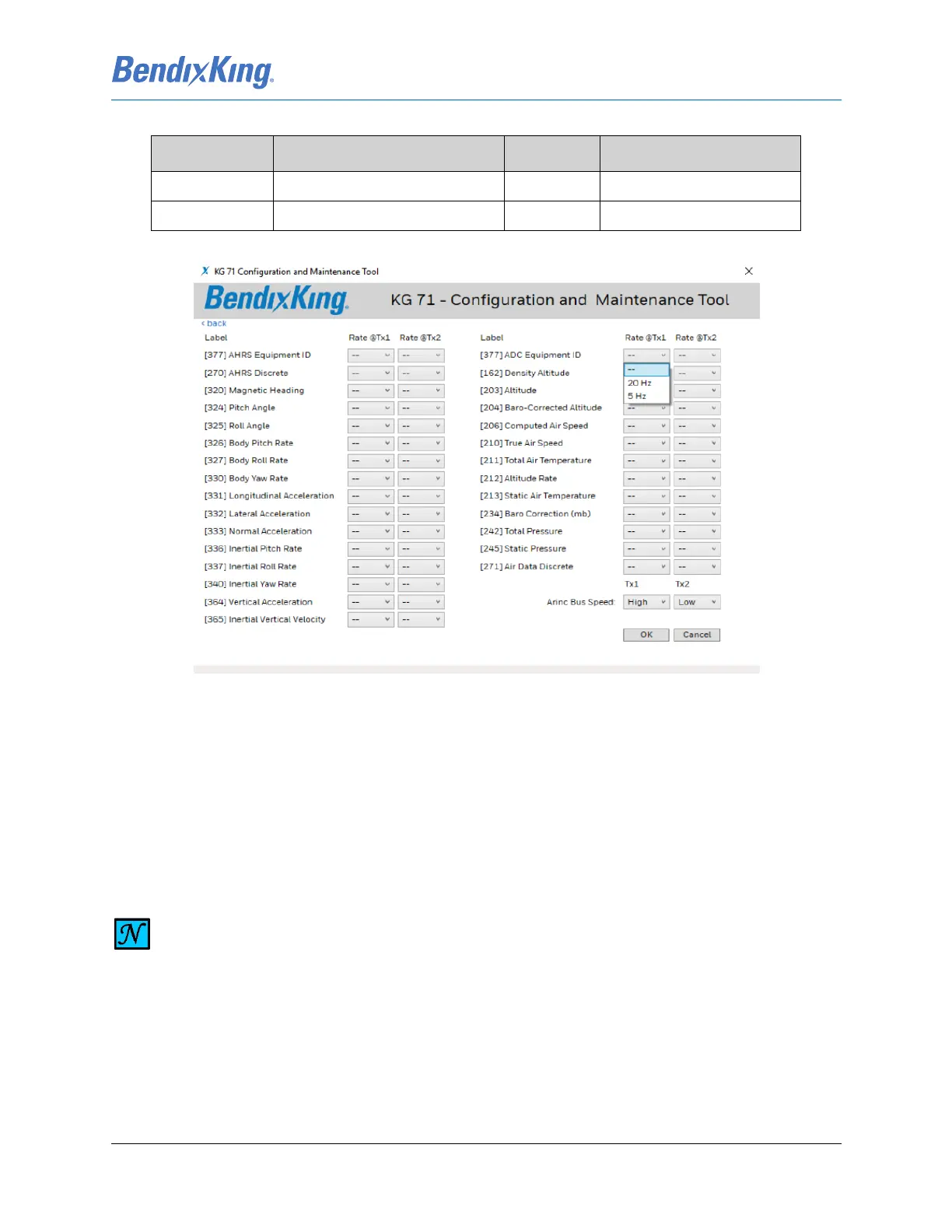
Figure 6-52 ARINC Transmit Channel Custom Configuration
Each channel can be configured to High Speed or Low Speed from the two drop-down lists at the right-
bottom side of the page. All available labels are listed on the page with rate option. If “- -” are displayed
in the Rate drop-down list for a specific label, then that label is not transmitted. The technician can select
any combination of AHRS and ADC labels to send out. If the rate for the label is selected, the label will be
transmitted at that rate. Once ARINC Bus Speed and all required labels and rates are selected, the
technician will click Save Selection button at the bottom of the page. The Save Selection button will store
the custom configuration and return to the Digital I/O page.
245 Static Pressure BNR 80
271 Air Data Discrete DISC 80
Table 6-6 KG 71EXP Air Data Output Labels
Label ID (Octal) Label Name Label Type Default Transmit Rate [Hz]
NOTE
NUMBER OF LABELS WHICH CAN BE SENT AT LOW SPEED ARINC IS LIMITED. IF THE
COMBINATION OF SELECTED LABELS AND RATES EXCEED THE LOW SPEED ARINC
THROUGHPUT, THE SAVE SELECTION BUTTON BECOMES NOT AVAILABLE.



 To Next Page